
Government to make Aadhaar authentication easier with mobile app
The mAadhaar will do Aadhaar authentications based on a time-based OTP (TOTP).
- Oct 16, 2017,
- Updated Oct 16, 2017 5:24 PM IST
The encouraging response to the biometric ID has led government to make use of its mobile app, mAadhaar to do all Aadhaar authentications based on OTPs. The mAadhaar app will have a time-based OTP (TOTP), so that people do not have to wait for the OTP to arrive on their mobile. A TOTP will always be available on the app on the mobile phone for 30 seconds before being refreshed to a new number, according to a Economic Times report.
About 31 crore transactions were executed using OTPs in September. The total Aadhaar authentications, however, stood 148.3 cr. This indicates the use of biometric ID by atleast once a month by an Aadhaar holder to avail of benefits or other government services. In December, the figure stood at 17 crore. The number of Aadhaar authentications last month was more than the country's population, a senior told Economic Times
According to government, the new authentication method will fix the issue of poor mobile networks and signals, that causes delays in the delivery of OTP to the registered mobile number.
The new mAadhaar app, which has seen more than 1 million downloads since its launch in July.
If you haven't download it now, here's how you can do so in few steps
First, go to Google play store and download the app.
Second, set a password. This password is needed everytime you want to carry out an action. Thereafter enter your Aadhaar number. Or you can also scan the bar code on the Aadhaar card
Third, upon entering the number, the app will send a Time-based One-time password to the linked phone number and read it too so you need not enter it manually. Make sure mobile is linked to Aadhaar. Else the verification will fail.
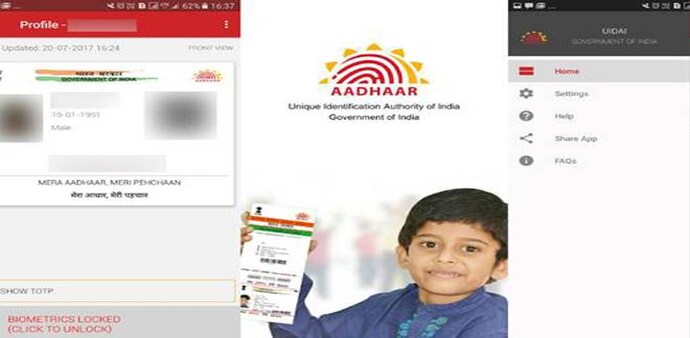
Fourth, after successfull OTP verification, you will able to see your profile with your name and Aadhaar number. However, to check you full details, you have to enter the password once again.
mAadhaar app, that was launched in July, lets you carry your demographic details like name, date of birth, gender, address and photograph that is linked with the Aadhaar number everywhere. You don't need hard copies of your Aadhaar. Also, you can also lock/ unlock your biometric details with it.
And as of now mAadhaar is available only Android.
The encouraging response to the biometric ID has led government to make use of its mobile app, mAadhaar to do all Aadhaar authentications based on OTPs. The mAadhaar app will have a time-based OTP (TOTP), so that people do not have to wait for the OTP to arrive on their mobile. A TOTP will always be available on the app on the mobile phone for 30 seconds before being refreshed to a new number, according to a Economic Times report.
About 31 crore transactions were executed using OTPs in September. The total Aadhaar authentications, however, stood 148.3 cr. This indicates the use of biometric ID by atleast once a month by an Aadhaar holder to avail of benefits or other government services. In December, the figure stood at 17 crore. The number of Aadhaar authentications last month was more than the country's population, a senior told Economic Times
According to government, the new authentication method will fix the issue of poor mobile networks and signals, that causes delays in the delivery of OTP to the registered mobile number.
The new mAadhaar app, which has seen more than 1 million downloads since its launch in July.
If you haven't download it now, here's how you can do so in few steps
First, go to Google play store and download the app.
Second, set a password. This password is needed everytime you want to carry out an action. Thereafter enter your Aadhaar number. Or you can also scan the bar code on the Aadhaar card
Third, upon entering the number, the app will send a Time-based One-time password to the linked phone number and read it too so you need not enter it manually. Make sure mobile is linked to Aadhaar. Else the verification will fail.
Fourth, after successfull OTP verification, you will able to see your profile with your name and Aadhaar number. However, to check you full details, you have to enter the password once again.
mAadhaar app, that was launched in July, lets you carry your demographic details like name, date of birth, gender, address and photograph that is linked with the Aadhaar number everywhere. You don't need hard copies of your Aadhaar. Also, you can also lock/ unlock your biometric details with it.
And as of now mAadhaar is available only Android.