
Google launches Gemini AI app for Mac: Check features, availability, and how to download
With the Gemini app, users can draft reports, verify facts, build a budget in a spreadsheet, and more.
- Apr 16, 2026,
- Updated Apr 16, 2026 10:44 AM IST
Google brings Gemini AI to Mac with a new native macOS app, bringing AI directly into the desktop experiences. The focus of bringing Gemini to Mac is to bring seamless accessibility, as it is just a “keyboard shortcut away.” The app can help Mac users generate images, analyse what’s on screen, review files and documents, and perform other AI-powered tasks.
Among the leading AI platforms, including OpenAI and Anthropic, Google’s Gemini is the last to introduce a dedicated macOS application.
Gemini app on Mac
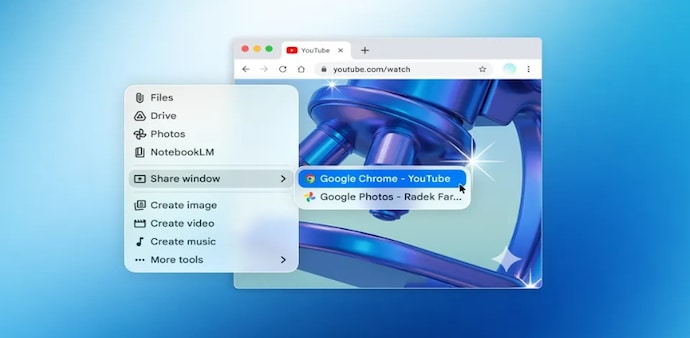
To access the Gemini AI app on a Mac, users need to use the “Option + Space” shortcut to open the floating chat bubble. Here, users can ask questions, share their window and get tailored responses.
If you need more room for deep work, press Option + Shift + Space to launch the full-screen chat interface. For those who prefer a mouse-driven workflow, you can keep Gemini pinned to your Dock or tucked neatly in the Menu Bar for quick-click access.
Google, in a blog post, states that with the Gemini app, users can draft reports, verify facts, build a budget in a spreadsheet, and more. In addition, the app also comes with the Nani Banana and Veo support, allowing users to generate images and videos effortlessly.
Availability and how to download
The native macOS app has started to roll out for all Gemini users globally. It will be available for Macs running on macOS versions 15 and up, at no additional cost.
To download the app, directly head to this website: gemini.google/mac, and follow the onscreen instructions to successfully install the app.
Starting today, the native macOS app is available to all Gemini users 1
In addition, Google says, “this first release is just the beginning.”
“We're building the foundation for a truly personal, proactive and powerful desktop assistant, with more news to share in the coming months,” it added.
For Unparalleled coverage of India's Businesses and Economy – Subscribe to Business Today Magazine
Google brings Gemini AI to Mac with a new native macOS app, bringing AI directly into the desktop experiences. The focus of bringing Gemini to Mac is to bring seamless accessibility, as it is just a “keyboard shortcut away.” The app can help Mac users generate images, analyse what’s on screen, review files and documents, and perform other AI-powered tasks.
Among the leading AI platforms, including OpenAI and Anthropic, Google’s Gemini is the last to introduce a dedicated macOS application.
Gemini app on Mac
To access the Gemini AI app on a Mac, users need to use the “Option + Space” shortcut to open the floating chat bubble. Here, users can ask questions, share their window and get tailored responses.
If you need more room for deep work, press Option + Shift + Space to launch the full-screen chat interface. For those who prefer a mouse-driven workflow, you can keep Gemini pinned to your Dock or tucked neatly in the Menu Bar for quick-click access.
Google, in a blog post, states that with the Gemini app, users can draft reports, verify facts, build a budget in a spreadsheet, and more. In addition, the app also comes with the Nani Banana and Veo support, allowing users to generate images and videos effortlessly.
Availability and how to download
The native macOS app has started to roll out for all Gemini users globally. It will be available for Macs running on macOS versions 15 and up, at no additional cost.
To download the app, directly head to this website: gemini.google/mac, and follow the onscreen instructions to successfully install the app.
Starting today, the native macOS app is available to all Gemini users 1
In addition, Google says, “this first release is just the beginning.”
“We're building the foundation for a truly personal, proactive and powerful desktop assistant, with more news to share in the coming months,” it added.
For Unparalleled coverage of India's Businesses and Economy – Subscribe to Business Today Magazine