
ChatGPT for Mac gets Computer History feature: How it works and what you should know
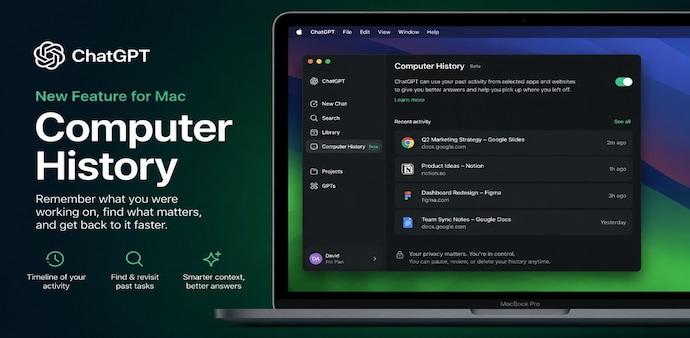
ChatGPT’s new Computer History feature for Mac can help you revisit past activity, find information and resume tasks by using interaction data from selected apps and websites.
- Aug 14, 2026,
- Updated Aug 14, 2026 11:30 AM IST
OpenAI has introduced Computer History for the ChatGPT desktop app on Mac. With this feature, you can decide which apps and websites contribute to your history. You can also pause collection, review what has been recorded or delete individual entries and your entire history.
OpenAI has released Computer History as an opt-in feature. This means it will be disabled by default, so your computer activity is not tracked unless you choose to enable it.
What is ChatGPT Computer History?
Computer History is a feature that helps ChatGPT understand your recent activity on a computer and use that context in future conversations. It is designed to give the AI a better sense of the work you have been doing across apps and websites, rather than making you explain everything again.
Must Read: Apple iPhone Ultra vs Google Pixel 11 Pro Fold: Features, display, camera and specs compared
The feature is built into the ChatGPT desktop experience for macOS, connecting your recent computer activity with ChatGPT and Codex. It can create a timeline of your activity and turn it into memories that can be referenced later.
How does Computer History work?
Computer History uses interaction events from permitted apps and websites, including clicks, typing, keyboard shortcuts and switching between apps. It periodically converts these events into text summaries and local memory files.
Must Read: Microsoft Edge may soon let you sign in with Apple Account instead of creating a Microsoft account
You can ask ChatGPT questions such as what you were working on before a break, where you viewed a particular document or which tasks you completed during the day. It can also identify repeated workflows and suggest turning them into skills or automations.
Importantly, Computer History does not capture screenshots, screen recordings, microphone input or system audio. Private-mode web browsing activity is also excluded.
Who can use it?
Computer History is available to ChatGPT Pro, Business and Enterprise users on the Mac desktop app. If you are a Pro user, then you can opt in yourself, while Business and Enterprise users need administrator access before enabling it. The feature is currently unavailable in the EEA, Switzerland and the UK.
There is no separate charge for Computer History. It is available as an optional feature for eligible ChatGPT plans.
Before enabling it, you should review the apps and websites included in your history, particularly those containing sensitive personal, financial or other private information.
For Unparalleled coverage of India's Businesses and Economy – Subscribe to Business Today Magazine
OpenAI has introduced Computer History for the ChatGPT desktop app on Mac. With this feature, you can decide which apps and websites contribute to your history. You can also pause collection, review what has been recorded or delete individual entries and your entire history.
OpenAI has released Computer History as an opt-in feature. This means it will be disabled by default, so your computer activity is not tracked unless you choose to enable it.
What is ChatGPT Computer History?
Computer History is a feature that helps ChatGPT understand your recent activity on a computer and use that context in future conversations. It is designed to give the AI a better sense of the work you have been doing across apps and websites, rather than making you explain everything again.
Must Read: Apple iPhone Ultra vs Google Pixel 11 Pro Fold: Features, display, camera and specs compared
The feature is built into the ChatGPT desktop experience for macOS, connecting your recent computer activity with ChatGPT and Codex. It can create a timeline of your activity and turn it into memories that can be referenced later.
How does Computer History work?
Computer History uses interaction events from permitted apps and websites, including clicks, typing, keyboard shortcuts and switching between apps. It periodically converts these events into text summaries and local memory files.
Must Read: Microsoft Edge may soon let you sign in with Apple Account instead of creating a Microsoft account
You can ask ChatGPT questions such as what you were working on before a break, where you viewed a particular document or which tasks you completed during the day. It can also identify repeated workflows and suggest turning them into skills or automations.
Importantly, Computer History does not capture screenshots, screen recordings, microphone input or system audio. Private-mode web browsing activity is also excluded.
Who can use it?
Computer History is available to ChatGPT Pro, Business and Enterprise users on the Mac desktop app. If you are a Pro user, then you can opt in yourself, while Business and Enterprise users need administrator access before enabling it. The feature is currently unavailable in the EEA, Switzerland and the UK.
There is no separate charge for Computer History. It is available as an optional feature for eligible ChatGPT plans.
Before enabling it, you should review the apps and websites included in your history, particularly those containing sensitive personal, financial or other private information.
For Unparalleled coverage of India's Businesses and Economy – Subscribe to Business Today Magazine