
Asus ExpertBook B1 review: A workhorse that always delivers
The Asus ExpertBook B1 is a practical workhorse. It's not flashy with its looks, it won't turn any heads in a cafe, but where it counts, the laptop pulls it all together. Read this review to find out the best features, some notable cons and who this laptop is for.
- Oct 3, 2025,
- Updated Oct 3, 2025 4:14 PM IST
I’ve spent the past couple of weeks living with the Asus ExpertBook B1, and I’ll be honest: this laptop surprised me. Not because it blew me away with wild specs or futuristic features, but because of how it quietly makes life easier in ways I didn’t even know I’d appreciate.
Design and Portability
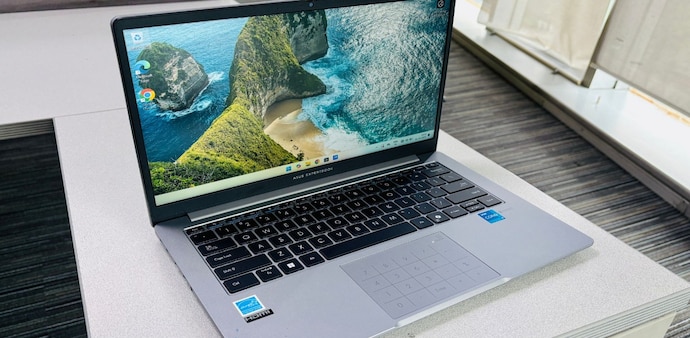
The ExpertBook B1 isn’t going to turn heads in a cafe. It’s not thin enough to pass as one of those ultra-sleek flagships, but it strikes a sweet balance between compact and practical. At about 1.4kg, it feels light in the hand and easy to slip into a backpack. I found myself carrying it around without giving it much thought, and that’s saying something, because many business laptops can feel like a workout in disguise.
Build quality is decent too. It feels sturdy enough for everyday knocks, and while the plastic finish doesn’t scream “premium”, it definitely screams “reliable”. Think less luxury sedan, more Toyota Corolla: dependable, no-nonsense, and built to get the job done.
Battery Life and My Favourite Charger Ever
The battery life is pretty solid, comfortably lasting through a regular workday with emails, docs, and plenty of browser tabs open. But here’s the bit I absolutely loved: the charger. Asus ships this thing with a compact 65W USB-C adapter, and I swear this tiny charger might just be the star of the show.
Not only is it ridiculously easy to carry, but it’s also the only charger I need to pack. My laptop, my phone, even my earbuds, everything just works with it. No hunting around for multiple bricks and cables. And because it’s USB-C with the right protections, I trust it not to fry my devices. For someone constantly on the move, that’s game-changing.
Typing, Trackpad, and That Numpad Gimmick
Typing on this machine was a genuinely pleasant experience. The keys have just enough travel to feel satisfying, the feedback is reassuring, and long typing sessions never felt fatiguing. For someone who spends hours hammering out words, that matters more than any flashy spec sheet.
But let’s talk about the touchpad, specifically the numpad on it. When I first set it up, I thought, “Oh, neat! Extra functionality.” Fast forward a few days, and I’d basically forgotten it exists. It felt more like a novelty than a feature I’d actually use. In fact, I ended up turning it off.
However, I understand that for the target audience of this laptop, a numpad is an absolute essential on a keyboard. But what I really appreciate in a good numpad is the click and the key feedback when you're crunching in those numbers, and that's missing here. For me, the trackpad worked best when it was just a trackpad.
Performance and Day-to-Day Use
Under the hood, the ExpertBook B1 is powered by Intel’s Core i5 or i7, depending on your configuration, and in daily use, it never let me down. Switching between apps, juggling tabs, and handling video calls was always smooth. This is not a machine for gaming or heavy video editing, and honestly, that’s fine. It’s built for productivity, and in that lane, it stays rock steady.
Storage speeds are fast, Wi-Fi 6E keeps connections snappy, and overall, the machine felt reliable enough that I never worried about it letting me down mid-task. That reliability is the kind of thing you don’t always notice, until you use a laptop that doesn’t have it.
Display and Multimedia
The 14-inch full HD display is… fine. Text looks sharp, and it’s easy enough on the eyes during long work sessions, thanks to the anti-glare finish. But colours are muted and washed out. If you’re in creative work that depends on accurate colour reproduction, this isn’t your machine. Watching a film or two is fine, but the speakers are tuned more for clarity in calls than depth in movies.
The Fan Exists
The fan likes to remind you that it’s there. Even during lighter tasks, it spins up more often than I’d like. It’s not unbearably loud, but if you’re in a quiet environment, you’ll notice it. The good news is that the laptop itself doesn’t run hot, so it’s comfortable on the lap for casual use.
The Verdict
For me, the Asus ExpertBook B1 feels like that colleague who’s never the loudest in the room, never the flashiest, but always delivers. It’s light, portable, has a genuinely pleasant keyboard, and comes with a charger that makes travel simpler than ever.
Sure, the display isn’t much to look at, the numpad-on-the-trackpad gimmick didn’t click for me, and the speakers are forgettable. But when it comes to the stuff that really matters, which is portability, battery life, typing, and sheer dependability, it nails the brief.
For Unparalleled coverage of India's Businesses and Economy – Subscribe to Business Today Magazine
I’ve spent the past couple of weeks living with the Asus ExpertBook B1, and I’ll be honest: this laptop surprised me. Not because it blew me away with wild specs or futuristic features, but because of how it quietly makes life easier in ways I didn’t even know I’d appreciate.
Design and Portability
The ExpertBook B1 isn’t going to turn heads in a cafe. It’s not thin enough to pass as one of those ultra-sleek flagships, but it strikes a sweet balance between compact and practical. At about 1.4kg, it feels light in the hand and easy to slip into a backpack. I found myself carrying it around without giving it much thought, and that’s saying something, because many business laptops can feel like a workout in disguise.
Build quality is decent too. It feels sturdy enough for everyday knocks, and while the plastic finish doesn’t scream “premium”, it definitely screams “reliable”. Think less luxury sedan, more Toyota Corolla: dependable, no-nonsense, and built to get the job done.
Battery Life and My Favourite Charger Ever
The battery life is pretty solid, comfortably lasting through a regular workday with emails, docs, and plenty of browser tabs open. But here’s the bit I absolutely loved: the charger. Asus ships this thing with a compact 65W USB-C adapter, and I swear this tiny charger might just be the star of the show.
Not only is it ridiculously easy to carry, but it’s also the only charger I need to pack. My laptop, my phone, even my earbuds, everything just works with it. No hunting around for multiple bricks and cables. And because it’s USB-C with the right protections, I trust it not to fry my devices. For someone constantly on the move, that’s game-changing.
Typing, Trackpad, and That Numpad Gimmick
Typing on this machine was a genuinely pleasant experience. The keys have just enough travel to feel satisfying, the feedback is reassuring, and long typing sessions never felt fatiguing. For someone who spends hours hammering out words, that matters more than any flashy spec sheet.
But let’s talk about the touchpad, specifically the numpad on it. When I first set it up, I thought, “Oh, neat! Extra functionality.” Fast forward a few days, and I’d basically forgotten it exists. It felt more like a novelty than a feature I’d actually use. In fact, I ended up turning it off.
However, I understand that for the target audience of this laptop, a numpad is an absolute essential on a keyboard. But what I really appreciate in a good numpad is the click and the key feedback when you're crunching in those numbers, and that's missing here. For me, the trackpad worked best when it was just a trackpad.
Performance and Day-to-Day Use
Under the hood, the ExpertBook B1 is powered by Intel’s Core i5 or i7, depending on your configuration, and in daily use, it never let me down. Switching between apps, juggling tabs, and handling video calls was always smooth. This is not a machine for gaming or heavy video editing, and honestly, that’s fine. It’s built for productivity, and in that lane, it stays rock steady.
Storage speeds are fast, Wi-Fi 6E keeps connections snappy, and overall, the machine felt reliable enough that I never worried about it letting me down mid-task. That reliability is the kind of thing you don’t always notice, until you use a laptop that doesn’t have it.
Display and Multimedia
The 14-inch full HD display is… fine. Text looks sharp, and it’s easy enough on the eyes during long work sessions, thanks to the anti-glare finish. But colours are muted and washed out. If you’re in creative work that depends on accurate colour reproduction, this isn’t your machine. Watching a film or two is fine, but the speakers are tuned more for clarity in calls than depth in movies.
The Fan Exists
The fan likes to remind you that it’s there. Even during lighter tasks, it spins up more often than I’d like. It’s not unbearably loud, but if you’re in a quiet environment, you’ll notice it. The good news is that the laptop itself doesn’t run hot, so it’s comfortable on the lap for casual use.
The Verdict
For me, the Asus ExpertBook B1 feels like that colleague who’s never the loudest in the room, never the flashiest, but always delivers. It’s light, portable, has a genuinely pleasant keyboard, and comes with a charger that makes travel simpler than ever.
Sure, the display isn’t much to look at, the numpad-on-the-trackpad gimmick didn’t click for me, and the speakers are forgettable. But when it comes to the stuff that really matters, which is portability, battery life, typing, and sheer dependability, it nails the brief.
For Unparalleled coverage of India's Businesses and Economy – Subscribe to Business Today Magazine