
Buying a laptop in 2026? 5 things to check beyond the processor name
Choosing the right machine means looking beyond familiar processor labels, as several hidden specifications can determine how fast, cool and efficiently your laptop performs.
- Sep 9, 2026,
- Updated Sep 9, 2026 7:00 AM IST
Buying a laptop in 2026 requires more than checking whether it has a high-end processor. The processor suffix, generation, graphics card power, RAM type and speed, and storage technology can all affect performance, battery life, and overall experience.
Must Read: Paytm Payment Gateway integrates with ChatGPT to track payments, refunds and sales insights
A laptop with a familiar processor name may still perform differently depending on these specifications. Graphics cards, too, can deliver different results even when the model is identical, depending on its TGP rating. And before you spend money on a new machine, understanding these five specifications can help you avoid choosing a laptop based only on headline numbers and ensure you get the performance you actually need.
1. Check the processor suffix
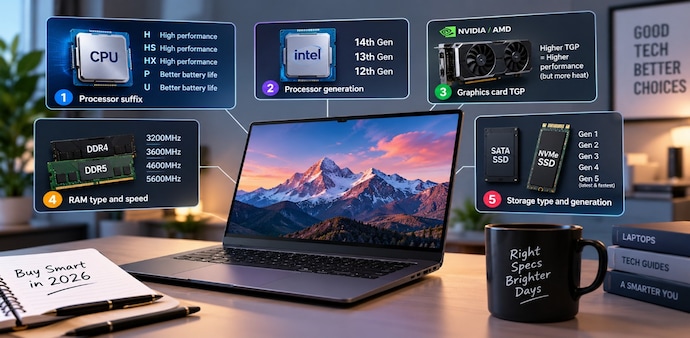
Don't choose a laptop simply because it has an i5 or i7 processor. Check the letter at the end of its name. H, HS, or HX suffixes indicate high-performance processors commonly found in gaming laptops. P and U processors prioritise battery life over top performance.
Must Read: Phone storage almost full? These 2 culprits account for 83% of storage problems
2. Check the processor generation
The processor generation also matters. Intel's current processors include 14th-generation chips, whose names begin with 14. Similarly, 13th- and 12th-generation processors carry 13 and 12, respectively, in their names.
3. Look at the graphics card TGP
You can choose a graphics card from Nvidia or AMD, but don't stop at the model name. If two laptops use the same graphics card, the one with the higher TGP (Total Graphics Power) can deliver higher performance. However, higher power consumption can also mean more heat.
4. Compare RAM type and speed
Current laptops commonly use DDR4 or DDR5 RAM, with DDR5 being faster. You should also check the clock speed, such as 3200MHz, 3600MHz, 4600MHz or 5600MHz. Generally, a higher clock speed means faster RAM.
5. Check the SSD type and generation
HDDs have largely disappeared from the laptop market, with SSDs now common. SATA SSDs are cheaper but slower, while NVMe SSDs cost more and offer higher speeds. For NVMe drives, check the generation too - Gen 5 is currently the latest and fastest.
For Unparalleled coverage of India's Businesses and Economy – Subscribe to Business Today Magazine
Buying a laptop in 2026 requires more than checking whether it has a high-end processor. The processor suffix, generation, graphics card power, RAM type and speed, and storage technology can all affect performance, battery life, and overall experience.
Must Read: Paytm Payment Gateway integrates with ChatGPT to track payments, refunds and sales insights
A laptop with a familiar processor name may still perform differently depending on these specifications. Graphics cards, too, can deliver different results even when the model is identical, depending on its TGP rating. And before you spend money on a new machine, understanding these five specifications can help you avoid choosing a laptop based only on headline numbers and ensure you get the performance you actually need.
1. Check the processor suffix
Don't choose a laptop simply because it has an i5 or i7 processor. Check the letter at the end of its name. H, HS, or HX suffixes indicate high-performance processors commonly found in gaming laptops. P and U processors prioritise battery life over top performance.
Must Read: Phone storage almost full? These 2 culprits account for 83% of storage problems
2. Check the processor generation
The processor generation also matters. Intel's current processors include 14th-generation chips, whose names begin with 14. Similarly, 13th- and 12th-generation processors carry 13 and 12, respectively, in their names.
3. Look at the graphics card TGP
You can choose a graphics card from Nvidia or AMD, but don't stop at the model name. If two laptops use the same graphics card, the one with the higher TGP (Total Graphics Power) can deliver higher performance. However, higher power consumption can also mean more heat.
4. Compare RAM type and speed
Current laptops commonly use DDR4 or DDR5 RAM, with DDR5 being faster. You should also check the clock speed, such as 3200MHz, 3600MHz, 4600MHz or 5600MHz. Generally, a higher clock speed means faster RAM.
5. Check the SSD type and generation
HDDs have largely disappeared from the laptop market, with SSDs now common. SATA SSDs are cheaper but slower, while NVMe SSDs cost more and offer higher speeds. For NVMe drives, check the generation too - Gen 5 is currently the latest and fastest.
For Unparalleled coverage of India's Businesses and Economy – Subscribe to Business Today Magazine