
How Apple's App Privacy Report can help safeguard your personal information
This feature works together with Apple’s App Store labels and the LED indicators (for mic and front camera access) to let users know which apps are collecting their data.
- Dec 20, 2021,
- Updated Dec 20, 2021 7:03 PM IST
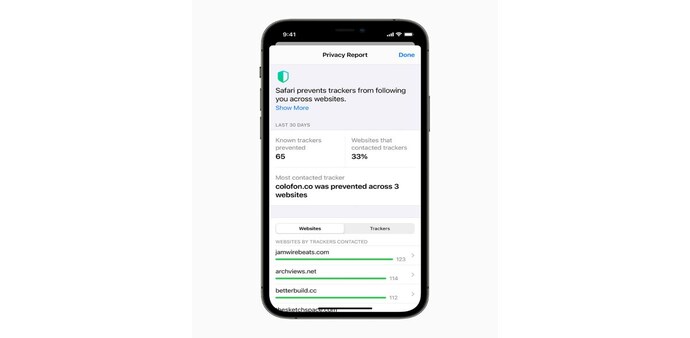
Apple has introduced its App Privacy Report that informs users about an app’s privacy practices before downloading the app. This feature works together with Apple’s App Store labels and the LED indicators (for mic and front camera access) to let users know which apps are collecting their data. The App Privacy Report feature is rolling out with the iOS 15.2 update and is available for iPhone and iPad users. As Apple explains, this is a great opportunity to review the apps’ senor, data, and internet usage.
All users with iPhones from 6s to newer models can use the App Privacy Report feature once they have the latest OS update. This can be accessed from the Settings app and it needs to be manually enabled.
For this, users need to go to Settings, then click on Privacy. From here, users need to go into the App Privacy Report setting and turn it on.
Apple has pointed out that users will need to identify all of the data that third party apps collect and this can be done via the App Store labels. This feature has been available since last year and it allows users to cross-check if the collected data has been disclosed by the developers.
“You’re responsible for keeping your responses accurate and up to date. If your practices change, update your responses in App Store Connect,” Apple told developers.
Once you turn App Privacy Report on, you will be able to see the recent data accessed or collected by any app.
For example, if WhatsApp is the last app you have accessed, you will see that the app has access to your microphone, photos, contacts, and camera. Now, WhatsApp has already disclosed that it accesses these data in the App Store.
With the App Privacy Report turned on, users are also able to see the App Network Activity that shows which domains were accessed by an app and how many times. This can also be checked under the Most Contacted Domains.
The App Privacy Report can also be turned off at any time you want and the procedure for this is just the same as it is for turning it on.
Also Read: Apple seeks dismissal of India apps market antitrust case, cites tiny market share
Also Read: Apple is hiring engineers to produce more wireless chips in-house for future iPhones and iPads
For Unparalleled coverage of India's Businesses and Economy – Subscribe to Business Today Magazine
Apple has introduced its App Privacy Report that informs users about an app’s privacy practices before downloading the app. This feature works together with Apple’s App Store labels and the LED indicators (for mic and front camera access) to let users know which apps are collecting their data. The App Privacy Report feature is rolling out with the iOS 15.2 update and is available for iPhone and iPad users. As Apple explains, this is a great opportunity to review the apps’ senor, data, and internet usage.
All users with iPhones from 6s to newer models can use the App Privacy Report feature once they have the latest OS update. This can be accessed from the Settings app and it needs to be manually enabled.
For this, users need to go to Settings, then click on Privacy. From here, users need to go into the App Privacy Report setting and turn it on.
Apple has pointed out that users will need to identify all of the data that third party apps collect and this can be done via the App Store labels. This feature has been available since last year and it allows users to cross-check if the collected data has been disclosed by the developers.
“You’re responsible for keeping your responses accurate and up to date. If your practices change, update your responses in App Store Connect,” Apple told developers.
Once you turn App Privacy Report on, you will be able to see the recent data accessed or collected by any app.
For example, if WhatsApp is the last app you have accessed, you will see that the app has access to your microphone, photos, contacts, and camera. Now, WhatsApp has already disclosed that it accesses these data in the App Store.
With the App Privacy Report turned on, users are also able to see the App Network Activity that shows which domains were accessed by an app and how many times. This can also be checked under the Most Contacted Domains.
The App Privacy Report can also be turned off at any time you want and the procedure for this is just the same as it is for turning it on.
Also Read: Apple seeks dismissal of India apps market antitrust case, cites tiny market share
Also Read: Apple is hiring engineers to produce more wireless chips in-house for future iPhones and iPads
For Unparalleled coverage of India's Businesses and Economy – Subscribe to Business Today Magazine