
iOS 26 Public Beta is out: How to install on your iPhone? Top 5 features you should use
If you've been waiting to try out the upcoming iOS 26 version, this is a chance to install a much more stable build on your iPhones and enjoy Apple's upcoming visual overhaul.
- Jul 25, 2025,
- Updated Jul 25, 2025 12:33 PM IST
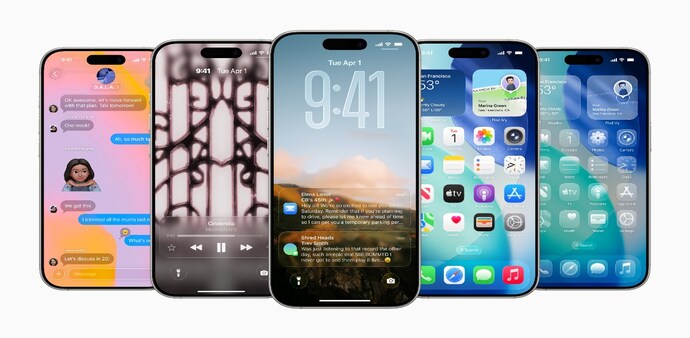
Apple has released the first public beta of iOS 26, giving iPhone users an early look at the company’s most ambitious software update in years. The update brings sweeping changes to the user interface, improved on-device intelligence, and powerful upgrades to the Phone, Camera, and Photos apps.
The beta is available for eligible iPhones starting today. While the update promises a more modern and smarter iPhone experience, Apple advises users to install it only on secondary devices, as beta software can be unstable.
Compatible Devices
The iOS 26 public beta supports the following iPhones:
- iPhone 15 Pro, iPhone 15 Pro Max
- iPhone 15, iPhone 15 Plus
- iPhone 14, 14 Plus, 14 Pro, 14 Pro Max
- iPhone 13, 13 Mini, 13 Pro, 13 Pro Max
- iPhone 12, 12 Mini, 12 Pro, 12 Pro Max
- iPhone 11, 11 Pro, 11 Pro Max
Note: iPhone XR, XS, and older devices are not supported. Apple Intelligence features will only be available on iPhone 15 Pro and newer.
How to Install iOS 26 Public Beta
- Visit beta.apple.com and sign in using your Apple ID.
- Enrol your iPhone in the Apple Beta Software Programme.
- On your iPhone, go to Settings → General → Software Update.
- Tap Beta Updates and select iOS 26 Public Beta.
- Return to the Software Update screen and tap Download and Install.
- Ensure your device is connected to Wi-Fi and charged at least 50%.
Top 5 iOS 26 Features to Check Out
1. Call Screening and Smarter Phone App
One of the biggest additions in iOS 26 is Call Screening, a feature that automatically asks unknown callers to identify themselves before your phone rings. If it’s spam, you’ll never be disturbed. Apple’s AI can also summarise voicemail messages and even stay on hold for you through a new Hold Assist feature, alerting you only when a real person is available.
2. Camera and Photos App Overhaul
iOS 26 revamps the entire photography experience. The Photos app now has a streamlined layout with separate Library and Collections tabs. It automatically organises your photos by trips, people, and pets, while also generating highlight reels and memories. The Camera app now supports better HDR previews, smarter scene detection, and quicker access to shooting modes.
3. Liquid Glass Design
Apple is introducing a bold new UI called Liquid Glass. The interface now includes frosted-glass textures, depth-aware animations, and spatial widget placement. Even the Lock Screen elements dynamically reposition themselves based on wallpaper content, offering a more refined and premium visual experience.
4. Apple Intelligence Features
Apple’s new on-device AI system, Apple Intelligence, powers several features in iOS 26. These include Live Translation in phone calls, intelligent writing tools, smart search across apps, and the ability to generate personalised emojis (Genmoji) or stylised images on the fly. These features are privacy-focused and processed entirely on-device for supported iPhones.
5. CarPlay Enhancements
Apple is finally giving CarPlay some attention in iOS 26. The new update introduces support for Live Activities, so you can see real-time updates like food delivery status or match scores. It also adds widget support, redesigned call handling, and smarter navigation suggestions based on your habits and calendar.
A Word of Caution
As with any beta software, iOS 26 may include bugs, reduced battery performance, and occasional app crashes. It’s best to install it on a secondary device if you’re not comfortable dealing with potential instability. The final, stable version of iOS 26 is expected to roll out in September, shortly after Apple unveils the iPhone 17 series.
For Unparalleled coverage of India's Businesses and Economy – Subscribe to Business Today Magazine
Apple has released the first public beta of iOS 26, giving iPhone users an early look at the company’s most ambitious software update in years. The update brings sweeping changes to the user interface, improved on-device intelligence, and powerful upgrades to the Phone, Camera, and Photos apps.
The beta is available for eligible iPhones starting today. While the update promises a more modern and smarter iPhone experience, Apple advises users to install it only on secondary devices, as beta software can be unstable.
Compatible Devices
The iOS 26 public beta supports the following iPhones:
- iPhone 15 Pro, iPhone 15 Pro Max
- iPhone 15, iPhone 15 Plus
- iPhone 14, 14 Plus, 14 Pro, 14 Pro Max
- iPhone 13, 13 Mini, 13 Pro, 13 Pro Max
- iPhone 12, 12 Mini, 12 Pro, 12 Pro Max
- iPhone 11, 11 Pro, 11 Pro Max
Note: iPhone XR, XS, and older devices are not supported. Apple Intelligence features will only be available on iPhone 15 Pro and newer.
How to Install iOS 26 Public Beta
- Visit beta.apple.com and sign in using your Apple ID.
- Enrol your iPhone in the Apple Beta Software Programme.
- On your iPhone, go to Settings → General → Software Update.
- Tap Beta Updates and select iOS 26 Public Beta.
- Return to the Software Update screen and tap Download and Install.
- Ensure your device is connected to Wi-Fi and charged at least 50%.
Top 5 iOS 26 Features to Check Out
1. Call Screening and Smarter Phone App
One of the biggest additions in iOS 26 is Call Screening, a feature that automatically asks unknown callers to identify themselves before your phone rings. If it’s spam, you’ll never be disturbed. Apple’s AI can also summarise voicemail messages and even stay on hold for you through a new Hold Assist feature, alerting you only when a real person is available.
2. Camera and Photos App Overhaul
iOS 26 revamps the entire photography experience. The Photos app now has a streamlined layout with separate Library and Collections tabs. It automatically organises your photos by trips, people, and pets, while also generating highlight reels and memories. The Camera app now supports better HDR previews, smarter scene detection, and quicker access to shooting modes.
3. Liquid Glass Design
Apple is introducing a bold new UI called Liquid Glass. The interface now includes frosted-glass textures, depth-aware animations, and spatial widget placement. Even the Lock Screen elements dynamically reposition themselves based on wallpaper content, offering a more refined and premium visual experience.
4. Apple Intelligence Features
Apple’s new on-device AI system, Apple Intelligence, powers several features in iOS 26. These include Live Translation in phone calls, intelligent writing tools, smart search across apps, and the ability to generate personalised emojis (Genmoji) or stylised images on the fly. These features are privacy-focused and processed entirely on-device for supported iPhones.
5. CarPlay Enhancements
Apple is finally giving CarPlay some attention in iOS 26. The new update introduces support for Live Activities, so you can see real-time updates like food delivery status or match scores. It also adds widget support, redesigned call handling, and smarter navigation suggestions based on your habits and calendar.
A Word of Caution
As with any beta software, iOS 26 may include bugs, reduced battery performance, and occasional app crashes. It’s best to install it on a secondary device if you’re not comfortable dealing with potential instability. The final, stable version of iOS 26 is expected to roll out in September, shortly after Apple unveils the iPhone 17 series.
For Unparalleled coverage of India's Businesses and Economy – Subscribe to Business Today Magazine