
Microsoft launches AI-powered ‘Copilot Mode’ in Edge browser to enhance search and navigation
Microsoft steps up its AI game with a smarter, more interactive browsing feature on Edge.
- Jul 29, 2025,
- Updated Jul 29, 2025 2:22 PM IST
Microsoft has unveiled a new feature called Copilot Mode in its Edge browser, designed to streamline and personalise web browsing using artificial intelligence. The announcement was made on Monday, positioning the company to better compete with rivals rolling out AI-enhanced browsing tools.
Copilot Mode integrates tasks such as search, web navigation and tab management into a unified interface. According to Microsoft, it enables users to organise their browsing around topics, compare results across multiple tabs, and carry out tasks without constantly switching between pages.
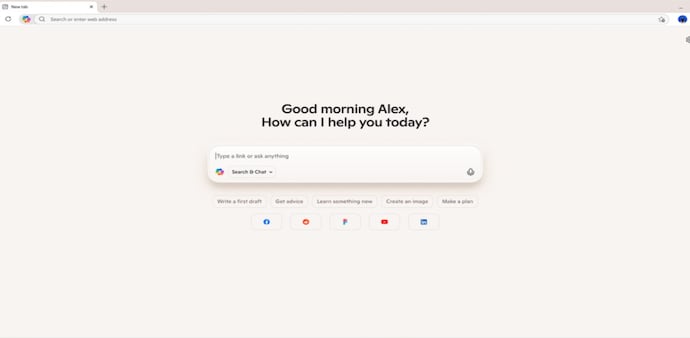
Users will be greeted with a single input box that merges chat, search and navigation features. The new tool also supports voice commands, allowing for hands-free browsing across both Windows and Mac PCs.
“Copilot will only be able to access browsing content when users enable it, and will provide visual cues to let users know when it is active in the background,” Microsoft said in a statement. The company added that users will soon be able to grant Copilot additional permissions, including access to browsing history and saved credentials, enabling it to handle more complex actions such as making bookings or managing daily errands.
The update comes as part of a broader trend in AI-integrated web tools. Competitors like Perplexity AI, backed by Nvidia, recently launched its own AI browser named Comet. Meanwhile, Google introduced an “AI Mode” in its search engine earlier this year and has already reported improved engagement through that feature. OpenAI is also said to be preparing its own AI-driven browser, according to reports from Reuters.
Copilot Mode is being rolled out for free across supported markets and will be available for a limited time. Users can disable the feature through the Edge settings menu if they prefer not to use it.
For Unparalleled coverage of India's Businesses and Economy – Subscribe to Business Today Magazine
Microsoft has unveiled a new feature called Copilot Mode in its Edge browser, designed to streamline and personalise web browsing using artificial intelligence. The announcement was made on Monday, positioning the company to better compete with rivals rolling out AI-enhanced browsing tools.
Copilot Mode integrates tasks such as search, web navigation and tab management into a unified interface. According to Microsoft, it enables users to organise their browsing around topics, compare results across multiple tabs, and carry out tasks without constantly switching between pages.
Users will be greeted with a single input box that merges chat, search and navigation features. The new tool also supports voice commands, allowing for hands-free browsing across both Windows and Mac PCs.
“Copilot will only be able to access browsing content when users enable it, and will provide visual cues to let users know when it is active in the background,” Microsoft said in a statement. The company added that users will soon be able to grant Copilot additional permissions, including access to browsing history and saved credentials, enabling it to handle more complex actions such as making bookings or managing daily errands.
The update comes as part of a broader trend in AI-integrated web tools. Competitors like Perplexity AI, backed by Nvidia, recently launched its own AI browser named Comet. Meanwhile, Google introduced an “AI Mode” in its search engine earlier this year and has already reported improved engagement through that feature. OpenAI is also said to be preparing its own AI-driven browser, according to reports from Reuters.
Copilot Mode is being rolled out for free across supported markets and will be available for a limited time. Users can disable the feature through the Edge settings menu if they prefer not to use it.
For Unparalleled coverage of India's Businesses and Economy – Subscribe to Business Today Magazine