
WhatsApp expands safety features with parent-managed accounts for children under 13
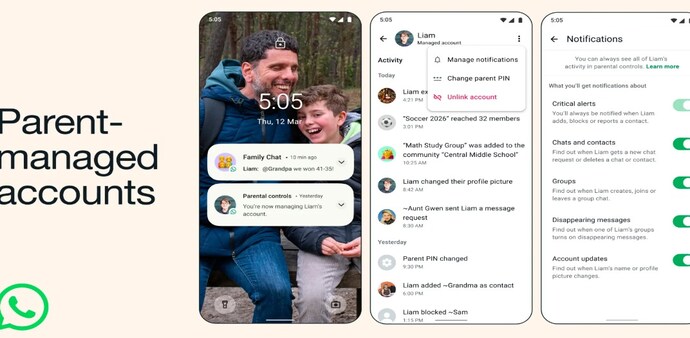
With a WhatsApp parent-managed account, parents will be able to control who their child is allowed to contact, which groups they can join, and review message requests from unknown users.
- Mar 12, 2026,
- Updated Mar 12, 2026 11:26 AM IST
WhatsApp is rolling out new safety features for its young users. The instant-messaging app is rolling out for parent-managed accounts for children under 13. This will allow parents to keep a tab on how their pre-teens use the app, while keeping the messaging features fully accessible, and keeping the conversation private and end-to-end encrypted.
WhatsApp parent-managed accounts: Key features
The new privacy update comes with a suite of parental controls, giving them meaningful oversight of their child's usage patterns and activity on the platform.
Parents can control who their child is allowed to contact, which groups they can join, and even review message requests from unknown users. This will allow parents to gatekeep who can reach their child on the app.
In addition, there’s a dedicated six-digit parent PIN that restricts children from accessing account settings, allowing parents to adjust privacy or communication permissions.
Despite parents' intervention, the chats will remain end-to-end encrypted, meaning neither WhatsApp or any other third party can access the chat conversation.
Furthermore, the children's account will only consist of messaging and calling features for smooth communication.
How to set up a parent-managed account
Step 1: Install WhatsApp from Playstore/ Apple app store
Step 2: Open the app, select More options, and click on create a parent-managed account
Step 3: Provide the child’s phone number and birth date.
Step 4: Now, scan the QR code displayed on the child’s device from your phone.
Step 5: It will ask for age verification on your device to ensure you’re an adult.
Step 6: Create 6-digit parent PIN.
Step 7: Now, enter the parent PIN to complete setup on child’s phone to complete set up.
Note that the parent-managed account feature will be rolled out in stages and may not yet be available in all regions. In addition, WhatsApp has not confirmed the global rollout timeline. Therefore, we may have to wait a couple of weeks for India's availability.
For Unparalleled coverage of India's Businesses and Economy – Subscribe to Business Today Magazine
WhatsApp is rolling out new safety features for its young users. The instant-messaging app is rolling out for parent-managed accounts for children under 13. This will allow parents to keep a tab on how their pre-teens use the app, while keeping the messaging features fully accessible, and keeping the conversation private and end-to-end encrypted.
WhatsApp parent-managed accounts: Key features
The new privacy update comes with a suite of parental controls, giving them meaningful oversight of their child's usage patterns and activity on the platform.
Parents can control who their child is allowed to contact, which groups they can join, and even review message requests from unknown users. This will allow parents to gatekeep who can reach their child on the app.
In addition, there’s a dedicated six-digit parent PIN that restricts children from accessing account settings, allowing parents to adjust privacy or communication permissions.
Despite parents' intervention, the chats will remain end-to-end encrypted, meaning neither WhatsApp or any other third party can access the chat conversation.
Furthermore, the children's account will only consist of messaging and calling features for smooth communication.
How to set up a parent-managed account
Step 1: Install WhatsApp from Playstore/ Apple app store
Step 2: Open the app, select More options, and click on create a parent-managed account
Step 3: Provide the child’s phone number and birth date.
Step 4: Now, scan the QR code displayed on the child’s device from your phone.
Step 5: It will ask for age verification on your device to ensure you’re an adult.
Step 6: Create 6-digit parent PIN.
Step 7: Now, enter the parent PIN to complete setup on child’s phone to complete set up.
Note that the parent-managed account feature will be rolled out in stages and may not yet be available in all regions. In addition, WhatsApp has not confirmed the global rollout timeline. Therefore, we may have to wait a couple of weeks for India's availability.
For Unparalleled coverage of India's Businesses and Economy – Subscribe to Business Today Magazine