
Apple iPadOS 16 update rolling out with Stage Manager, new features; check all details
iPadOS 16 is available to users today as an OTA (over-the-air) software update. The new version is a free software update that is available for the following iPads.
- Oct 25, 2022,
- Updated Oct 25, 2022 7:13 AM IST
iPadOS 16 has finally launched after an initial delay. This development comes almost one week after Apple revealed the latest line-up of iPads including a new iPad Pro with M2 chip and a new iPad. The new iPadOS 16 update was delayed after multiple bugs were spotted in the beta version of the operating system. Now, Apple has released a stable update of the OS with some big updates to Mail, iCloud Shared Photo Library, passkeys and new collaboration features in Safari, the Weather app, pro features including Reference Mode and Display Zoom. The new operating system has also introduced an entirely new multitasking experience with Stage Manager which has been taken from the macOS. However, the feature is currently turned off by default and users might have to manually turn it on.
Availability and Eligibility
iPadOS 16 is available to users today as an OTA (over-the-air) software update. The new version is a free software update that is available for iPad (5th generation and later), iPad mini (5th generation and later), iPad Air (3rd generation and later), and all iPad Pro models.
Share and Connect in Messages
New features in Messages make it possible to edit, undo send, and mark conversations as unread. With iPadOS 16, users can invite friends and family to SharePlay via Messages. Users will be able to conduct shared activity — like watching a movie, TV show, or doing a workout, or playing a game — in sync while they chat in a Messages thread.
Apple’s new collaboration features will also make working with others quick. When users send an invitation to collaborate via Messages, everyone on the thread is automatically added to the document, spreadsheet, or project, and when someone makes an edit to the shared document, activity updates appear at the top of the thread.
Mail Introduces New Smart Tools
Users on Mail can set reminders to come back to a message at a later date with the Remind me feature. They will be able to receive automatic suggestions to follow up on an email if they haven’t received a response, and get automatic alerts when they’ve forgotten to include a recipient or attachment in an email. Users can also cancel delivery of a message before it reaches a recipient’s inbox and schedule emails to be sent at the perfect moment.
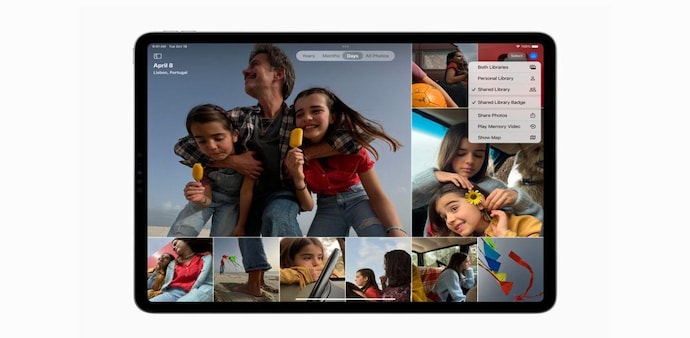
iCloud Shared Photo Library
iCloud Shared Photo Library will allow families to share photos in a more efficient way with a separate iCloud Photos library that up to six people can collaborate on and contribute to. It’s easy for users to either share all of their existing photos from their personal libraries, share based on a start date, or from the people in their photos. Users will receive AI suggestions to share photo moments that include participants in the library and any other people they choose. Every user can add, delete, edit, or favorite the shared photos and videos, which will appear in each user’s Memories and Featured Photos.
Safari has introduced passkeys, a next-generation credential that can’t be phished or leaked. This new feature is designed to replace passwords, passkeys use Touch ID or Face ID for biometric verification, and are synced with end-to-end encryption, according to Apple. The new passkeys feature is created as a joint effort in collaboration with the FIDO Alliance, Google, and Microsoft. Passkeys will work across apps and the web, and users can sign in to websites or an app on non-Apple devices using their iPad. Safari also added shared Tab Groups to share a collection of websites with other users.
Weather app in iPadOS 16
iPadOS 16 is getting the Weather app. The animated backgrounds in Weather represent the sun position, clouds, and precipitation, making the entire visual more interactive and time-accurate.
Visual Look Up and Live Text Get Updates
Users can tap and hold on the subject of an image to lift it from the background and place it in apps like Messages. Visual Look Up also expands to recognize birds, insects, and statues. The iPadOS 16 has also introduced Live Text which can recognize text in videos across the system, making text interactive in paused video frames. With a tap on a video, users can quickly copy and paste, translate, convert currency, and more.
Stage Manager and Full External Display Support
Stage Manager was first showcased with macOS. Now, it is being introduced on the iPadOS 16. It is a multitasking experience that automatically organizes apps and windows. For the first time on iPad, users can create overlapping windows of different sizes in a single view, drag and drop windows from the side, or open apps from the Dock to create groups of apps. The window of the app users are working on is displayed prominently in the center, and other open apps and windows are arranged on the left-hand side in order of recency.
In an update for M1 and M2 iPad models later this year, Stage Manager will also unlock full external display support with resolutions of up to 6K, so users will be able arrange the ideal workspace, and work with up to four apps on iPad and four apps on the external display simultaneously.
For Unparalleled coverage of India's Businesses and Economy – Subscribe to Business Today Magazine
iPadOS 16 has finally launched after an initial delay. This development comes almost one week after Apple revealed the latest line-up of iPads including a new iPad Pro with M2 chip and a new iPad. The new iPadOS 16 update was delayed after multiple bugs were spotted in the beta version of the operating system. Now, Apple has released a stable update of the OS with some big updates to Mail, iCloud Shared Photo Library, passkeys and new collaboration features in Safari, the Weather app, pro features including Reference Mode and Display Zoom. The new operating system has also introduced an entirely new multitasking experience with Stage Manager which has been taken from the macOS. However, the feature is currently turned off by default and users might have to manually turn it on.
Availability and Eligibility
iPadOS 16 is available to users today as an OTA (over-the-air) software update. The new version is a free software update that is available for iPad (5th generation and later), iPad mini (5th generation and later), iPad Air (3rd generation and later), and all iPad Pro models.
Share and Connect in Messages
New features in Messages make it possible to edit, undo send, and mark conversations as unread. With iPadOS 16, users can invite friends and family to SharePlay via Messages. Users will be able to conduct shared activity — like watching a movie, TV show, or doing a workout, or playing a game — in sync while they chat in a Messages thread.
Apple’s new collaboration features will also make working with others quick. When users send an invitation to collaborate via Messages, everyone on the thread is automatically added to the document, spreadsheet, or project, and when someone makes an edit to the shared document, activity updates appear at the top of the thread.
Mail Introduces New Smart Tools
Users on Mail can set reminders to come back to a message at a later date with the Remind me feature. They will be able to receive automatic suggestions to follow up on an email if they haven’t received a response, and get automatic alerts when they’ve forgotten to include a recipient or attachment in an email. Users can also cancel delivery of a message before it reaches a recipient’s inbox and schedule emails to be sent at the perfect moment.
iCloud Shared Photo Library
iCloud Shared Photo Library will allow families to share photos in a more efficient way with a separate iCloud Photos library that up to six people can collaborate on and contribute to. It’s easy for users to either share all of their existing photos from their personal libraries, share based on a start date, or from the people in their photos. Users will receive AI suggestions to share photo moments that include participants in the library and any other people they choose. Every user can add, delete, edit, or favorite the shared photos and videos, which will appear in each user’s Memories and Featured Photos.
Safari has introduced passkeys, a next-generation credential that can’t be phished or leaked. This new feature is designed to replace passwords, passkeys use Touch ID or Face ID for biometric verification, and are synced with end-to-end encryption, according to Apple. The new passkeys feature is created as a joint effort in collaboration with the FIDO Alliance, Google, and Microsoft. Passkeys will work across apps and the web, and users can sign in to websites or an app on non-Apple devices using their iPad. Safari also added shared Tab Groups to share a collection of websites with other users.
Weather app in iPadOS 16
iPadOS 16 is getting the Weather app. The animated backgrounds in Weather represent the sun position, clouds, and precipitation, making the entire visual more interactive and time-accurate.
Visual Look Up and Live Text Get Updates
Users can tap and hold on the subject of an image to lift it from the background and place it in apps like Messages. Visual Look Up also expands to recognize birds, insects, and statues. The iPadOS 16 has also introduced Live Text which can recognize text in videos across the system, making text interactive in paused video frames. With a tap on a video, users can quickly copy and paste, translate, convert currency, and more.
Stage Manager and Full External Display Support
Stage Manager was first showcased with macOS. Now, it is being introduced on the iPadOS 16. It is a multitasking experience that automatically organizes apps and windows. For the first time on iPad, users can create overlapping windows of different sizes in a single view, drag and drop windows from the side, or open apps from the Dock to create groups of apps. The window of the app users are working on is displayed prominently in the center, and other open apps and windows are arranged on the left-hand side in order of recency.
In an update for M1 and M2 iPad models later this year, Stage Manager will also unlock full external display support with resolutions of up to 6K, so users will be able arrange the ideal workspace, and work with up to four apps on iPad and four apps on the external display simultaneously.
For Unparalleled coverage of India's Businesses and Economy – Subscribe to Business Today Magazine