
Diwali 2026: iPhone 18 Pro camera tips to capture stunning festive photos at night
From adjusting aperture and shutter speed to choosing the right lens and using Night mode, these practical steps can help first-time iPhone users capture Diwali celebrations in low light with confidence.
- Nov 8, 2026,
- Updated Nov 8, 2026 5:30 AM IST
Diwali is one occasion when you want to capture almost every moment, from family members dressed in traditional outfits and candid celebrations to beautifully decorated homes and fireworks lighting up the night sky. But photographing these moments in low light can be challenging, especially when bright lights and dark backgrounds appear together.
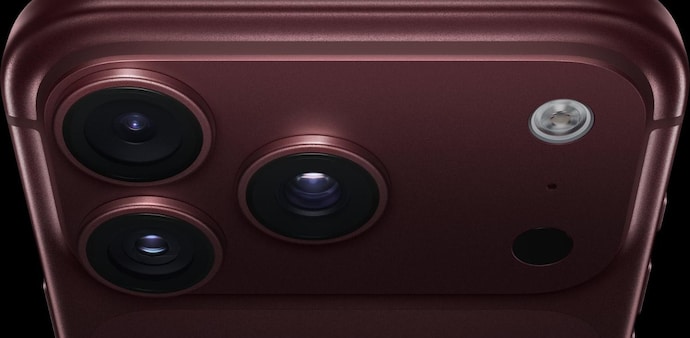
If you have an iPhone 18 Pro, knowing how to use its camera controls can make a difference. Here is how to get the best out of its camera during your Diwali celebrations.
First, set up your iPhone camera
Open the Camera app and select Photo mode. Tap the Camera Controls button to access Lens Aperture, Shutter Speed and White Balance. You can also add these controls above the camera viewfinder for quicker access.
To adjust focus, tap your subject on the screen. Drag the sun icon next to the focus area up or down to control brightness.
DON'T MISS | Diwali 2026 gifting: From vivo S2 FE to Pixel 10a, 5 smartphones worth consider around Rs 50,000
Capture beautiful family portraits
Select the 1x main camera and position your family members a little away from decorative lights to create background separation. Tap on a person's face to focus and select ƒ/1.48 or ƒ/1.8 for more light. If adjusting shutter speed manually, start at 1/125 second to minimise movement blur. Keep the phone steady and ask everyone to hold their pose.
Capture candid moments without blur
For photographs of family members laughing, dancing or moving around, use the 1x camera and experiment with a faster shutter speed of 1/250 second. Turn off Night mode if it is causing motion blur. Take multiple photographs so you can select the sharpest moment.
Photograph the festive atmosphere
Use the 1x camera for better low-light results. Switch to 0.5x Ultra Wide when you want to include more of the decorated home, gathering and surroundings. Tap your main subject, adjust exposure if bright lights appear overexposed and use Night mode when the scene is relatively still.
Capture fireworks and moving sparks
Select the 1x camera and try a shutter speed of 1/500 second to freeze fast-moving sparks. Keep the aperture at ƒ/1.48 and adjust exposure if the highlights appear too bright. Switch off Night mode to avoid unwanted motion blur. Photograph from a safe distance.
Experiment with creative night photographs
For close-up details and stationary subjects, use ƒ/1.48 to let in more light. For photographs where you want more of the background in focus, experiment with ƒ/2.8 or ƒ/4. Keep Night mode on Auto in darker surroundings and hold your phone steady during capture.
Make your photographs look better with Photographic Styles 3
Open Camera Controls, select Styles and swipe through the available options. Experiment with warmer tones for festive lighting, natural colours for family portraits and texture or grain for a film-like appearance. You can also adjust these effects later.
What about ISO and Night mode?
The iPhone 18 Pro automatically manages ISO in its native Camera app. You can manually adjust aperture, shutter speed and white balance, but not ISO. Night mode activates in low light and can take longer exposures to capture details. It works best when your subjects remain still.
Before putting your phone away, check your photographs in the Photos app to make sure faces are sharp and important details are visible. After all, the best Diwali photographs are the ones that bring back your favourite family memories.
For Unparalleled coverage of India's Businesses and Economy – Subscribe to Business Today Magazine
Diwali is one occasion when you want to capture almost every moment, from family members dressed in traditional outfits and candid celebrations to beautifully decorated homes and fireworks lighting up the night sky. But photographing these moments in low light can be challenging, especially when bright lights and dark backgrounds appear together.
If you have an iPhone 18 Pro, knowing how to use its camera controls can make a difference. Here is how to get the best out of its camera during your Diwali celebrations.
First, set up your iPhone camera
Open the Camera app and select Photo mode. Tap the Camera Controls button to access Lens Aperture, Shutter Speed and White Balance. You can also add these controls above the camera viewfinder for quicker access.
To adjust focus, tap your subject on the screen. Drag the sun icon next to the focus area up or down to control brightness.
DON'T MISS | Diwali 2026 gifting: From vivo S2 FE to Pixel 10a, 5 smartphones worth consider around Rs 50,000
Capture beautiful family portraits
Select the 1x main camera and position your family members a little away from decorative lights to create background separation. Tap on a person's face to focus and select ƒ/1.48 or ƒ/1.8 for more light. If adjusting shutter speed manually, start at 1/125 second to minimise movement blur. Keep the phone steady and ask everyone to hold their pose.
Capture candid moments without blur
For photographs of family members laughing, dancing or moving around, use the 1x camera and experiment with a faster shutter speed of 1/250 second. Turn off Night mode if it is causing motion blur. Take multiple photographs so you can select the sharpest moment.
Photograph the festive atmosphere
Use the 1x camera for better low-light results. Switch to 0.5x Ultra Wide when you want to include more of the decorated home, gathering and surroundings. Tap your main subject, adjust exposure if bright lights appear overexposed and use Night mode when the scene is relatively still.
Capture fireworks and moving sparks
Select the 1x camera and try a shutter speed of 1/500 second to freeze fast-moving sparks. Keep the aperture at ƒ/1.48 and adjust exposure if the highlights appear too bright. Switch off Night mode to avoid unwanted motion blur. Photograph from a safe distance.
Experiment with creative night photographs
For close-up details and stationary subjects, use ƒ/1.48 to let in more light. For photographs where you want more of the background in focus, experiment with ƒ/2.8 or ƒ/4. Keep Night mode on Auto in darker surroundings and hold your phone steady during capture.
Make your photographs look better with Photographic Styles 3
Open Camera Controls, select Styles and swipe through the available options. Experiment with warmer tones for festive lighting, natural colours for family portraits and texture or grain for a film-like appearance. You can also adjust these effects later.
What about ISO and Night mode?
The iPhone 18 Pro automatically manages ISO in its native Camera app. You can manually adjust aperture, shutter speed and white balance, but not ISO. Night mode activates in low light and can take longer exposures to capture details. It works best when your subjects remain still.
Before putting your phone away, check your photographs in the Photos app to make sure faces are sharp and important details are visible. After all, the best Diwali photographs are the ones that bring back your favourite family memories.
For Unparalleled coverage of India's Businesses and Economy – Subscribe to Business Today Magazine