
Google starts rolling out Android 17 to Pixel phones: Check eligibility and what’s new
Android 17 officially makes a stable release to Pixel 6 and newer generation models. From UI changes to new features, here's what's coming with the new Android update.
- Jun 17, 2026,
- Updated Jun 17, 2026 12:45 PM IST
Google is officially rolling out the stable version of Android 17 update to eligible Pixel phones, bringing new features, AI upgrades, and refining the UI experience. This year, the tech giant is running ahead of its schedule on software releases, making it one of the fastest Android rollouts.
Previously, the next generation Android update was rolled out after the new Pixel phone launch, but now it is happening two months ahead of its schedule. Therefore, if you own a Pixel device, check your eligibility and what’s new coming to your phones.
Android 17 features: What’s coming?
Bubble apps: Android 17, you can now make any application appear as a small floating icon, similar to a chat head. To activate Bubbles, simply press and hold an app icon on the home screen, click on the new Bubble option, and the app will start to appear as a movable floating bubble that stays on top of other apps.
You can also drag this bubble around the screen, and on larger-screen devices like tablets or foldable phones, Android is bringing a Bubble Bar in the bottom-right corner to manage these floating apps.
Hide app names on homescreen and more customisations: You can now hide app names from the homescreen, making the page look clean and clutter-free. Simply go to Wallpaper & style, then Icons, and click on Names. There you’ll find “Show app names,” which you can disable.
In addition, Android 17 brings further customisation options such as blurred backgrounds and translucent effects across widgets, volume panel, and power off menu. It also offers the ability to resize the menu and make it look compact.
Privacy features: Android 17 comes with enhanced privacy features, such as a system contact picker, where you can select which third-party apps can have access to your contacts. It's also improving location privacy by making permission choices clearer, allowing temporary, precise location sharing, and making approximate location more accurate.
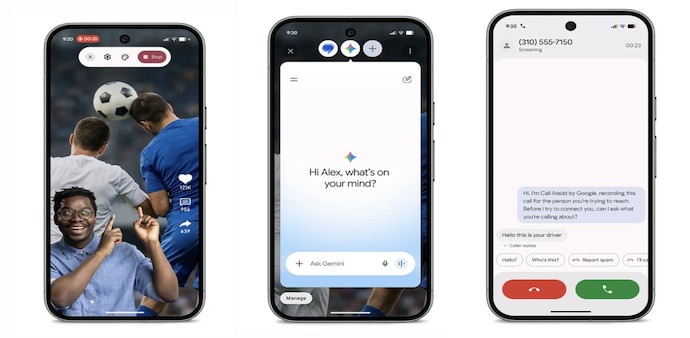
In addition to these features, the update also brings Screen Reactions that let users record selfie videos directly within screen recording. Gemini Omni now offers video creation and editing abilities using text, images, and video prompts.
Android 17 eligible Pixel models
- Pixel 6
- Pixel 6 Pro
- Pixel 6a
- Pixel 7
- Pixel 7 Pro
- Pixel 7a
- Pixel Tablet
- Pixel Fold
- Pixel 8
- Pixel 8 Pro
- Pixel 8a
- Pixel 9
- Pixel 9 Pro XL
- Pixel 9 Pro
- Pixel 9 Pro Fold
- Pixel 9a
- Pixel 10
- Pixel 10 Pro XL
- Pixel 10 Pro
- Pixel 10 Pro Fold
- Pixel 10a
Alongside Pixel models, Android 17 will soon come to other Android devices from Samsung, OnePlus, OPPO, Honor, Xiaomi, and others, as they have already started rolling out the beta versions.
For Unparalleled coverage of India's Businesses and Economy – Subscribe to Business Today Magazine
Google is officially rolling out the stable version of Android 17 update to eligible Pixel phones, bringing new features, AI upgrades, and refining the UI experience. This year, the tech giant is running ahead of its schedule on software releases, making it one of the fastest Android rollouts.
Previously, the next generation Android update was rolled out after the new Pixel phone launch, but now it is happening two months ahead of its schedule. Therefore, if you own a Pixel device, check your eligibility and what’s new coming to your phones.
Android 17 features: What’s coming?
Bubble apps: Android 17, you can now make any application appear as a small floating icon, similar to a chat head. To activate Bubbles, simply press and hold an app icon on the home screen, click on the new Bubble option, and the app will start to appear as a movable floating bubble that stays on top of other apps.
You can also drag this bubble around the screen, and on larger-screen devices like tablets or foldable phones, Android is bringing a Bubble Bar in the bottom-right corner to manage these floating apps.
Hide app names on homescreen and more customisations: You can now hide app names from the homescreen, making the page look clean and clutter-free. Simply go to Wallpaper & style, then Icons, and click on Names. There you’ll find “Show app names,” which you can disable.
In addition, Android 17 brings further customisation options such as blurred backgrounds and translucent effects across widgets, volume panel, and power off menu. It also offers the ability to resize the menu and make it look compact.
Privacy features: Android 17 comes with enhanced privacy features, such as a system contact picker, where you can select which third-party apps can have access to your contacts. It's also improving location privacy by making permission choices clearer, allowing temporary, precise location sharing, and making approximate location more accurate.
In addition to these features, the update also brings Screen Reactions that let users record selfie videos directly within screen recording. Gemini Omni now offers video creation and editing abilities using text, images, and video prompts.
Android 17 eligible Pixel models
- Pixel 6
- Pixel 6 Pro
- Pixel 6a
- Pixel 7
- Pixel 7 Pro
- Pixel 7a
- Pixel Tablet
- Pixel Fold
- Pixel 8
- Pixel 8 Pro
- Pixel 8a
- Pixel 9
- Pixel 9 Pro XL
- Pixel 9 Pro
- Pixel 9 Pro Fold
- Pixel 9a
- Pixel 10
- Pixel 10 Pro XL
- Pixel 10 Pro
- Pixel 10 Pro Fold
- Pixel 10a
Alongside Pixel models, Android 17 will soon come to other Android devices from Samsung, OnePlus, OPPO, Honor, Xiaomi, and others, as they have already started rolling out the beta versions.
For Unparalleled coverage of India's Businesses and Economy – Subscribe to Business Today Magazine