
iOS 27, iPadOS 27 rolls out: Top new features to use on your iPhone and iPad
Apple’s latest software updates bring smarter assistance, quicker everyday tasks and several practical changes across communication, photography, browsing and device controls, giving users more ways to personalise their experience.
- Sep 15, 2026,
- Updated Sep 15, 2026 12:21 PM IST
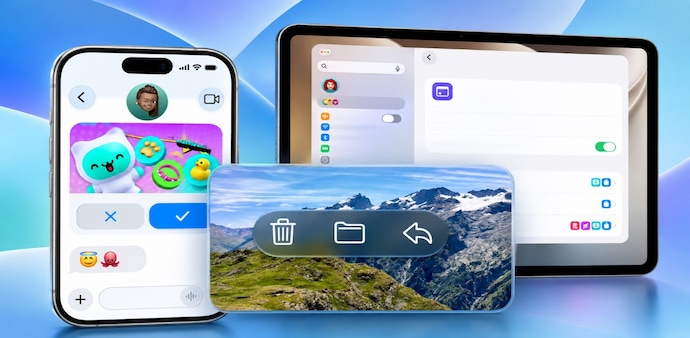
Apple has rolled out iOS 27 and iPadOS 27 globally, bringing new features, performance improvements, AI-powered tools and several other upgrades to iPhones and iPads. The update is less dramatic than last year’s Liquid Glass redesign, but it introduces changes that could impact how you use your device every day.
Must Read: Apple Stores to get a major makeover: New Genius Bars, pickup areas, more coming soon
Siri AI is the biggest addition, with a new app, personal context, and visual search capabilities. Apple has also simplified Shortcuts, added new Safari tools and improved parental controls - however, not every feature works on every compatible device.
Siri AI, performance and personalisation
Siri AI: Siri gets a glass-orb interface, natural typing and conversation, along with a dedicated app that keeps chat history across devices. It can use information from your emails, messages and photos, perform tasks such as drafting emails and splitting restaurant bills, and support camera-based visual search. You can also adjust its voice, expressiveness and pace.
Apple Intelligence: Siri uses third-generation foundation models developed with Google’s Gemini models, but not Google’s infrastructure. Apple says Siri data is not shared with Google.
Faster performance: App launches can be up to 30% faster, Photo Library loading up to 70% faster, and AirDrop transfers up to 80% faster.
Liquid Glass: More control over the Liquid Glass interface with a new intensity slider. You can adjust how transparent or prominent the glass-like elements appear, helping improve readability and contrast while keeping the overall visual style intact.
Parental controls: Ask to Browse requires a parent's approval when a child wants to visit a new website, while Communication Safety helps protect children from sensitive content. Time Allowances lets parents set usage limits for apps and categories, and Schedules can restrict access during specific periods, such as school hours. The updated Setup Assistant also makes it easier to configure these controls when setting up a child’s device.
Photos and Image Playground: The Photos app gets new editing tools aimed at providing more flexibility. Clean Up can remove unwanted elements from photos, while Extend expands an image beyond its original frame. Spatial Reframing helps adjust the composition of spatial photos. Meanwhile, Image Playground gets more advanced photorealistic image-generation capabilities, allowing you to create more realistic-looking images from your ideas.
Safari, Shortcuts and other new features
Shortcuts: You can create automations using natural-language instructions instead of building them manually.
Safari: Tabs can be organised by topic, while the browser can alert you when webpages change and create custom extensions that sync across devices.
Other updates include:
- Mail: Improved search makes finding messages easier.
- Calendar: Natural-language commands can be used to create events.
- FaceTime: Dual Capture lets you record from both cameras.
- VoiceOver: Provides richer descriptions for accessibility.
- Maps: Adds more detailed 3D visuals.
- AirPods: Get custom EQ controls.
- Call Context: Provides relevant information during calls.
- iCloud Shared Albums: Easier photo sharing and management
- Health: Simpler health information management
- Home: Smarter connected home notifications
- Messages: Faster message syncing
iOS 27 supports iPhone 11 and newer, including iPhone SE (2nd generation). iPadOS 27 supports selected iPad, iPad mini, iPad Air and iPad Pro models. Apple Intelligence features require compatible hardware, including iPhone 15 Pro and newer. Before updating, back up your device and head to Settings > General > Software Update.
For Unparalleled coverage of India's Businesses and Economy – Subscribe to Business Today Magazine
Apple has rolled out iOS 27 and iPadOS 27 globally, bringing new features, performance improvements, AI-powered tools and several other upgrades to iPhones and iPads. The update is less dramatic than last year’s Liquid Glass redesign, but it introduces changes that could impact how you use your device every day.
Must Read: Apple Stores to get a major makeover: New Genius Bars, pickup areas, more coming soon
Siri AI is the biggest addition, with a new app, personal context, and visual search capabilities. Apple has also simplified Shortcuts, added new Safari tools and improved parental controls - however, not every feature works on every compatible device.
Siri AI, performance and personalisation
Siri AI: Siri gets a glass-orb interface, natural typing and conversation, along with a dedicated app that keeps chat history across devices. It can use information from your emails, messages and photos, perform tasks such as drafting emails and splitting restaurant bills, and support camera-based visual search. You can also adjust its voice, expressiveness and pace.
Apple Intelligence: Siri uses third-generation foundation models developed with Google’s Gemini models, but not Google’s infrastructure. Apple says Siri data is not shared with Google.
Faster performance: App launches can be up to 30% faster, Photo Library loading up to 70% faster, and AirDrop transfers up to 80% faster.
Liquid Glass: More control over the Liquid Glass interface with a new intensity slider. You can adjust how transparent or prominent the glass-like elements appear, helping improve readability and contrast while keeping the overall visual style intact.
Parental controls: Ask to Browse requires a parent's approval when a child wants to visit a new website, while Communication Safety helps protect children from sensitive content. Time Allowances lets parents set usage limits for apps and categories, and Schedules can restrict access during specific periods, such as school hours. The updated Setup Assistant also makes it easier to configure these controls when setting up a child’s device.
Photos and Image Playground: The Photos app gets new editing tools aimed at providing more flexibility. Clean Up can remove unwanted elements from photos, while Extend expands an image beyond its original frame. Spatial Reframing helps adjust the composition of spatial photos. Meanwhile, Image Playground gets more advanced photorealistic image-generation capabilities, allowing you to create more realistic-looking images from your ideas.
Safari, Shortcuts and other new features
Shortcuts: You can create automations using natural-language instructions instead of building them manually.
Safari: Tabs can be organised by topic, while the browser can alert you when webpages change and create custom extensions that sync across devices.
Other updates include:
- Mail: Improved search makes finding messages easier.
- Calendar: Natural-language commands can be used to create events.
- FaceTime: Dual Capture lets you record from both cameras.
- VoiceOver: Provides richer descriptions for accessibility.
- Maps: Adds more detailed 3D visuals.
- AirPods: Get custom EQ controls.
- Call Context: Provides relevant information during calls.
- iCloud Shared Albums: Easier photo sharing and management
- Health: Simpler health information management
- Home: Smarter connected home notifications
- Messages: Faster message syncing
iOS 27 supports iPhone 11 and newer, including iPhone SE (2nd generation). iPadOS 27 supports selected iPad, iPad mini, iPad Air and iPad Pro models. Apple Intelligence features require compatible hardware, including iPhone 15 Pro and newer. Before updating, back up your device and head to Settings > General > Software Update.
For Unparalleled coverage of India's Businesses and Economy – Subscribe to Business Today Magazine