
iPadOS 26 review: The iPad finally feels like a real computer
Apple’s new iPadOS 26 brings the iPad closer than ever to being a proper computer. Here's my experience after a month of use.
- Jul 30, 2025,
- Updated Jul 30, 2025 12:48 PM IST
I’ve been using iPadOS 26 since the very first developer beta, running it daily on both the iPad Pro M2 and the new iPad Air M3. And after more than a month of real-world use, I can say this confidently: the iPad now functions like a proper laptop. In fact, in many ways, it’s even better, provided you’re the right kind of user.
When Apple unveiled iPadOS 26 at WWDC this year, there was a collective nod across the tech world. This was the update many had been waiting for years. Apple, it seemed, had finally made the iPad behave like a computer, albeit still not quite a Mac. But after spending weeks working, browsing, editing and multitasking exclusively on the iPad, the shift feels very real. And for me, it’s been a liberating experience.
From media machine to multitasking powerhouse
Before this update, my iPad Pro was already one of my favourite devices but also one of the most underused. Despite all that power, it often ended up as a high-end media machine during my travels. Great for media consumption, some light browsing, checking emails, and occasionally sketching or editing images with the Apple Pencil. But when real work needed doing, I always reached for the MacBook Air in my bag.
That changed with iPadOS 26.
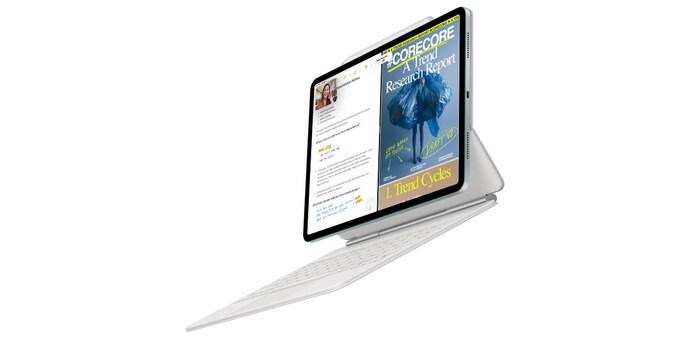
The most obvious and talked-about addition is the overhauled window management system. Gone are the awkward constraints of earlier multitasking tools. Now, you can open nearly any app, grab the corner, and resize it as you would on a Mac. Want multiple overlapping windows? Go ahead. Want to split-screen or snap a window to one half of the display? Done. It’s fluid, flexible, and dare I say it, fun.
And crucially, it’s optional. You can toggle this windowed apps mode on or off with a quick tap in Control Center. Switch it off and you’re back to the classic full-screen, swipe-driven iPad experience. It’s a clever move, one that allows the iPad to be both a focused, single-task tablet and a desktop-like multitasking machine depending on your needs.
Living with the iPad as my only device
Once I installed the beta, I deliberately left my MacBook Air out of my backpack. For over a month, the iPad became my only device on the go. Email, Slack, Docs, browser-based CMS work, note-taking, file transfers, Zoom calls, even signing PDFs, I did everything on the iPad.
And yes, it mostly just worked.
Of course, there were occasional moments that reminded me this wasn’t a Mac. Signing a PDF from Slack and sending it back involved a few more steps than it would on macOS. Some apps still lag slightly when resizing windows. The Files app, despite big improvements, doesn’t always behave like its desktop counterpart, especially when it comes to locating AirDropped files. And not being able to play music while watching YouTube remains a strange limitation.
But the bigger picture is this: the friction has dropped considerably. Everyday productivity now feels intuitive. There’s a learning curve, especially if you’re used to macOS, but once you get into the rhythm, the iPad begins to feel like your main machine.
Hardware helps, but also reminds you this is still an iPad
The iPad Pro M2 and iPad Air M3 both run iPadOS 26 brilliantly. They’re fast, fluid, and beautiful to use. The displays are stunning. The battery life remains excellent. And both work seamlessly with the Magic Keyboard and trackpad support. The cursor experience feels polished now. No longer a gimmick, but a core part of the system.
Still, there are limits. The keyboard case, while improved, isn’t as comfortable as a traditional laptop for long stretches of typing. It’s top-heavy. It’s awkward on your lap. And the whole setup, with accessories added, begins to match the weight and size of a MacBook Air.
But that’s the paradox of the iPad: the more you kit it out to act like a laptop, the more it physically resembles one. And yet, it can also be something entirely different. A media player, a notepad, an art studio, a camera, a cellular-connected browser, or a gaming console. No Mac can say the same.
Do I want it to replace my laptop?
That’s the question I kept asking myself, not can the iPad replace my laptop, but do I want it to?
There are days when the iPad is the better machine. Its single-app focus helps me avoid distractions. Its weight makes my backpack feel lighter. Its battery lasts longer. The touchscreen is delightful, whether I’m flicking through articles or signing documents with the Pencil. And with eight windows now supported simultaneously, I never feel constrained while multitasking.
But there are also moments when I miss the sheer ease of macOS. Whether it’s advanced multitasking, external monitor support, or the simplicity of dragging and dropping files exactly where I want them.
Still, that’s a trade-off I’m increasingly willing to make.
Final thoughts
iPadOS 26 doesn’t magically turn the iPad into a Mac. But it doesn’t need to. What it does is make the iPad a more serious, credible computer in its own right.
With the right accessories and the right use case, it’s now perfectly possible to leave your laptop at home. And not just for media consumption or casual browsing, but for proper, sustained work.
Is it for everyone? Probably not. But for me, after weeks of relying solely on my iPad Pro M2 and iPad Air M3, I’m convinced: this is the most capable and complete iPad experience yet.
For Unparalleled coverage of India's Businesses and Economy – Subscribe to Business Today Magazine
I’ve been using iPadOS 26 since the very first developer beta, running it daily on both the iPad Pro M2 and the new iPad Air M3. And after more than a month of real-world use, I can say this confidently: the iPad now functions like a proper laptop. In fact, in many ways, it’s even better, provided you’re the right kind of user.
When Apple unveiled iPadOS 26 at WWDC this year, there was a collective nod across the tech world. This was the update many had been waiting for years. Apple, it seemed, had finally made the iPad behave like a computer, albeit still not quite a Mac. But after spending weeks working, browsing, editing and multitasking exclusively on the iPad, the shift feels very real. And for me, it’s been a liberating experience.
From media machine to multitasking powerhouse
Before this update, my iPad Pro was already one of my favourite devices but also one of the most underused. Despite all that power, it often ended up as a high-end media machine during my travels. Great for media consumption, some light browsing, checking emails, and occasionally sketching or editing images with the Apple Pencil. But when real work needed doing, I always reached for the MacBook Air in my bag.
That changed with iPadOS 26.
The most obvious and talked-about addition is the overhauled window management system. Gone are the awkward constraints of earlier multitasking tools. Now, you can open nearly any app, grab the corner, and resize it as you would on a Mac. Want multiple overlapping windows? Go ahead. Want to split-screen or snap a window to one half of the display? Done. It’s fluid, flexible, and dare I say it, fun.
And crucially, it’s optional. You can toggle this windowed apps mode on or off with a quick tap in Control Center. Switch it off and you’re back to the classic full-screen, swipe-driven iPad experience. It’s a clever move, one that allows the iPad to be both a focused, single-task tablet and a desktop-like multitasking machine depending on your needs.
Living with the iPad as my only device
Once I installed the beta, I deliberately left my MacBook Air out of my backpack. For over a month, the iPad became my only device on the go. Email, Slack, Docs, browser-based CMS work, note-taking, file transfers, Zoom calls, even signing PDFs, I did everything on the iPad.
And yes, it mostly just worked.
Of course, there were occasional moments that reminded me this wasn’t a Mac. Signing a PDF from Slack and sending it back involved a few more steps than it would on macOS. Some apps still lag slightly when resizing windows. The Files app, despite big improvements, doesn’t always behave like its desktop counterpart, especially when it comes to locating AirDropped files. And not being able to play music while watching YouTube remains a strange limitation.
But the bigger picture is this: the friction has dropped considerably. Everyday productivity now feels intuitive. There’s a learning curve, especially if you’re used to macOS, but once you get into the rhythm, the iPad begins to feel like your main machine.
Hardware helps, but also reminds you this is still an iPad
The iPad Pro M2 and iPad Air M3 both run iPadOS 26 brilliantly. They’re fast, fluid, and beautiful to use. The displays are stunning. The battery life remains excellent. And both work seamlessly with the Magic Keyboard and trackpad support. The cursor experience feels polished now. No longer a gimmick, but a core part of the system.
Still, there are limits. The keyboard case, while improved, isn’t as comfortable as a traditional laptop for long stretches of typing. It’s top-heavy. It’s awkward on your lap. And the whole setup, with accessories added, begins to match the weight and size of a MacBook Air.
But that’s the paradox of the iPad: the more you kit it out to act like a laptop, the more it physically resembles one. And yet, it can also be something entirely different. A media player, a notepad, an art studio, a camera, a cellular-connected browser, or a gaming console. No Mac can say the same.
Do I want it to replace my laptop?
That’s the question I kept asking myself, not can the iPad replace my laptop, but do I want it to?
There are days when the iPad is the better machine. Its single-app focus helps me avoid distractions. Its weight makes my backpack feel lighter. Its battery lasts longer. The touchscreen is delightful, whether I’m flicking through articles or signing documents with the Pencil. And with eight windows now supported simultaneously, I never feel constrained while multitasking.
But there are also moments when I miss the sheer ease of macOS. Whether it’s advanced multitasking, external monitor support, or the simplicity of dragging and dropping files exactly where I want them.
Still, that’s a trade-off I’m increasingly willing to make.
Final thoughts
iPadOS 26 doesn’t magically turn the iPad into a Mac. But it doesn’t need to. What it does is make the iPad a more serious, credible computer in its own right.
With the right accessories and the right use case, it’s now perfectly possible to leave your laptop at home. And not just for media consumption or casual browsing, but for proper, sustained work.
Is it for everyone? Probably not. But for me, after weeks of relying solely on my iPad Pro M2 and iPad Air M3, I’m convinced: this is the most capable and complete iPad experience yet.
For Unparalleled coverage of India's Businesses and Economy – Subscribe to Business Today Magazine