
Why your keyboard has tiny bumps on F and J keys and how they help you type faster
Those tiny bumps on your keyboard may seem insignificant, but they play an important role in helping you position your hands, type faster and stay accurate without looking down.
- Aug 18, 2026,
- Updated Aug 18, 2026 9:00 AM IST
When you spend hours typing on a computer, there is a good chance your fingers have learned the keyboard almost automatically. You can write messages, search for information or finish work while keeping your eyes on the screen instead of constantly checking where each key is.
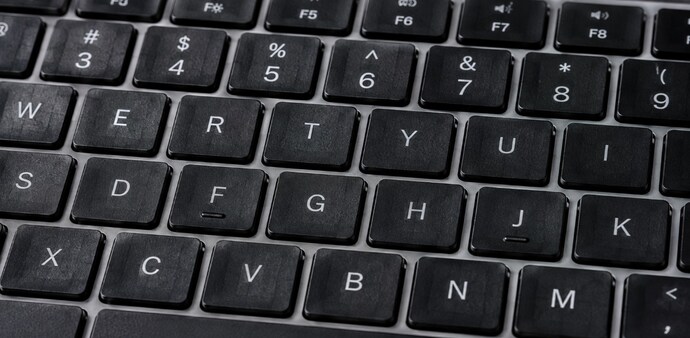
But there is a small design detail that quietly helps make this possible. Look closely at the F and J keys on your keyboard, and you will usually find a tiny raised line or bump.
The tiny bumps are there for a reason
These raised marks are called tactile markers or home-row markers. They act as physical reference points, helping you position your hands correctly without looking down at the keyboard.
Must Read: Coin on your Wi-Fi router: Does it actually help boost speed, and what is it for?
For touch typing, the left index finger rests on F, while the right index finger rests on J. Your other fingers then naturally line up across the home row - A, S and D on the left and K, L and the semicolon key on the right.
So, when you place your index fingers on the two raised markers, you can quickly find the correct starting position. This becomes particularly useful when you are typing quickly and want to keep your attention on the screen.
How the bumps improve typing
The markers can also help when your hands gradually drift from their proper positions. Instead of looking down to check where your fingers are, you can feel the raised bars and adjust your hands.
Must Read: Forgot your power bank? Your phone can be charge using another phone; Here’s how
This small feature can therefore support both typing speed and accuracy. Your fingers essentially get a way to "see" their position through touch.
The idea dates back to typewriters
The design is not something that appeared with modern computer keyboards. Physical markers used to help typists position their hands were already associated with typewriters and the development of touch typing.
As keyboards moved from typewriters to computers and laptops, their layouts and several practical design elements remained. The F and J keys were among the features that carried over into modern keyboards.
For Unparalleled coverage of India's Businesses and Economy – Subscribe to Business Today Magazine
When you spend hours typing on a computer, there is a good chance your fingers have learned the keyboard almost automatically. You can write messages, search for information or finish work while keeping your eyes on the screen instead of constantly checking where each key is.
But there is a small design detail that quietly helps make this possible. Look closely at the F and J keys on your keyboard, and you will usually find a tiny raised line or bump.
The tiny bumps are there for a reason
These raised marks are called tactile markers or home-row markers. They act as physical reference points, helping you position your hands correctly without looking down at the keyboard.
Must Read: Coin on your Wi-Fi router: Does it actually help boost speed, and what is it for?
For touch typing, the left index finger rests on F, while the right index finger rests on J. Your other fingers then naturally line up across the home row - A, S and D on the left and K, L and the semicolon key on the right.
So, when you place your index fingers on the two raised markers, you can quickly find the correct starting position. This becomes particularly useful when you are typing quickly and want to keep your attention on the screen.
How the bumps improve typing
The markers can also help when your hands gradually drift from their proper positions. Instead of looking down to check where your fingers are, you can feel the raised bars and adjust your hands.
Must Read: Forgot your power bank? Your phone can be charge using another phone; Here’s how
This small feature can therefore support both typing speed and accuracy. Your fingers essentially get a way to "see" their position through touch.
The idea dates back to typewriters
The design is not something that appeared with modern computer keyboards. Physical markers used to help typists position their hands were already associated with typewriters and the development of touch typing.
As keyboards moved from typewriters to computers and laptops, their layouts and several practical design elements remained. The F and J keys were among the features that carried over into modern keyboards.
For Unparalleled coverage of India's Businesses and Economy – Subscribe to Business Today Magazine