
Logitech MX Master 4 review: The productivity mouse that disappears in your hand
Logitech’s flagship mouse grows up, gets smarter, and somehow feels even more invisible in daily work.
- Dec 23, 2025,
- Updated Dec 23, 2025 9:16 AM IST
There are gadgets you admire, and then there are gadgets you stop noticing because they simply work. The Logitech MX Master 4 belongs firmly in the second camp. After living with it across long writing days, photo edits, spreadsheet marathons, and the occasional late-night deadline panic, it becomes clear that this mouse is not chasing flash. It is chasing flow.
The MX Master line has always been Logitech’s quiet flex, a reminder that peripherals still matter when most of us live inside browsers and cloud apps. The MX Master 4 does not reinvent the idea of a work mouse, but it refines it so thoroughly that going back feels oddly uncomfortable.
Design: familiar, but more considered
At first glance, the MX Master 4 looks like a gentle evolution rather than a dramatic redesign. That is exactly the point. Logitech has resisted the temptation to fix what was not broken, instead smoothing out rough edges both literal and metaphorical.
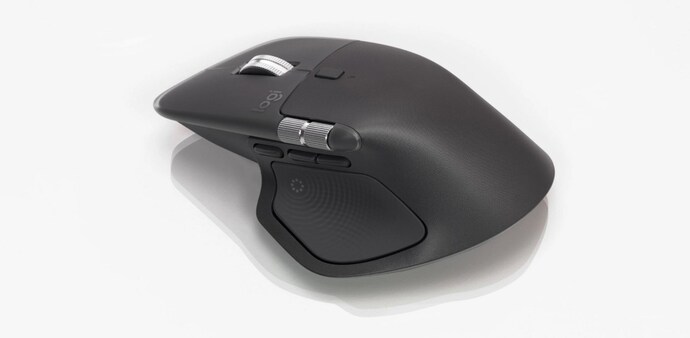
The sculpted right-handed shape remains one of the best in the business. It cradles the palm, supports the thumb naturally, and avoids the claw-inducing angles that plague many so-called productivity mice. The rubberised grip is now more restrained, limited mainly to the right side and thumb rest, which gives the mouse a cleaner look without sacrificing control.
Button placement is subtly improved. The primary clicks feel broader and more forgiving, while the side buttons are easier to locate without looking. Everything sits where your fingers expect it to be, which sounds obvious but is surprisingly rare.
"Left-handed users, unfortunately, are still left out. This remains a right-hand-only affair, and that omission feels more glaring with every generation"
The quietest clicks you will ever hear
If you work in shared spaces or simply value a calmer desk, the MX Master 4’s clicks are a revelation. Logitech has somehow made them even quieter than before. They are soft without feeling mushy, defined without being sharp. It is the kind of click that fades into the background of your thoughts, which is exactly what you want when you are deep in work.
The MagSpeed scroll wheel returns, and it is still one of the best arguments for buying this mouse. Free spin through hundreds of lines, then snap back into precise, tactile scrolling with a single press. The side scroll wheel is more accessible this time, making horizontal movement in timelines and spreadsheets genuinely useful rather than a novelty.
Haptics that actually make sense
The headline upgrade this year is haptic feedback, and this is where things could have gone very wrong. Thankfully, Logitech has taken a restrained approach. The haptics are not there to impress you, but to confirm intent.
You feel subtle feedback when switching scroll modes, engaging certain shortcuts, or interacting with app-specific controls. It is customisable, both in strength and behaviour, and can be turned down or off entirely. In practice, medium intensity strikes the best balance between awareness and distraction.
There is a battery cost to all this, but it is manageable. Even with haptics enabled, the mouse comfortably lasts several workdays. Turn them off, and battery anxiety disappears altogether.
Gesture button and Action Ring: power without clutter
Two new features define the MX Master 4’s productivity push. The first is the gesture button, which acts as a modifier for directional shortcuts. Hold it down and move the mouse to trigger commands like showing the desktop, opening task views, or switching apps. Once learned, it feels faster than reaching for the keyboard.
The second is the Action Ring, a radial menu that appears on screen when you press the dedicated button on the thumb wing. From there, you flick towards shortcuts, tools, or even nested options. It sounds complex, but it is surprisingly intuitive, especially once customised.
What makes this system compelling is context. With app-specific profiles, the same gesture or ring direction can do different things depending on what you are using. Editing video, managing spreadsheets, or jumping between chats all benefit in different ways.
The downside is that this power lives almost entirely inside Logitech’s software.
Logi Options Plus: essential, but still excellent
To unlock the MX Master 4’s full potential, you need Logi Options Plus. Thankfully, it remains one of the better peripheral utilities around. The interface is clear, profiles are easy to manage, and advanced features are tucked away without being hidden.
Smart Actions allow you to chain tasks together, while AI-powered tools help automate text prompts and repetitive actions. Not everything integrates with the Action Ring yet, which feels like a missed opportunity, but the foundation is strong.
Plug-ins are still limited, though the list is growing. Creative and professional apps benefit the most, and it is easy to imagine this ecosystem becoming far more compelling over time.
Connectivity and everyday reliability
The MX Master 4 connects via Bluetooth or Logitech’s Bolt receiver, and switching between devices is instant and reliable. It works across Windows, macOS, Linux, ChromeOS, tablets, and even phones. Logitech’s Flow feature remains magical when moving files and text between computers, especially in mixed platform setups.
One irritation remains unchanged. There is still no storage slot for the USB dongle, and no cable is included in the box. These are small complaints, but at this price, they stand out.
Who is this for?
The MX Master 4 is not trying to win over casual users or gamers chasing ultra-high polling rates. This mouse is for people who live at their desks and care about efficiency, comfort, and muscle memory.
If your day involves writing, editing, coding, designing, analysing, or managing, this mouse earns its place quickly. Compared to the MX Master 3S, the improvements feel incremental but meaningful. Over time, they add up to a noticeably smoother experience.
The Logitech MX Master 4 does not shout about its upgrades. It simply gets out of your way and lets you work better. That is its greatest strength. It refines an already excellent formula with quieter clicks, smarter controls, and deeper customisation, without losing the comfort and reliability that made the series famous.
It is expensive for a mouse at ₹15,995, but for the right kind of user, it justifies every rupee. Once it becomes part of your workflow, replacing it feels unthinkable.
For Unparalleled coverage of India's Businesses and Economy – Subscribe to Business Today Magazine
There are gadgets you admire, and then there are gadgets you stop noticing because they simply work. The Logitech MX Master 4 belongs firmly in the second camp. After living with it across long writing days, photo edits, spreadsheet marathons, and the occasional late-night deadline panic, it becomes clear that this mouse is not chasing flash. It is chasing flow.
The MX Master line has always been Logitech’s quiet flex, a reminder that peripherals still matter when most of us live inside browsers and cloud apps. The MX Master 4 does not reinvent the idea of a work mouse, but it refines it so thoroughly that going back feels oddly uncomfortable.
Design: familiar, but more considered
At first glance, the MX Master 4 looks like a gentle evolution rather than a dramatic redesign. That is exactly the point. Logitech has resisted the temptation to fix what was not broken, instead smoothing out rough edges both literal and metaphorical.
The sculpted right-handed shape remains one of the best in the business. It cradles the palm, supports the thumb naturally, and avoids the claw-inducing angles that plague many so-called productivity mice. The rubberised grip is now more restrained, limited mainly to the right side and thumb rest, which gives the mouse a cleaner look without sacrificing control.
Button placement is subtly improved. The primary clicks feel broader and more forgiving, while the side buttons are easier to locate without looking. Everything sits where your fingers expect it to be, which sounds obvious but is surprisingly rare.
"Left-handed users, unfortunately, are still left out. This remains a right-hand-only affair, and that omission feels more glaring with every generation"
The quietest clicks you will ever hear
If you work in shared spaces or simply value a calmer desk, the MX Master 4’s clicks are a revelation. Logitech has somehow made them even quieter than before. They are soft without feeling mushy, defined without being sharp. It is the kind of click that fades into the background of your thoughts, which is exactly what you want when you are deep in work.
The MagSpeed scroll wheel returns, and it is still one of the best arguments for buying this mouse. Free spin through hundreds of lines, then snap back into precise, tactile scrolling with a single press. The side scroll wheel is more accessible this time, making horizontal movement in timelines and spreadsheets genuinely useful rather than a novelty.
Haptics that actually make sense
The headline upgrade this year is haptic feedback, and this is where things could have gone very wrong. Thankfully, Logitech has taken a restrained approach. The haptics are not there to impress you, but to confirm intent.
You feel subtle feedback when switching scroll modes, engaging certain shortcuts, or interacting with app-specific controls. It is customisable, both in strength and behaviour, and can be turned down or off entirely. In practice, medium intensity strikes the best balance between awareness and distraction.
There is a battery cost to all this, but it is manageable. Even with haptics enabled, the mouse comfortably lasts several workdays. Turn them off, and battery anxiety disappears altogether.
Gesture button and Action Ring: power without clutter
Two new features define the MX Master 4’s productivity push. The first is the gesture button, which acts as a modifier for directional shortcuts. Hold it down and move the mouse to trigger commands like showing the desktop, opening task views, or switching apps. Once learned, it feels faster than reaching for the keyboard.
The second is the Action Ring, a radial menu that appears on screen when you press the dedicated button on the thumb wing. From there, you flick towards shortcuts, tools, or even nested options. It sounds complex, but it is surprisingly intuitive, especially once customised.
What makes this system compelling is context. With app-specific profiles, the same gesture or ring direction can do different things depending on what you are using. Editing video, managing spreadsheets, or jumping between chats all benefit in different ways.
The downside is that this power lives almost entirely inside Logitech’s software.
Logi Options Plus: essential, but still excellent
To unlock the MX Master 4’s full potential, you need Logi Options Plus. Thankfully, it remains one of the better peripheral utilities around. The interface is clear, profiles are easy to manage, and advanced features are tucked away without being hidden.
Smart Actions allow you to chain tasks together, while AI-powered tools help automate text prompts and repetitive actions. Not everything integrates with the Action Ring yet, which feels like a missed opportunity, but the foundation is strong.
Plug-ins are still limited, though the list is growing. Creative and professional apps benefit the most, and it is easy to imagine this ecosystem becoming far more compelling over time.
Connectivity and everyday reliability
The MX Master 4 connects via Bluetooth or Logitech’s Bolt receiver, and switching between devices is instant and reliable. It works across Windows, macOS, Linux, ChromeOS, tablets, and even phones. Logitech’s Flow feature remains magical when moving files and text between computers, especially in mixed platform setups.
One irritation remains unchanged. There is still no storage slot for the USB dongle, and no cable is included in the box. These are small complaints, but at this price, they stand out.
Who is this for?
The MX Master 4 is not trying to win over casual users or gamers chasing ultra-high polling rates. This mouse is for people who live at their desks and care about efficiency, comfort, and muscle memory.
If your day involves writing, editing, coding, designing, analysing, or managing, this mouse earns its place quickly. Compared to the MX Master 3S, the improvements feel incremental but meaningful. Over time, they add up to a noticeably smoother experience.
The Logitech MX Master 4 does not shout about its upgrades. It simply gets out of your way and lets you work better. That is its greatest strength. It refines an already excellent formula with quieter clicks, smarter controls, and deeper customisation, without losing the comfort and reliability that made the series famous.
It is expensive for a mouse at ₹15,995, but for the right kind of user, it justifies every rupee. Once it becomes part of your workflow, replacing it feels unthinkable.
For Unparalleled coverage of India's Businesses and Economy – Subscribe to Business Today Magazine