
Your iPhone can now send encrypted messages to Android users; here’s how
end-to-end encryption ensures that messages exchanged between supported iPhones and Android devices remain protected while being transmitted.
- May 12, 2026,
- Updated May 12, 2026 3:08 PM IST
Apple has rolled out the iOS 26.5 update for iPhones, bringing one of the most significant upgrades yet for messaging between iPhone and Android users: end-to-end encrypted RCS chats.
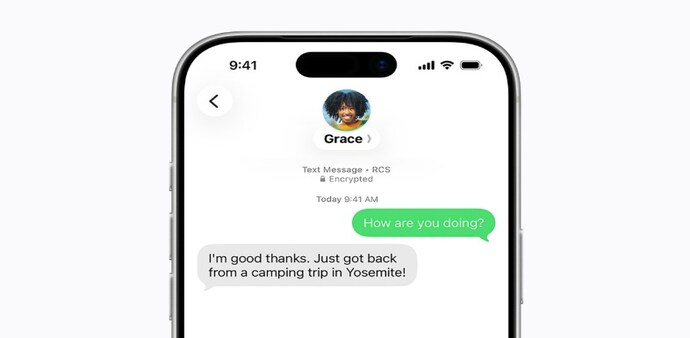
The feature, which is currently rolling out in beta, ensures that messages exchanged between supported iPhones and Android devices remain protected while being transmitted. Encrypted conversations will also be marked accordingly, allowing users to identify secure chats more easily.
Until now, only iMessage conversations between Apple users were end-to-end encrypted. Chats between iPhone and Android users, even after Apple adopted Rich Communication Services (RCS), did not offer the same level of protection.
Must read: Apple’s iOS 26.5 update rolls out with new features to iPhones: Here’s what’s new
With iOS 26.5, Apple is extending encryption to supported RCS conversations as well. Besides improved security, RCS messaging already enables features such as higher-quality media sharing, typing indicators, read receipts and better group chats compared to traditional SMS.
However, Apple noted that the feature’s availability depends on carrier support, the Android device being used and compatibility with the latest RCS standard. As a result, not all users may see encrypted RCS messaging immediately.
How to check if encrypted RCS messaging is enabled on iPhone
To enable the feature, users must first update their iPhone to iOS 26.5.
Open the Settings app, go to General, and tap Software Update to install the latest version. Once updated, head to Settings, open Apps, and under the Text Messaging section, tap RCS Messaging.
Must read: Apple, Google bring WhatsApp-like encryption to iPhone-Android texting
Inside the settings page, users can check whether the “End-to-End Encryption (Beta)” option is enabled. Apple says the feature is turned on by default for supported devices and carriers.
How Android users can check RCS encryption settings
On Android devices, users need to open Google Messages, tap their profile icon, and go to Message Settings.
Under RCS Chats, users can check whether the “Automatically resend as text” option is enabled. Google notes that users can switch to RCS chats if an encrypted message fails to send.
Apple first introduced RCS support to iPhones to improve messaging compatibility with Android devices, replacing traditional SMS for supported conversations. The addition of encryption now brings those chats closer to the privacy protections already available on iMessage.
For Unparalleled coverage of India's Businesses and Economy – Subscribe to Business Today Magazine
Apple has rolled out the iOS 26.5 update for iPhones, bringing one of the most significant upgrades yet for messaging between iPhone and Android users: end-to-end encrypted RCS chats.
The feature, which is currently rolling out in beta, ensures that messages exchanged between supported iPhones and Android devices remain protected while being transmitted. Encrypted conversations will also be marked accordingly, allowing users to identify secure chats more easily.
Until now, only iMessage conversations between Apple users were end-to-end encrypted. Chats between iPhone and Android users, even after Apple adopted Rich Communication Services (RCS), did not offer the same level of protection.
Must read: Apple’s iOS 26.5 update rolls out with new features to iPhones: Here’s what’s new
With iOS 26.5, Apple is extending encryption to supported RCS conversations as well. Besides improved security, RCS messaging already enables features such as higher-quality media sharing, typing indicators, read receipts and better group chats compared to traditional SMS.
However, Apple noted that the feature’s availability depends on carrier support, the Android device being used and compatibility with the latest RCS standard. As a result, not all users may see encrypted RCS messaging immediately.
How to check if encrypted RCS messaging is enabled on iPhone
To enable the feature, users must first update their iPhone to iOS 26.5.
Open the Settings app, go to General, and tap Software Update to install the latest version. Once updated, head to Settings, open Apps, and under the Text Messaging section, tap RCS Messaging.
Must read: Apple, Google bring WhatsApp-like encryption to iPhone-Android texting
Inside the settings page, users can check whether the “End-to-End Encryption (Beta)” option is enabled. Apple says the feature is turned on by default for supported devices and carriers.
How Android users can check RCS encryption settings
On Android devices, users need to open Google Messages, tap their profile icon, and go to Message Settings.
Under RCS Chats, users can check whether the “Automatically resend as text” option is enabled. Google notes that users can switch to RCS chats if an encrypted message fails to send.
Apple first introduced RCS support to iPhones to improve messaging compatibility with Android devices, replacing traditional SMS for supported conversations. The addition of encryption now brings those chats closer to the privacy protections already available on iMessage.
For Unparalleled coverage of India's Businesses and Economy – Subscribe to Business Today Magazine