
BT Explainer: How EV kill switch BAT-BMS app works and how to prevent misuse
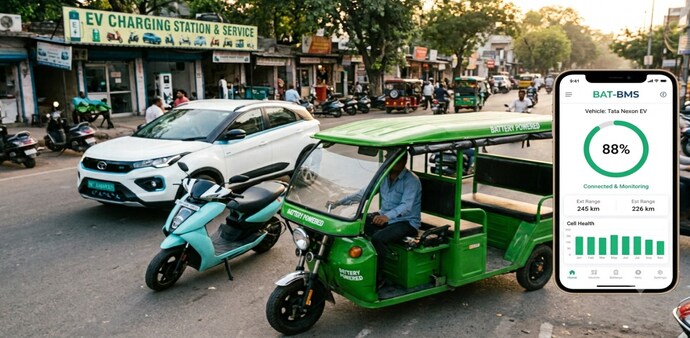
Reports suggest that the flaw lies in certain Bluetooth-enabled battery systems that allow nearby users to connect and shut down the vehicle without permission.
- Jul 3, 2026,
- Updated Jul 3, 2026 3:08 PM IST
You may have been seeing viral videos on social media platforms about strangers stopping a moving e-rickshaw on a busy road using nothing but a smartphone. What looks like a prank has caused severe distress as it exposes a real, fixable security gap in how electric three-wheelers and EVs manage their batteries.
Reports suggest that the flaw lies in certain Bluetooth-enabled battery systems that allow nearby users to connect and shut down the vehicle without permission. Here’s everything you need to know about the technology, and how to prevent the misuse.
Must read: Viral e-rickshaw 'prank' app: Switching off batteries could cost you ₹5 lakh & 3 years in jail
The technology behind the “prank”
Nowadays, modern e-rickshaws run on lithium-ion batteries that also support a Bluetooth-enabled Battery Management System (BMS). This system helps track charge levels, voltage, temperature and cell health. Therefore, owners typically pair a companion app, most commonly BAT-BMS, to monitor this data on their phone.
But where exactly does the problem lie? Some budget battery packs ship with Bluetooth switched on by default; this requires no password or authentication layer, making it vulnerable to misuse. For this reason, anyone within roughly 15 metres can use the compatible app, connect to the battery, and tap a "Discharge Switch" option.
This cuts the power instantly, which stops the EV or e-rickshaws, and it won’t start until the battery is reactivated through the same app.
What is the BAT-BMS app?
BAT-BMS is reportedly built by a Chinese manufacturer, Shenzhen Grenergy Technology, to monitor Bluetooth-enabled lithium-ion batteries. As mentioned above, the app helps EV owners monitor battery charge (SOC), voltage, current and temperature. They can also check battery health and charging cycles. The app can be connected wirelessly via Bluetooth 5.0 and operates within a 15-metre range.
Must read: Can Chinese apps like BAT-BMS remotely disable Your EV? What vehicle owners should know
However, the app becomes a major security hassle as it misses out on basic access controls like passwords or authentication.
Not every EV is at risk
It is suggested that older e-rickshaw models running on lead-acid batteries are not impacted, as they do not come with Bluetooth support. In addition, newer lithium-ion systems have started to come with password protection or proprietary apps that block unauthorised connections.
Therefore, the concerns are limited to EVs with low-cost Bluetooth BMS units.
How to prevent app access misuse?
The positive side of the issue is that it can be controlled and it doesn't require new hardware. Here are a few ways to fix it:
- If the BMS supports it, go to the app Settings or Parameter Settings menu and change the default password with a new one.
- Turn on lock features like “Remote Control Lock” or “App Control Lock.” This will block unauthorised devices from connecting at all.
- If the app is not being used, make sure to disconnect Bluetooth entirely.
For Unparalleled coverage of India's Businesses and Economy – Subscribe to Business Today Magazine
You may have been seeing viral videos on social media platforms about strangers stopping a moving e-rickshaw on a busy road using nothing but a smartphone. What looks like a prank has caused severe distress as it exposes a real, fixable security gap in how electric three-wheelers and EVs manage their batteries.
Reports suggest that the flaw lies in certain Bluetooth-enabled battery systems that allow nearby users to connect and shut down the vehicle without permission. Here’s everything you need to know about the technology, and how to prevent the misuse.
Must read: Viral e-rickshaw 'prank' app: Switching off batteries could cost you ₹5 lakh & 3 years in jail
The technology behind the “prank”
Nowadays, modern e-rickshaws run on lithium-ion batteries that also support a Bluetooth-enabled Battery Management System (BMS). This system helps track charge levels, voltage, temperature and cell health. Therefore, owners typically pair a companion app, most commonly BAT-BMS, to monitor this data on their phone.
But where exactly does the problem lie? Some budget battery packs ship with Bluetooth switched on by default; this requires no password or authentication layer, making it vulnerable to misuse. For this reason, anyone within roughly 15 metres can use the compatible app, connect to the battery, and tap a "Discharge Switch" option.
This cuts the power instantly, which stops the EV or e-rickshaws, and it won’t start until the battery is reactivated through the same app.
What is the BAT-BMS app?
BAT-BMS is reportedly built by a Chinese manufacturer, Shenzhen Grenergy Technology, to monitor Bluetooth-enabled lithium-ion batteries. As mentioned above, the app helps EV owners monitor battery charge (SOC), voltage, current and temperature. They can also check battery health and charging cycles. The app can be connected wirelessly via Bluetooth 5.0 and operates within a 15-metre range.
Must read: Can Chinese apps like BAT-BMS remotely disable Your EV? What vehicle owners should know
However, the app becomes a major security hassle as it misses out on basic access controls like passwords or authentication.
Not every EV is at risk
It is suggested that older e-rickshaw models running on lead-acid batteries are not impacted, as they do not come with Bluetooth support. In addition, newer lithium-ion systems have started to come with password protection or proprietary apps that block unauthorised connections.
Therefore, the concerns are limited to EVs with low-cost Bluetooth BMS units.
How to prevent app access misuse?
The positive side of the issue is that it can be controlled and it doesn't require new hardware. Here are a few ways to fix it:
- If the BMS supports it, go to the app Settings or Parameter Settings menu and change the default password with a new one.
- Turn on lock features like “Remote Control Lock” or “App Control Lock.” This will block unauthorised devices from connecting at all.
- If the app is not being used, make sure to disconnect Bluetooth entirely.
For Unparalleled coverage of India's Businesses and Economy – Subscribe to Business Today Magazine