
Google Drive is finally getting keyboard shortcuts support, finally
In case you didn’t know, Google Drive did not support keyboard shortcuts. We’re just as surprised.
- May 27, 2022,
- Updated May 27, 2022 2:17 PM IST
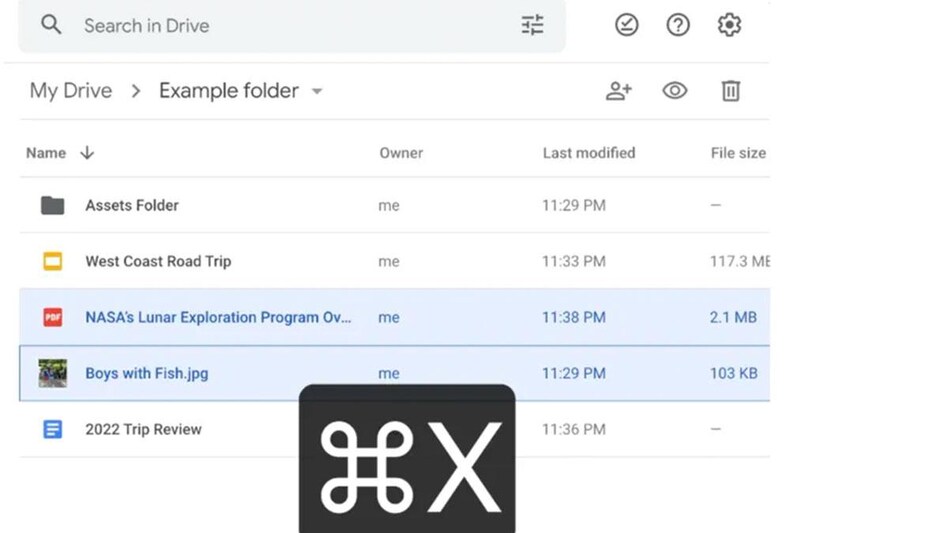
Google has announced that it is rolling out the ability to use keyboard shortcuts to cut, copy, and paste files on Google Drive, on Chrome. In case you never noticed before, Google Drive did not support keyboard shortcuts to cut, copy, and paste files - so you cannot use Command + C and Command + V, and such.
“You can now use familiar keyboard shortcuts Ctrl + C (or ⌘ + C on Mac), Ctrl + X and Ctrl + V to copy, cut and paste Google Drive files in your Chrome browser. This saves you time by allowing you to copy one or more files and move them to new locations in Drive, and across multiple tabs, with fewer clicks,” Google explained in its announcement.
“Additionally, a link to the file and its title will also be captured when copying a file, which allows you to easily paste them into a document or an email. To help you more easily organize files in multiple locations without necessarily creating duplicate files, Ctrl + C, Ctrl + Shift + V will create shortcuts,” Google added.
And that’s not all. You will soon be able to open files and folders in a new tab with Ctrl/Cmd + Enter. This will allow you to view multiple files at once or use different tabs to organise files better.
And you can also paste shortcuts to files if you don’t want duplicate versions all over your cloud storage system with - Ctrl/Cmd + Shift + V.
The feature is rolling out currently to all users starting May 26 under the rapid release, and the scheduled release kicks off on June 1. All users should get it by June 4 and it is going to be available to all Google Workspace customers and users with personal Google accounts on Google Chrome (basically everyone).
In case you don’t see it on your Google Drive, give it a few more days.
Also Read: Google’s foldable Pixel gets delayed again, but here's why that's not a bad thing
Also Read: Google starts rolling out new Real Tone filters on Google Photos for users
For Unparalleled coverage of India's Businesses and Economy – Subscribe to Business Today Magazine
Google has announced that it is rolling out the ability to use keyboard shortcuts to cut, copy, and paste files on Google Drive, on Chrome. In case you never noticed before, Google Drive did not support keyboard shortcuts to cut, copy, and paste files - so you cannot use Command + C and Command + V, and such.
“You can now use familiar keyboard shortcuts Ctrl + C (or ⌘ + C on Mac), Ctrl + X and Ctrl + V to copy, cut and paste Google Drive files in your Chrome browser. This saves you time by allowing you to copy one or more files and move them to new locations in Drive, and across multiple tabs, with fewer clicks,” Google explained in its announcement.
“Additionally, a link to the file and its title will also be captured when copying a file, which allows you to easily paste them into a document or an email. To help you more easily organize files in multiple locations without necessarily creating duplicate files, Ctrl + C, Ctrl + Shift + V will create shortcuts,” Google added.
And that’s not all. You will soon be able to open files and folders in a new tab with Ctrl/Cmd + Enter. This will allow you to view multiple files at once or use different tabs to organise files better.
And you can also paste shortcuts to files if you don’t want duplicate versions all over your cloud storage system with - Ctrl/Cmd + Shift + V.
The feature is rolling out currently to all users starting May 26 under the rapid release, and the scheduled release kicks off on June 1. All users should get it by June 4 and it is going to be available to all Google Workspace customers and users with personal Google accounts on Google Chrome (basically everyone).
In case you don’t see it on your Google Drive, give it a few more days.
Also Read: Google’s foldable Pixel gets delayed again, but here's why that's not a bad thing
Also Read: Google starts rolling out new Real Tone filters on Google Photos for users
For Unparalleled coverage of India's Businesses and Economy – Subscribe to Business Today Magazine