
Now, you can redesign your Instagram profile without deleting a thing!
Previously, Instagram head Adam Mosseri teased this feature nearly a year ago. This feature will make it easier for people to create a specific aesthetic, highlight important posts, or organise their profiles the way they want.
Business Today Desk
- Jun 9, 2026,
- Updated Jun 10, 2026 12:30 PM IST
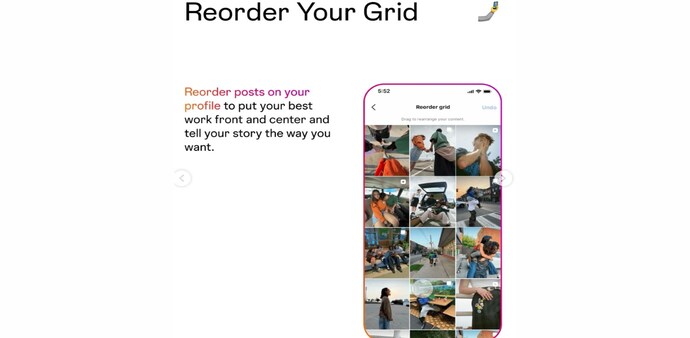
Instagram has finally rolled out the awaited grid customisation features that let users rearrange the layout of their profile without deleting and reposting content. Previously, Instagram posts appeared in chronological order as user posts, with the newest posts shown first. Now, Instagram will let users move the posts around on their profile grid, irrespective of when the posts were originally published.
Advertisement
Previously, Instagram head Adam Mosseri teased this feature nearly a year ago. This feature will make it easier for people to create a specific aesthetic, highlight important posts, or organise their profiles the way they want.
Must read: Instagram sends urgent warnings to users after Meta AI hack attempts
Instagram’s Creator account shared the post announcing the update. The post said, “With the new 'Reorder your grid' feature, you can now rearrange content on your main profile grid, which is perfect for highlighting your best work or making your profile feel more like you.”
Must read: Meta unveils AI Business Agent platform for WhatsApp, Instagram and Messenger
Advertisement
How to rearrange the Instagram grid
Step 1: Open Instagram and go to your profile page.
Step 2: Long-press on any post you want to move.
Step 3: From the menu, tap "Reorder grid."
Step 4: Instagram will open a new editing screen showing all your posts.
Step 5: Drag and drop posts to rearrange them in your preferred order.
Step 6: Once rearranged, save the changes to update your profile layout.
The rearrange posts feature on Instagram has been one of the most requested features for years. In 2022, an app researcher named Alessandro Paluzzi discovered the ability to an "Edit Grid" feature hidden inside Instagram's code. The discovery suggested that Instagram had been exploring profile grid customisation for several years before finally rolling it out to users.
For Unparalleled coverage of India's Businesses and Economy – Subscribe to Business Today Magazine
Instagram has finally rolled out the awaited grid customisation features that let users rearrange the layout of their profile without deleting and reposting content. Previously, Instagram posts appeared in chronological order as user posts, with the newest posts shown first. Now, Instagram will let users move the posts around on their profile grid, irrespective of when the posts were originally published.
Advertisement
Previously, Instagram head Adam Mosseri teased this feature nearly a year ago. This feature will make it easier for people to create a specific aesthetic, highlight important posts, or organise their profiles the way they want.
Must read: Instagram sends urgent warnings to users after Meta AI hack attempts
Instagram’s Creator account shared the post announcing the update. The post said, “With the new 'Reorder your grid' feature, you can now rearrange content on your main profile grid, which is perfect for highlighting your best work or making your profile feel more like you.”
Must read: Meta unveils AI Business Agent platform for WhatsApp, Instagram and Messenger
Advertisement
How to rearrange the Instagram grid
Step 1: Open Instagram and go to your profile page.
Step 2: Long-press on any post you want to move.
Step 3: From the menu, tap "Reorder grid."
Step 4: Instagram will open a new editing screen showing all your posts.
Step 5: Drag and drop posts to rearrange them in your preferred order.
Step 6: Once rearranged, save the changes to update your profile layout.
The rearrange posts feature on Instagram has been one of the most requested features for years. In 2022, an app researcher named Alessandro Paluzzi discovered the ability to an "Edit Grid" feature hidden inside Instagram's code. The discovery suggested that Instagram had been exploring profile grid customisation for several years before finally rolling it out to users.
For Unparalleled coverage of India's Businesses and Economy – Subscribe to Business Today Magazine
Read more!