
WhatsApp Username rules explained: Allowed characters, length, and restrictions you need to know
WhatsApp now allows users to reserve usernames to create a secure chat environment. However, there are specific requirements for reserving a username.
- Jun 30, 2026,
- Updated Jun 30, 2026 11:33 AM IST
WhatsApp Username will be rolled out soon, and the platform is inviting users to reserve their desired username before anyone else does. WhatsApp is teasing the feature as a major privacy upgrade, as users will not have to exchange phone numbers to connect with anyone. Since you can reserve a username for WhatsApp, the company has shared some guidelines that you must follow.
Must read: WhatsApp Usernames are here: Here's how to reserve yours before someone else does
WhatsApp Username rules
WhatsApp now allows you to reserve usernames to create a secure chat environment. However, your chosen WhatsApp Username must meet these specific constraints:
- The WhatsApp Username should be between 3 and 35 characters long.
- The username can consist of lowercase letters (a–z), numbers (0–9), periods (.), and underscores (_). However, it must contain at least one letter.
- Symbols and spaces will not be allowed.
- You can not use www, .com or .net.
Must read: WhatsApp's new feature could help you avoid scam contacts; Here’s how it works
How to reserve WhatsApp Username
Step 1: Update your WhatsApp app via the Android Play Store or iPhone App Store. Step 2: Open WhatsApp and go to “Settings.” Step 3: Click on Account and then “Username” Step 4: Now choose the available username before anyone else does.
Who can see my username?
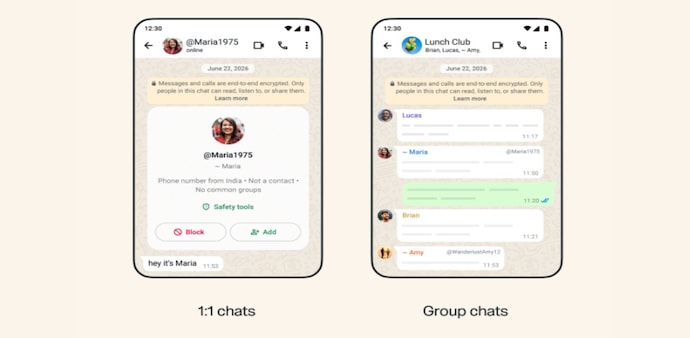
According to the WhatsApp Support page, WhatsApp users who do not have your phone number will be able to see your username by default. This will work in group chats, direct messages, and calls.
Your username will appear with an @ symbol so users can differentiate between your username, your display name, and your phone number. However, if someone has already saved your number, they'll still see the contact name they saved for you and your phone number.
Must read: Meta CPO reveals why CRED’s Kunal Shah was chosen to lead WhatsApp
To share your username, you can generate a QR code or link that directs people to your username.
Can you change or delete my username?
WhatsApp says that having a username is “completely optional.” You can also change or delete your username at any time.
WhatsApp says, “If you delete your username, people will be able to see your phone number again.”
For Unparalleled coverage of India's Businesses and Economy – Subscribe to Business Today Magazine
WhatsApp Username will be rolled out soon, and the platform is inviting users to reserve their desired username before anyone else does. WhatsApp is teasing the feature as a major privacy upgrade, as users will not have to exchange phone numbers to connect with anyone. Since you can reserve a username for WhatsApp, the company has shared some guidelines that you must follow.
Must read: WhatsApp Usernames are here: Here's how to reserve yours before someone else does
WhatsApp Username rules
WhatsApp now allows you to reserve usernames to create a secure chat environment. However, your chosen WhatsApp Username must meet these specific constraints:
- The WhatsApp Username should be between 3 and 35 characters long.
- The username can consist of lowercase letters (a–z), numbers (0–9), periods (.), and underscores (_). However, it must contain at least one letter.
- Symbols and spaces will not be allowed.
- You can not use www, .com or .net.
Must read: WhatsApp's new feature could help you avoid scam contacts; Here’s how it works
How to reserve WhatsApp Username
Step 1: Update your WhatsApp app via the Android Play Store or iPhone App Store. Step 2: Open WhatsApp and go to “Settings.” Step 3: Click on Account and then “Username” Step 4: Now choose the available username before anyone else does.
Who can see my username?
According to the WhatsApp Support page, WhatsApp users who do not have your phone number will be able to see your username by default. This will work in group chats, direct messages, and calls.
Your username will appear with an @ symbol so users can differentiate between your username, your display name, and your phone number. However, if someone has already saved your number, they'll still see the contact name they saved for you and your phone number.
Must read: Meta CPO reveals why CRED’s Kunal Shah was chosen to lead WhatsApp
To share your username, you can generate a QR code or link that directs people to your username.
Can you change or delete my username?
WhatsApp says that having a username is “completely optional.” You can also change or delete your username at any time.
WhatsApp says, “If you delete your username, people will be able to see your phone number again.”
For Unparalleled coverage of India's Businesses and Economy – Subscribe to Business Today Magazine