
WhatsApp's Username feature under govt scanner over online fraud concerns: Sources
WhatsApp's Username feature under govt scanner over online fraud concerns: Sources
WhatsApp recently announced that usernames will be rolled out globally over the coming months.
Business Today Desk
- Jul 1, 2026,
- Updated Jul 1, 2026 5:02 PM IST
The Centre plans to closely examine WhatsApp's upcoming username-based messaging feature over concerns that it could be misused by online scammers, even as the company pitches it as one of its biggest privacy upgrades in years.
India Today reported, citing sources, that the government will review the privacy and security implications of WhatsApp's 'User ID' feature before or as it rolls out. If any irregularities are found, Meta, WhatsApp's parent company, could be issued a notice seeking an explanation or corrective measures.
Advertisement
Moreover, the Centre is also concerned that this feature could complicate investigations by making it harder for law enforcement agencies to identify users.
The review comes amid a rise in online scams in India, with officials assessing whether the username-based system creates fresh challenges in identifying fraudsters or strengthens privacy without compromising security. The government will also examine whether the feature includes adequate safeguards against cybercriminals.
Must read: WhatsApp Usernames are here: Here's how to reserve yours before someone else does
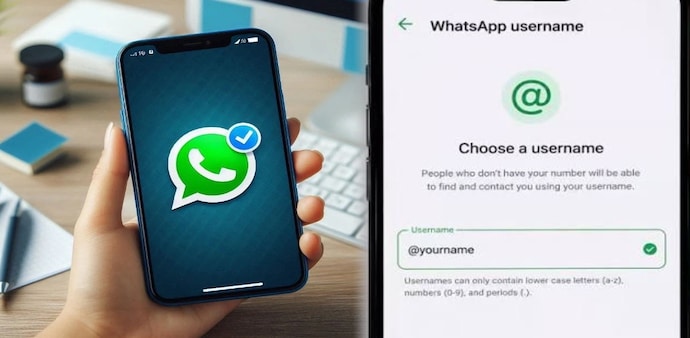
WhatsApp recently announced that usernames will be rolled out globally over the coming months. The optional feature will allow users to start conversations by sharing a unique username instead of their phone number. Users will be able to reserve, change or remove their username at any time and continue using existing safety tools such as blocking and reporting suspicious accounts.
Advertisement
The company says the feature is aimed at users who are uncomfortable sharing their phone numbers, particularly in group chats or when messaging someone for the first time. Explaining the update, WhatsApp Head of Product Alice Newton-Rex told the BBC it will "give users control over how they choose to show up" on the platform.
Must Read: WhatsApp brings back a BBM-style idea: Usernames, PIN-like keys to replace phone number sharing
Usernames can be up to 35 characters long, while names of public figures and celebrities will be protected to prevent impersonation. Initially, usernames can only be reserved through the mobile app, with WhatsApp Web and desktop support to follow later.
WhatsApp Username rules explained: Allowed characters, length, and restrictions you need to know
Advertisement
WhatsApp now allows you to reserve usernames to create a secure chat environment. However, your chosen WhatsApp Username must meet these specific constraints:
- The WhatsApp Username should be between 3 and 35 characters long.
- The username can consist of lowercase letters (a–z), numbers (0–9), periods (.), and underscores (_). However, it must contain at least one letter.
- Symbols and spaces will not be allowed.
- You can not use www, .com or .net.
Must read: WhatsApp's new feature could help you avoid scam contacts; Here’s how it works
How to reserve WhatsApp Username
Step 1: Update your WhatsApp app via the Android Play Store or iPhone App Store. Step 2: Open WhatsApp and go to “Settings.” Step 3: Click on Account and then “Username” Step 4: Now choose the available username before anyone else does.
Who can see my username?
According to the WhatsApp Support page, WhatsApp users who do not have your phone number will be able to see your username by default. This will work in group chats, direct messages, and calls.
Advertisement
Your username will appear with an @ symbol so users can differentiate between your username, your display name, and your phone number. However, if someone has already saved your number, they'll still see the contact name they saved for you and your phone number.
Must read: Meta CPO reveals why CRED’s Kunal Shah was chosen to lead WhatsApp
To share your username, you can generate a QR code or link that directs people to your username.
Can you change or delete my username?
WhatsApp says that having a username is “completely optional.” You can also change or delete your username at any time.
WhatsApp says, “If you delete your username, people will be able to see your phone number again.”
For Unparalleled coverage of India's Businesses and Economy – Subscribe to Business Today Magazine
The Centre plans to closely examine WhatsApp's upcoming username-based messaging feature over concerns that it could be misused by online scammers, even as the company pitches it as one of its biggest privacy upgrades in years.
India Today reported, citing sources, that the government will review the privacy and security implications of WhatsApp's 'User ID' feature before or as it rolls out. If any irregularities are found, Meta, WhatsApp's parent company, could be issued a notice seeking an explanation or corrective measures.
Advertisement
Moreover, the Centre is also concerned that this feature could complicate investigations by making it harder for law enforcement agencies to identify users.
The review comes amid a rise in online scams in India, with officials assessing whether the username-based system creates fresh challenges in identifying fraudsters or strengthens privacy without compromising security. The government will also examine whether the feature includes adequate safeguards against cybercriminals.
Must read: WhatsApp Usernames are here: Here's how to reserve yours before someone else does
WhatsApp recently announced that usernames will be rolled out globally over the coming months. The optional feature will allow users to start conversations by sharing a unique username instead of their phone number. Users will be able to reserve, change or remove their username at any time and continue using existing safety tools such as blocking and reporting suspicious accounts.
Advertisement
The company says the feature is aimed at users who are uncomfortable sharing their phone numbers, particularly in group chats or when messaging someone for the first time. Explaining the update, WhatsApp Head of Product Alice Newton-Rex told the BBC it will "give users control over how they choose to show up" on the platform.
Must Read: WhatsApp brings back a BBM-style idea: Usernames, PIN-like keys to replace phone number sharing
Usernames can be up to 35 characters long, while names of public figures and celebrities will be protected to prevent impersonation. Initially, usernames can only be reserved through the mobile app, with WhatsApp Web and desktop support to follow later.
WhatsApp Username rules explained: Allowed characters, length, and restrictions you need to know
Advertisement
WhatsApp now allows you to reserve usernames to create a secure chat environment. However, your chosen WhatsApp Username must meet these specific constraints:
- The WhatsApp Username should be between 3 and 35 characters long.
- The username can consist of lowercase letters (a–z), numbers (0–9), periods (.), and underscores (_). However, it must contain at least one letter.
- Symbols and spaces will not be allowed.
- You can not use www, .com or .net.
Must read: WhatsApp's new feature could help you avoid scam contacts; Here’s how it works
How to reserve WhatsApp Username
Step 1: Update your WhatsApp app via the Android Play Store or iPhone App Store. Step 2: Open WhatsApp and go to “Settings.” Step 3: Click on Account and then “Username” Step 4: Now choose the available username before anyone else does.
Who can see my username?
According to the WhatsApp Support page, WhatsApp users who do not have your phone number will be able to see your username by default. This will work in group chats, direct messages, and calls.
Advertisement
Your username will appear with an @ symbol so users can differentiate between your username, your display name, and your phone number. However, if someone has already saved your number, they'll still see the contact name they saved for you and your phone number.
Must read: Meta CPO reveals why CRED’s Kunal Shah was chosen to lead WhatsApp
To share your username, you can generate a QR code or link that directs people to your username.
Can you change or delete my username?
WhatsApp says that having a username is “completely optional.” You can also change or delete your username at any time.
WhatsApp says, “If you delete your username, people will be able to see your phone number again.”
For Unparalleled coverage of India's Businesses and Economy – Subscribe to Business Today Magazine
Read more!