
JioHotstar x ChatGPT first impressions: Here’s what works and what doesn’t
JioHotstar brings a ChatGPT-powered voice discovery feature that lets users describe what they want to watch in plain, natural language and receive personalised content recommendations
- Apr 10, 2026,
- Updated Apr 10, 2026 7:56 PM IST
Tired of scrolling through the overwhelming content library on OTT apps, and it's always confusing to pick the right movie or series to watch. JioHotstar last month did something different to make content discovery seamless. The OTT platform partnered with OpenAI, integrating a ChatGPT-powered voice discovery feature that lets users describe what they want to watch in plain, natural language and receive personalised content recommendations in return.
The feature began rolling out in February 2026, and we have spent the last couple of days putting it through its paces to understand its functionality and whether it is really helpful.
JioHotstar x ChatGPT: Design and interface
As per a two-day initial usage, the ChatGPT integration on the JioHotstar app feels seamless and easy to access. The ChatGPT icon sits at the bottom alongside the TV, Movies, and Sports tabs.
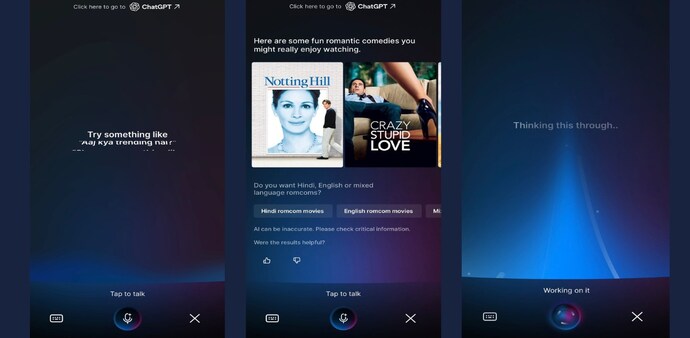
Tapping the icon opens a chat interface that looks similar to ChatGPT’s Voice Mode. Users can either speak their query or tap the keyboard icon on the left to type a prompt.
Also read: OpenAI introduces new ChatGPT Pro Plan: Check price, features, and upgrades
Once a prompt is entered, a blue light animation appears, and then provides a curated list of content based on the request. An intuitive addition here is the follow-up suggestions; if you ask for “rom-com” recommendations, it further refines options with prompts like “more romance,” “more comedy,” or “balanced romcoms.”
Just below the results, ChatGPT also displays a disclaimer stating, “AI can be inaccurate. Please check critical information.” Users can further refine the experience by giving feedback through thumbs-up or thumbs-down options.
Overall, the interface and experience feel quite smooth and seamless to use.
JioHotstar x ChatGPT: How does it help in content discovery?
The JioHotstar app with ChatGPT integration makes content discovery personalised, as users can prompt what they feel like watching. Users can add prompts like “Recommend a crime series with a strong female lead but not too violent,” and it will compile a list of series available on JioHotstar. Simply click on the desired recommendation, and continue watching the content.
It also helps you to prompt ChatGPT around actors, specific genres, mood, and even categories like TV, Movies, or Sports. For sports, users can prompt ChatGPT, “Show me that last wicket again”, “Who is the top scorer right now?”, and it will provide the required information from the Live match as well.
Also read: OpenAI’s ChatGPT app integrates EaseMyTrip: What it means for users
As of now, we have yet to test the feature across different languages, but sometimes ChatGPT does not take the prompt very correctly in Hindi, and it also disclaims like “I can’t handle that request here” and prompts users to “Continue on ChatGPT.” Therefore, we have yet to explore the performance more thoroughly across varied use cases and regional inputs.
Initially, the features look and perform intuitively, and it may come in handy for users who are mostly confused about what they want to watch.
For Unparalleled coverage of India's Businesses and Economy – Subscribe to Business Today Magazine
Tired of scrolling through the overwhelming content library on OTT apps, and it's always confusing to pick the right movie or series to watch. JioHotstar last month did something different to make content discovery seamless. The OTT platform partnered with OpenAI, integrating a ChatGPT-powered voice discovery feature that lets users describe what they want to watch in plain, natural language and receive personalised content recommendations in return.
The feature began rolling out in February 2026, and we have spent the last couple of days putting it through its paces to understand its functionality and whether it is really helpful.
JioHotstar x ChatGPT: Design and interface
As per a two-day initial usage, the ChatGPT integration on the JioHotstar app feels seamless and easy to access. The ChatGPT icon sits at the bottom alongside the TV, Movies, and Sports tabs.
Tapping the icon opens a chat interface that looks similar to ChatGPT’s Voice Mode. Users can either speak their query or tap the keyboard icon on the left to type a prompt.
Also read: OpenAI introduces new ChatGPT Pro Plan: Check price, features, and upgrades
Once a prompt is entered, a blue light animation appears, and then provides a curated list of content based on the request. An intuitive addition here is the follow-up suggestions; if you ask for “rom-com” recommendations, it further refines options with prompts like “more romance,” “more comedy,” or “balanced romcoms.”
Just below the results, ChatGPT also displays a disclaimer stating, “AI can be inaccurate. Please check critical information.” Users can further refine the experience by giving feedback through thumbs-up or thumbs-down options.
Overall, the interface and experience feel quite smooth and seamless to use.
JioHotstar x ChatGPT: How does it help in content discovery?
The JioHotstar app with ChatGPT integration makes content discovery personalised, as users can prompt what they feel like watching. Users can add prompts like “Recommend a crime series with a strong female lead but not too violent,” and it will compile a list of series available on JioHotstar. Simply click on the desired recommendation, and continue watching the content.
It also helps you to prompt ChatGPT around actors, specific genres, mood, and even categories like TV, Movies, or Sports. For sports, users can prompt ChatGPT, “Show me that last wicket again”, “Who is the top scorer right now?”, and it will provide the required information from the Live match as well.
Also read: OpenAI’s ChatGPT app integrates EaseMyTrip: What it means for users
As of now, we have yet to test the feature across different languages, but sometimes ChatGPT does not take the prompt very correctly in Hindi, and it also disclaims like “I can’t handle that request here” and prompts users to “Continue on ChatGPT.” Therefore, we have yet to explore the performance more thoroughly across varied use cases and regional inputs.
Initially, the features look and perform intuitively, and it may come in handy for users who are mostly confused about what they want to watch.
For Unparalleled coverage of India's Businesses and Economy – Subscribe to Business Today Magazine