
Android 17 features revealed: What Google Pixel and Android users can expect
The Android 17 update brings several AI-focused features, including Gemini Intelligence, user interface refinements, security upgrades, and more.
- May 13, 2026,
- Updated May 13, 2026 10:34 AM IST
Google hosted the Android Show a week ahead of I/O 2026, revealing features and upgrades for its next-generation smartphone software, Android 17. This year, the Android update brings several AI-focused features, including Gemini Intelligence, user interference refinements, security upgrades, and more.
For starters, Android 17 will be rolled out to Google Pixel phones and Samsung Galaxy phones before coming to other Android devices later this year. Therefore, if you own an Android smartphone, here’s what you can expect from the new software update:
Must read: Google showcased Googlebooks: AI-first laptops that combines Gemini, Android and ChromeOS
Android 17 features and upgrades
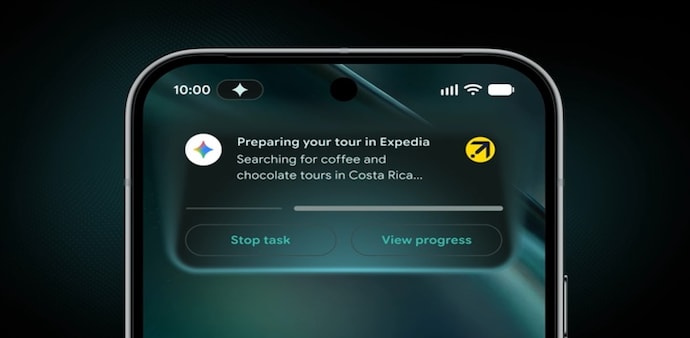
Gemini Intelligence: Google is bringing a more intelligent upgrade to Android 17 with Gemini Intelligence, powered by its powerful AI models. The company revealed that Gemini Intelligence will power several Android 17 features, powering autonomous and smart features.
The AI feature connects Google apps and select third-party services to help users book, search, schedule, summarise, and organise information seamlessly. Other features powered by Gemini Intelligence are Rambler, Create My Widget and more. Read here
Quick Share to AirDrop transfers: Last year, Google introduced a feature on the Google Pixel 10 series that allowed Android’s Quick Share to work with Apple’s AirDrop for easier file transfers between Android and iOS. The feature was extended to the Google Pixel 9 lineup, Samsung Galaxy S26 series, Samsung Galaxy S25 lineup and some older Galaxy devices. Now, Google expands the feature to more brands, including Oppo, OnePlus, Vivo, Xiaomi, and Honor to support Quick Share-to-AirDrop transfers.
Must read: From Android 17, Gemini 4 to AI: Everything to expect at Google I/O 2026
Pause Point: Google introduces a feature that helps break the doomscrolling habit across social media apps like Instagram and, in some countries, TikTok. With this feature, you can choose certain apps, like social media or any other distracting apps, under the “distracting” label.
Now, whenever you try to open any of these apps, Android won’t open them immediately. Instead, it shows a short 10-second pause screen before allowing access. During those 10 seconds, the feature will suggest healthier alternatives such as breathing exercises, setting a usage timer, viewing favourite photos, or switching to something calmer like an audiobook app.
Redesigned 3D emojis: With Android 17, Google teased redesigned 3D emojis that make them look detailed, more expressive, and visually richer. The company showcased a few sample emojis, but did not reveal the entire redesigned emoji collection yet.
The company says these new 3D emojis will roll out to Google Pixel devices later this year, likely expanding to other Android phones later on.
Must read: Apple, Google bring WhatsApp-like encryption to iPhone-Android texting
Android 17 security and scam protection upgrade: Google is expanding Android’s anti-scam and security protections with Android 17. The update introduces anti-spoofing call protection in partnership with select banks, allowing Android phones to verify whether it's a scam or a genuine call. Suspicious calls can be flagged or disconnected automatically.
Android 17 will also enhance Live Threat Detection by scanning apps for risky behaviour such as SMS forwarding, hidden background activity, and misuse of accessibility features.
FindHub also gets an upgraded feature dubbed “Mark as Lost” mode with stronger security protections. If your phone is marked as lost, Android can lock the device behind biometric authentication apart from PIN or password. Therefore, even if someone knows your phone’s passcode, they may still not be able to fully access the device without your biometric verification.
For Unparalleled coverage of India's Businesses and Economy – Subscribe to Business Today Magazine
Google hosted the Android Show a week ahead of I/O 2026, revealing features and upgrades for its next-generation smartphone software, Android 17. This year, the Android update brings several AI-focused features, including Gemini Intelligence, user interference refinements, security upgrades, and more.
For starters, Android 17 will be rolled out to Google Pixel phones and Samsung Galaxy phones before coming to other Android devices later this year. Therefore, if you own an Android smartphone, here’s what you can expect from the new software update:
Must read: Google showcased Googlebooks: AI-first laptops that combines Gemini, Android and ChromeOS
Android 17 features and upgrades
Gemini Intelligence: Google is bringing a more intelligent upgrade to Android 17 with Gemini Intelligence, powered by its powerful AI models. The company revealed that Gemini Intelligence will power several Android 17 features, powering autonomous and smart features.
The AI feature connects Google apps and select third-party services to help users book, search, schedule, summarise, and organise information seamlessly. Other features powered by Gemini Intelligence are Rambler, Create My Widget and more. Read here
Quick Share to AirDrop transfers: Last year, Google introduced a feature on the Google Pixel 10 series that allowed Android’s Quick Share to work with Apple’s AirDrop for easier file transfers between Android and iOS. The feature was extended to the Google Pixel 9 lineup, Samsung Galaxy S26 series, Samsung Galaxy S25 lineup and some older Galaxy devices. Now, Google expands the feature to more brands, including Oppo, OnePlus, Vivo, Xiaomi, and Honor to support Quick Share-to-AirDrop transfers.
Must read: From Android 17, Gemini 4 to AI: Everything to expect at Google I/O 2026
Pause Point: Google introduces a feature that helps break the doomscrolling habit across social media apps like Instagram and, in some countries, TikTok. With this feature, you can choose certain apps, like social media or any other distracting apps, under the “distracting” label.
Now, whenever you try to open any of these apps, Android won’t open them immediately. Instead, it shows a short 10-second pause screen before allowing access. During those 10 seconds, the feature will suggest healthier alternatives such as breathing exercises, setting a usage timer, viewing favourite photos, or switching to something calmer like an audiobook app.
Redesigned 3D emojis: With Android 17, Google teased redesigned 3D emojis that make them look detailed, more expressive, and visually richer. The company showcased a few sample emojis, but did not reveal the entire redesigned emoji collection yet.
The company says these new 3D emojis will roll out to Google Pixel devices later this year, likely expanding to other Android phones later on.
Must read: Apple, Google bring WhatsApp-like encryption to iPhone-Android texting
Android 17 security and scam protection upgrade: Google is expanding Android’s anti-scam and security protections with Android 17. The update introduces anti-spoofing call protection in partnership with select banks, allowing Android phones to verify whether it's a scam or a genuine call. Suspicious calls can be flagged or disconnected automatically.
Android 17 will also enhance Live Threat Detection by scanning apps for risky behaviour such as SMS forwarding, hidden background activity, and misuse of accessibility features.
FindHub also gets an upgraded feature dubbed “Mark as Lost” mode with stronger security protections. If your phone is marked as lost, Android can lock the device behind biometric authentication apart from PIN or password. Therefore, even if someone knows your phone’s passcode, they may still not be able to fully access the device without your biometric verification.
For Unparalleled coverage of India's Businesses and Economy – Subscribe to Business Today Magazine