One of the better things about
Windows 8 is its seamless integration of touch across multiple screens and devices. While there are keyboard and mouse equivalents for most touch features, it won't take long for you to feel woefully inadequate while using Windows 8 on a non-touch device. But there are accessories that let you take full advantage of the touch features.
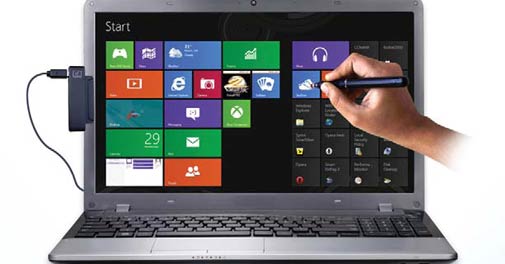
HI-TECH E-TOUCH PEN, ( Rs 3,990)
Jeswill Hi-Tech Solutions has been making digital pens for a few years. So when Windows 8 was launched, they adapted this technology to bring touch to non-touch devices running the new operating system. Their kit includes a battery-powered digital pen with a brush instead of a nib, a USBbased receiver and a magnetic strip to fix it to the desktop or laptop screen. However, the success of the device depends on the one-time calibration that is necessary to get the touch to work. It took us a few attempts to get it right. But after this was done we could use the pen to do all things you would on a touchscreen. Additionally, you can use the pen to exploit the wonderful handwriting recognition of Windows 8 and apps like Fresh Paint.
LOGITECH K400R ( Rs 2,995)
You can also use this
keyboard, which comes with a multi-touch trackpad to bring touch features to your laptop. But it would be sort of silly carrying a full keyboard with a laptop. So we suggest this for people who own Windows 8 desktops and All-in-Ones. For them, replacing a regular keyboard, and mouse, with this one device will make sense. The K400R comes with a full keyboard with extra buttons for music player, home page and lock PC. There is also a on/off buttons for the PC. But, the real goodness of the device is in the trackpad lets you use all Windows 8 touch features as well as swipe to navigate. Below the trackpad are left/right keys that let you select something on the screen.
LOGITECH T620 ( Rs 4,295)
A regular mouse will let you touch the corner and summon the charms menu on Windows 8. But the T620 brings all the touch moves you do on a screen to your fingertips. Once you plug in the USB dongle of the mouse, a pop-up asks you to download software for the mouse. After the software is installed, think of the mouse surface as the screen. Swipe from the left edge and you get the apps menu, swap from the right and the charms menu pops up. You can also scroll horizontally and vertically by swiping on the mouse. There are also gestures to open the smart menu as well as to swap back. If you are looking at a touchmouse for Windows 8, this seems to be the best bet now.
Your favourite tech magazine Gadgets & Gizmos has gone digital! Grab your copy now!