
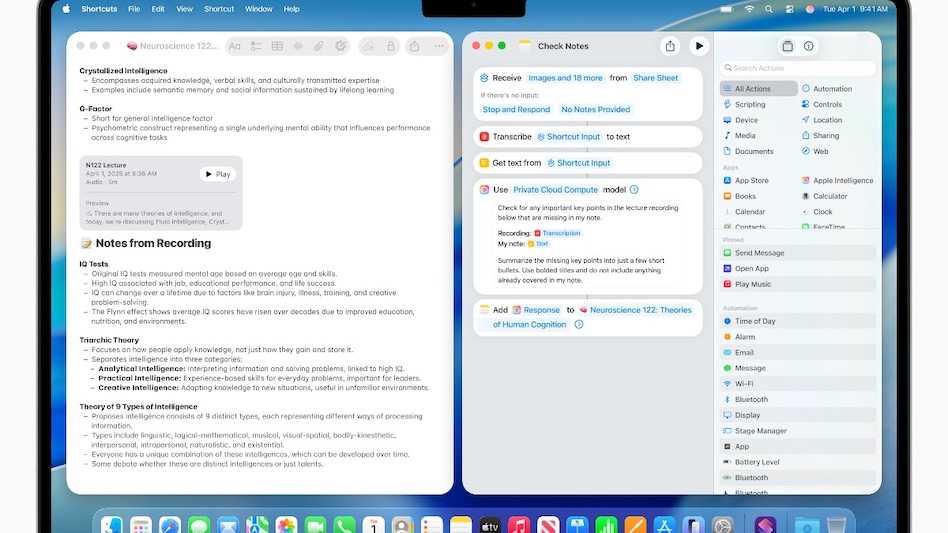
 Shortcuts are supercharged with Apple Intelligence, allowing users to tap directly into Apple Intelligence models, either on-device or with Private Cloud Compute, to generate responses that feed into the rest of a shortcut.
Apple is taking automation on its devices to the next level with major updates to the Shortcuts app. These new features are powered by Apple Intelligence and aim to make everyday tasks faster, smarter, and far more personalised. From generating images and summaries to building powerful workflows with natural language prompts, Shortcuts now serves as a central hub for AI-driven productivity.
The app, already a go-to for tech-savvy users looking to automate multi-step actions across iPhone, iPad, and Mac, is now more accessible and intelligent. With these new updates, Apple is positioning Shortcuts as a core part of its AI strategy, allowing users to benefit from powerful on-device and cloud-assisted intelligence.

 India sent $29 billion abroad, but LRS isn't the forex problem, says Capitalmind's Deepak Shenoy
 Foreign exchange violations: ED searches offices of CoinDCX, Delta Exchange
 Can you convert NSE's Electronic Gold Receipts into jewellery or physical gold? Here's how redemption works
 Bounty on the blueprint: US offers $20 million for intelligence on Iran's nuclear programme
 Trump's post-midterm White House shake-up: Susie Wiles exits, top Justice Department officials quit
 Samvat 2083: Which Sectors Could Create The Biggest Wealth As India's Economy Moves Towards $7T?
 "India's First Cathode Material Unit": 12 Electronics Projects Get ₹7,503 Crore Push
 Global Market Bloodbath: U.S. And Asian Stocks Crash, Is India The New Safe Haven For Investors?
 Gold Rush On Dhanteras! Zaveri Bazaar Buyers Defy PM's Appeal Amid Record Prices
 Market Guru | Abhay Agarwal On Samvat 2083: Investment Strategy & Market Outlook

 Zerodha Fund House becomes Zerodha CASE Funds as investor base crosses 12 lakh in three years
 Gold, silver or stocks this Dhanteras? Nifty 500 won 9 years, gold 7 and silver 5 since 2006
 Bharti Airtel shares: Citi remains bullish after strong Q2 despite elevated churn; Rs 299 plan restored
 Vijay Kedia shares formula on how to pick stocks during correction
 Diwali cheer on D-St! Nifty reclaims 25,000 as rally extends to 7th session; investors add over Rs 30 lakh crore
 'I fell, but got back up': Mohammed Shami's emotional farewell to Test cricket after 13 yearsSamvat 2083: Which Sectors Could Create The Biggest Wealth As India's Economy Moves Towards $7T?
 Delhi pollution: AQI hits 364 day before Diwali, GRAP-3 restrictions in place in Delhi-NCRForeign exchange violations: ED searches offices of CoinDCX, Delta Exchange
 SpaceX sets November 13 target for historic feat, Musk highlights 'critical breakthrough'