








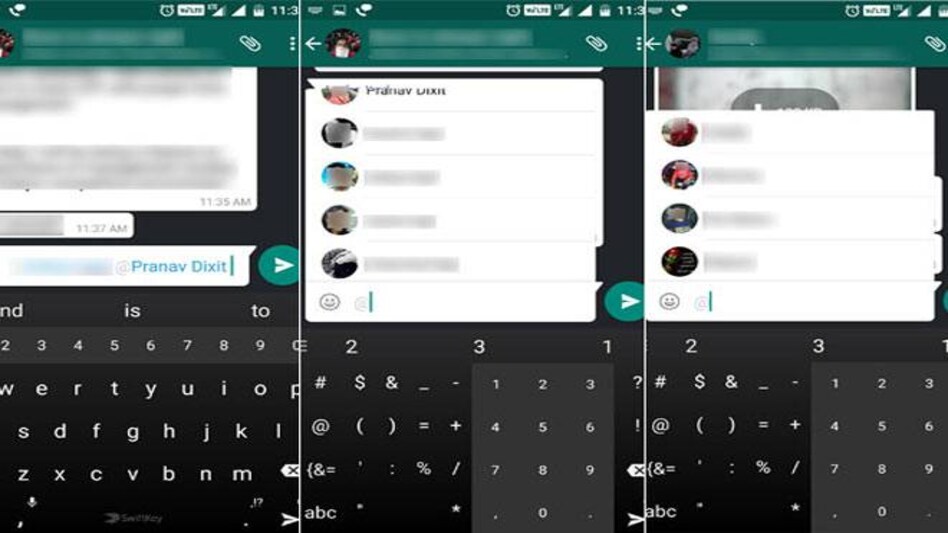
 How to use Whatsapp's new featureHow to use Whatsapp's new feature
WhatsApp has added a new feature to its group chats. Userscan now tag a specific person within the WhatsApp group. Though this might be helpfulfor larger WhatsApp groups, it can get annoying for a person who doesn't wantto be disturbed by the notifications as the tagging overrides the mute-featureavailable in the group chat settings.
The only way one can stop getting notifications from the Whatsapp group is by disabling all notifications from the IM application. To do that, the user will have to go to the phone settings, look for the 'Sound and notification' option, select 'App notification' and then select Whatsapp from the list of applications. The user can then switch the toggle to off.
Disclaimer: Doing this won't stop messages from being delivered but the user wiill have to enter the application to see the new texts.
To use this new feature, one can start typing with thesymbol '@' and then a list of names will pop up. The user can then tag multiplepeople in a single text.
In light of new competition from Google's Allo, Whatsapp istrying to introduce a host of new features within the app. Features likedoodling on pictures, information from banks and airlines, and a newselfie-flash feature will soon make an appearance on the stable version of theapplication.
Google's Allo is the new kid in the block and is lookingforward to eat into Whatsapp's massive user base. The introduction ofmachine-learning within an instant messaging app has numerous possibilitiesand with Google's massive database, thisapp might end-up threatening WhatsApp's domination over the IM platform.
ALSO READ: Google launches Allo, an intelligent IM to dethrone Whatsapp
For Unparalleled coverage of India's Businesses and Economy – Subscribe to Business Today Magazine
 Shipping crisis deepens: Maersk pauses key services, cargo bookings across West Asia
  ‘Some people will die’: Trump says Americans may face attacks at home amid Iran war
  'We are the largest intercity player already': Prabhjeet Singh as Uber launches bus ticketing in India
 Dubai gold trade hit as Iran-Israel-US conflict delays shipments; bullion sold at $30 discount, says report
 Oil at $150, gas prices to quadruple? Qatar warns West Asia war could crash global economy
 BT Golf 2025-26 Mumbai Awards Ceremony Marks A High-Energy, Successful Conclusion
 Managing Money Amid Geopolitical Uncertainty | Wealth Leaders Share Golf & Investing Lessons
 Iran War Threatens India’s LPG Supply As Hormuz Risk Rises, Russian Oil Returns
 Shashi Kiran Shetty On Golf Lessons, Global Crisis & Why Businesses Must Stay Lean
 Iran War Hits Global Airlines: Major Aviation Hubs Shut, Flights Cancelled, Fuel Prices Soar
 LT Foods shares: Mukul Agrawal stock falls in 12 of 14 sessions; Geojit target hints at 32% upside
 Amid global geopolitical shock, time to look inwards and focus on domestic-oriented sectors, says Motilal Oswal's Siddhartha Khemka
 Rs 13 lakh cr m-cap gone in 4 days! Sensex, Nifty tank over 1% on fag-end selling; what’s ahead?
 Jefferies’ Chris Wood cites 2 triggers for FPI return; one may unsettle retail investors
 Iran war lift crude oil prices: What geopolitical tensions mean for Indian bond market?