


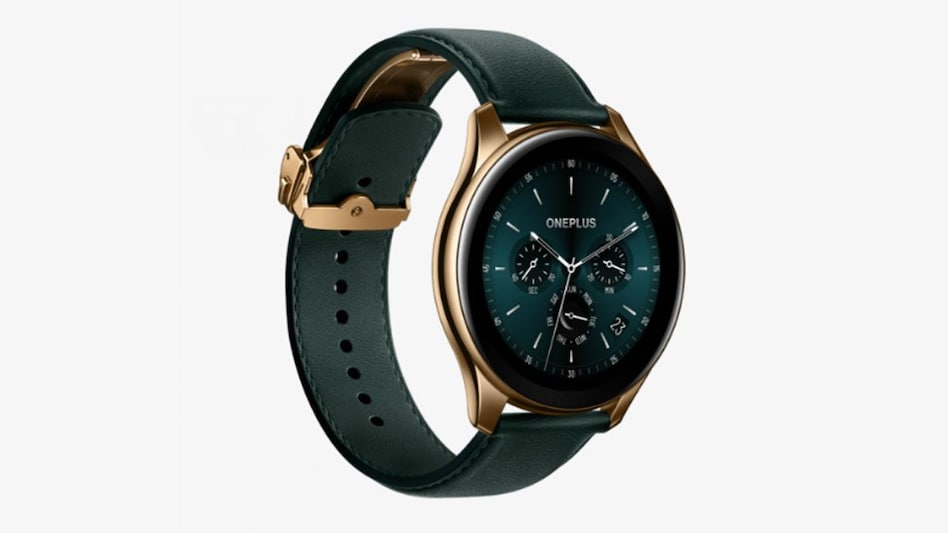
 OnePlus Watch Cobalt Limited Edition
Smartphones, check. Smart TV, check. Fitness band, check. Smartwatch... hmmm (a 3-month wait) check. Since its first phone launch, OnePlus has not just disrupted the mid-level smartphone market but has been ruling the category. While the expectations were somewhat similar from its first smartwatch, it turned out to be a little disappointing. But it didn’t take the company long to correct what was wrong. Barely 3 months and OnePlus has managed to turn an ‘ugly duckling into a beautiful swan’.
Good Looks:
Be it a regular analogue wristwatch or a smartwatch, I always prefer a big dial. And this Cobalt Edition Watch with 46 mm circular dial is big yet nice. Some might not even like this big a dial, but OnePlus does not offer any options. OnePlus has used striking colours combination — the circular dial is done in matte gold with chrome green leather strap — which makes it look stunning. Perfecting the looks are the style watch faces. The Chrome Green and Shadowy (also have a shade of green in the background) made this watch look exquisite.
OnePlus also boasts about crafting the middle frame using cobalt alloy, which is twice as hard as stainless steel and is corrosion-resistant. And the 1.39-inch AMOLED display has specially treated sapphire glass onboard.

 Mahindra takes battery-as-a-service to entire electric SUV line-up
 Closing Auction Session: Why the system expected to reduce volatility is still seeing occasional wild swings
 Reliance Industries denies Subhash Chandra’s media allegations
 Silver may be cheaper than gold as 2026 draws to a close: Report
 India paid 29% more for cooking gas after Hormuz strikes: Report
 CMF Buds Neo Review | Tech Gear | Business Today
 Gen Z Is Changing Politics? D.K. Shivakumar On Youth Power & Rahul Gandhi’s Outreach
 Babita Singh Reporting, Part-Timers, Bandar & More: 5 OTT Releases To Watch This Weekend
 Using AI To Write? You Could Be Caught! Anthropic's Invisible Watermark Explained
 Shah Rukh, Salman & Madhuri-Backed Pernia’s Pop-Up Shop Parent Eyes ₹680 Cr IPO
 Jio Platforms IPO gets SEBI nod: Rs 27,500 crore debt repayment plan, $100 billion valuation in focusClosing Auction Session: Why the system expected to reduce volatility is still seeing occasional wild swings
 RIL-backed penny stock hits 52-week low; firm clarifies on high trading volume
 Happiest Minds shares slip despite IT stocks surge; here's what is weighing on the stock
 BEL, Solar Industries shares remain Nuvama's top defence picks; here's what it said on BDL, Data Patterns, HAL
 India’s 15-metre giant: The sleeper bus changing the future of long-distance travel
 Apple’s CEO History: Who led the company before Steve Jobs and Tim Cook?
 September 9 surprise: Apple could unveil more than just a new iPhone
 Special FD rates in August 2026: DCB Bank, Indian Bank, Federal Bank and Union Bank offer higher returnsCMF Buds Neo Review | Tech Gear | Business Today












