












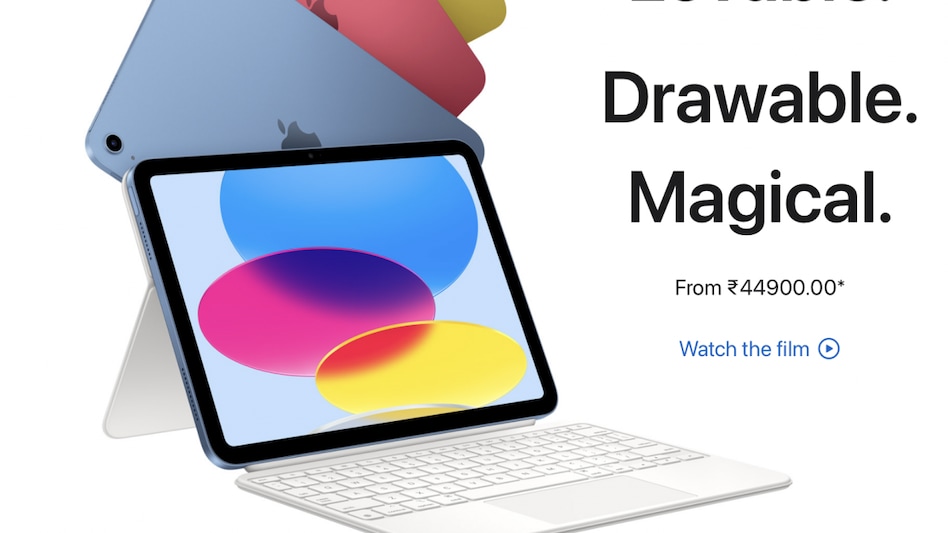
 The Apple iPad 10th gen is a tad bit more expensive than the 9th gen model, which Apple still retails.
 The Apple iPad 10th gen is a tad bit more expensive than the 9th gen model, which Apple still retails.
The new tablet from Apple joins the extensive range of iPads ranging from the mini to the Pro. Housing some nifty upgrades, the iPad 10th gen is a tad bit more expensive than the 9th gen model, which Apple still retails.
Modern Design
Ditching the iconic home button, the new iPad follows the design language of the other sibling - an edge-to-edge screen. This has resulted in more screen estate, with Apple opting for a 10.9-inch screen instead of the 10.2 inches on the previous gen. Apple hasn’t compromised security as the Touch ID has been embedded in the power button, which is easily accessible while used in portrait and landscape mode. Another significant change is the addition of a Type-C port replacing the lightning port. Weighing 477 grams, it’s comfortable to hold and use. Contrary to the common perception that recycled materials might be flimsy, the tablet feels solid even with the 100 per cent recycled aluminium enclosure.
Screen
iPads are all about the screen and touch response. And this new model does not disappoint.
The edge-to-edge 10.9-inch 2360x1640-pixel resolution back-lit LED screen with 500 nits of brightness is bright and vibrant with excellent colour reproduction. It has decent sunlight legibility too. Like other iPads, it comes with Apple's True Tone, which adjusts colour and intensity in real-time to match the ambient light.
The tablet has been designed to use in both portrait and landscape modes. I preferred using the former mostly for reading, the latter for content consumption, gaming or working while mounting it on the new keyboard dock.
Finally, Apple has moved the front camera from the horizontal bezel to the landscape. This makes a significant difference during video calls when mounted over the keyboard, as now I am looking straight into the camera and not towards the side.
Work and Fun
Many people I know argue about the need for an iPad. And many others are addicted to this third piece of hardware. I belong to the latter. I often use an iPad for reading, browsing, streaming content and gaming at home. And for days when I don’t feel like lugging my laptop around, I use the iPad as a makeshift laptop to work on. All the utility apps that I need are available on the App Store. As my work mostly requires Office Suite, I have multiple options. Microsoft Office subscription is one, but the popular free solutions include Pages, Numbers and Keynote from Apple or Docs and Sheets from Google. I have backed all my documents in the cloud, which is easily accessible on the iPad as well.
Besides the front camera, which I use for work-related video calls over Zoom, Teams and WebEx, there is also a single 12MP rear camera. I don’t capture images with an iPad but often use it to scan documents.
Power
This iPad belongs to the energy-level line-up and does not feature Apple’s powerful M1 or M2 chip. Even though it has the A14 Bionic chip onboard, there aren’t any issues in the performance. I could still edit photos and short videos on this tablet, play heavy graphic games or even run two apps side by side. But it is not just the processor at work alone. Some credit goes to the iPadOS as well, which Apple has refined over the years to handle multitasking. Features such as a side-by-side view and drag-and-drop make it much easier to work. If you have experienced the macOS on any of the Apple laptops, the dock at the bottom makes you feel at home. For those who haven’t, the dock is a shortcut for the apps you wish to access in a jiffy. Plus, it also gives access to frequently used apps, eliminating the need to browse through the home windows.
Folio Case
Apple has introduced a new Folio case designed for this new iPad. The case has a two-piece design - the back support easily attaches to the iPad and can hold the tablet on a hard surface. The second is the detachable keyboard that can also flip around the back. Unlike the Magic Keyboard, this one can’t be used on the lap when on the move. However, it is a pretty decent setup if you have to work on a desk. The keyboard has a dedicated function row and trackpad. However, this isn’t bundled, and you will have to shell out an additional Rs 24,900. Suppose you don’t wish to spend this amount on the folio keyboard and yet want a keyboard. In that case, you might want to consider the Logitech K480 retailing for Rs 2,795 with an integrated cradle that can hold the tablet (or your phone) at an angle to work. But this also works best on a flat surface like a table.
Pencil Support
Apple has added support for the 1st gen pencil (read stylus) to this tab. While there aren’t any issues with the pencil or its accuracy while scribbling or sketching, it is the charging bit that Apple may have overlooked. The 1st gen Pencil had to be plugged into the lightning port for charging. But remember, the lightning port is gone? So, if you are buying the pencil (Rs Rs 9,500), you better buy the USB-C to Apple Pencil adapter worth Rs 900.
Battery: Apple iPads have decent battery backup. This machine lasted me a day’s work with ease. It easily lasts over five days if used only for a couple of hours a day.
Verdict
Unlike iPhones, which most upgrade every couple of years, iPads stay put for a good 4-5 years easily, and if used carefully, even longer. If you plan to buy an entry-level iPad, the 9th gen model with the 10.2-inch screen and lightning port is still a good buy. But if you are not stretched for budget, this 10th gen starting at Rs 45,900 should be on your list. But these are the entry-level variants with just 64GB onboard storage and no option for expandable memory. So be it any model, it would be wise to go for the 256GB variant, but that would mean another 15k.
Also read: Apple may not launch iPhone with USB C charger until 2024
Also read: Apple AirPods Pro 2nd gen: The best earbuds around?
For Unparalleled coverage of India's Businesses and Economy – Subscribe to Business Today Magazine
 Are NSE Electronic Gold Receipts better than physical gold or Gold ETFs?
  Inside luxury cruise MV Hondius: Where it went, fare, Hantavirus outbreak & deaths
 Hantavirus outbreak: Is India at risk from the Andes strain spreading globally?
 Is gold becoming investors’ favourite safe-haven bet again in 2026?
 Samsung's m-cap is bigger than Reliance, HDFC Bank, Airtel, SBI, other top 10 Indian listed firms put together
 Coforge Q4 Decoded: CEO Sudhir Singh On AI, Deals & FY27 Growth
 Paytm’s Big Turnaround! Analysts Cheer Strong FY26 Performance
 "Hard Facts Over Rhetoric": Air Marshal Bharti Reveals How India Decimated 9 Pak Terror Camps
 Are Smallcaps Ready For Another Big Run? JM Financial AMC Shares View
 A.I. Won’t Destroy IT Jobs? Coforge CEO Reveals The Bigger Opportunity
 Grasim, L&T and BEL: Trading strategy for three stocks| Daily Calls on BTTV
 Bajaj Auto, Moschip Tech, FDC: Expert shares outlook, strategy | Daily Calls on BTTVSamsung's m-cap is bigger than Reliance, HDFC Bank, Airtel, SBI, other top 10 Indian listed firms put together
 NCLT Mumbai admits insolvency plea against Prime Focus; stock zooms 215% in a year
 Expert advice on Multibagger Apollo Micro Systems; Fractal Analytics strategy | Daily Calls on BTTV