The moment I unboxed it, I knew this wasn’t meant for coffee shop vibes. At almost 3.6 kilos, the Titan isn’t a machine you casually toss into a backpack. It’s massive, thick, and unapologetically designed to scream “I mean business.” The RGB accents, mechanical keyboard, and hulking chassis remind me more of a gaming battle station than a laptop.
That said, MSI has clearly paid attention to details, the cooling vents are aggressive, the keyboard deck feels solid, and there’s a sense of durability that inspires confidence. But again, it’s a tank.
Display
Now, here’s where things start getting seriously impressive. The 18-inch 4K Mini-LED display is simply gorgeous. It’s one of the brightest panels I’ve used on a laptop, and HDR content looks stunning. Games and movies feel incredibly immersive thanks to that massive canvas and the 120 Hz refresh rate. If you’re into creative work like editing videos, colour grading, or design, this display will spoil you.
Performance
This is where the Titan 18 HX AI earns its name. With Intel’s Core Ultra 9 285HX under the hood and Nvidia’s RTX 5090 laptop GPU, the performance is nothing short of ridiculous. I threw everything at it, high-end gaming, 4K video editing, rendering, AI workloads, and it barely broke a sweat.
Frame rates in modern AAA titles stayed comfortably high, even at ultra settings in 4K. Creative workloads that would normally bring laptops to their knees finished faster here. In many ways, it genuinely feels like using a high-end desktop disguised as a laptop.
Keyboard and Touchpad
Typing on the Titan is… interesting. The main keys use Cherry MX mechanical switches, which feel fantastic thanks to their tactile, clicky, and incredibly satisfying feedback. But then, oddly, the number pad and arrow keys are membrane-based, which creates an inconsistent typing experience. It’s not a deal-breaker, but it does feel like two different keyboards stitched together.
The touchpad, on the other hand, is a bit of a let-down. It’s haptic-based and doesn’t always respond as smoothly as I’d like. Let’s be real though, no one’s buying this laptop to use the touchpad. You’ll almost certainly be plugging in a gaming mouse.
Heat, Noise, and Battery Life
All that power comes at a cost. The Titan gets loud under heavy loads, the fans spin up aggressively, and you’ll definitely hear them in a quiet room. Surface temperatures also rise, though not unbearably so. It’s manageable, but you’ll want to keep it on a desk, not your lap.
And then there’s battery life. Or rather, the lack of it. Even under light use, I struggled to cross the two-hour mark. Gaming on battery? Forget it. This machine is built to live on a desk with the power brick permanently plugged in.
AI Features
The “AI” in the Titan’s name isn’t just for show, it also comes from Intel’s new Core Ultra 9 285HX chip, which includes a dedicated NPU alongside the CPU and GPU. This NPU is designed to handle lighter, sustained AI tasks efficiently, without always waking up the GPU. In practice, it powers things like Windows Copilot, background noise cancellation, and smart camera features with much less impact on battery life. It’s not the kind of muscle you’ll notice in gaming, but for day-to-day productivity, video calls, or creative workflows that tap into AI enhancements, it means the Titan can offload those jobs to the NPU instead of burning through GPU power
Titan 18 HX AI vs Alienware Area-51 18
If you read my review of the Alienware Area-51 18 earlier this year, you’ll know that machine set the tone for what a modern “portable desktop” could be. So naturally, the Titan 18 HX AI is its direct rival.
Spec-for-spec, the two are eerily similar. Both pack Nvidia’s RTX 5090 laptop GPU, which means gaming performance is practically identical across most titles. Where MSI tries to pull ahead is with Intel’s Core Ultra 9 285HX chip. But here’s the thing, compared to the Alienware’s CPU, we’re talking about a very minor gain. With only a slight overclock and architectural tweaks, the Titan is at best 3–5% faster in synthetic benchmarks and demanding workloads. In real-world gaming, you’re unlikely to notice much difference.
That means the real battle comes down to design, display, and features. MSI’s Mini-LED 4K panel is genuinely more impressive than Alienware’s offering, particularly for HDR content. But Alienware still wins points for a more consistent keyboard layout and slightly better thermals under prolonged load.
So while the Titan edges ahead in screen quality, it doesn’t convincingly dethrone the Alienware when it comes to raw performance, the two are more equals than rivals, and which one you pick will mostly depend on whether you lean towards MSI’s flashy design and display, or Alienware’s refinement.
Verdict
So, who is the MSI Titan 18 HX AI for? Honestly, it’s not for most people. This isn’t your everyday laptop. It’s a statement machine. If you’re a gamer who wants the absolute best performance money can buy, or a creator who needs desktop-class power in a semi-portable package, this thing is phenomenal.
But if you care about portability, battery life, or value for money, there are far better options out there. The Titan is unapologetically over the top, and that’s exactly the point. It's less like a laptop and more like a “portable desktop.” It’s not subtle, it’s not practical, but it’s undeniably impressive.



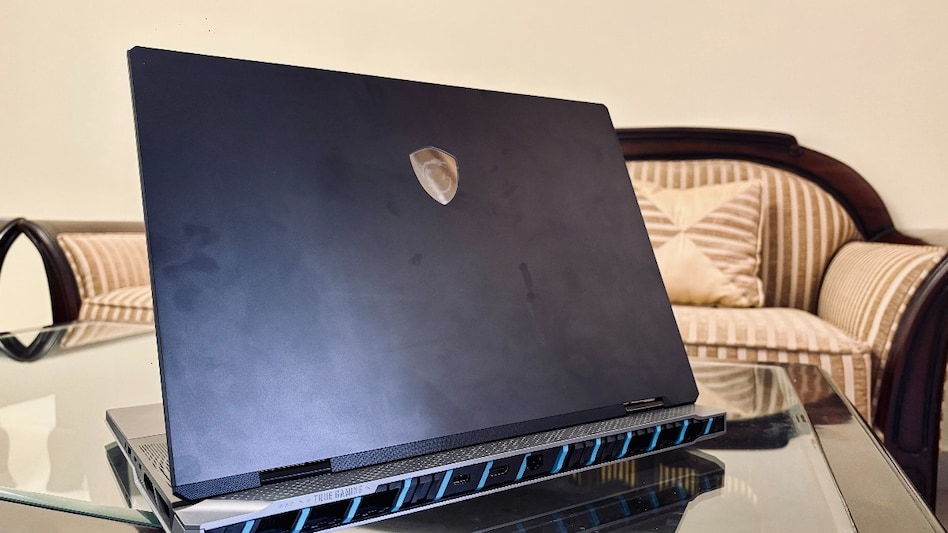 MSI Titan 18 HX AI
 IDBI Bank employees and pensioners have nothing to fear: DIPAM Secretary
  'I wish I was 20 years younger': Sunil Mittal on India's next 20 years, recalls OneWeb pitch to Rishi Sunak
 RIL group to become India's largest conglomerate by m-cap after Jio IPO: Uday Kotak
 NDMC announces two-day closure of Connaught Place's Central Park ahead of CJP's 'Lehra Do Tiranga' march on Friday
 IDBI Bank sale to Fairfax faces union resistance, black-badge protest on October 16
 Jio Platforms IPO: ₹30,000 Crore Issue Opens October 21, Valuation At ₹10.3 Lakh Crore
 Weekend OTT Releases: The Diplomat 4, Aasha, Sacrifice And More
 How Jio Transformed India From Data Scarce to Data Abundant! | Akash Ambani | Jio Platforms IPO
 Akash Ambani Decodes Jio's Financial Muscle | Reveals The 5 Key Business Drivers | Jio Platforms IPO
 From Dhirubhai’s 1977 IPO to Jio's Mega Launch | Uday Kotak Calls Jio IPO a ‘Moment in History’
 Gold eyes sharp recovery; can MCX prices hit Rs 1.5 lakh? Vandana Bharti explains
 Tech Mahindra Q2 results: PAT rises 33% YoY to Rs 1,586 crore; recommends 1:1 bonus issue
 Jio Platforms IPO: How HFCL promoter Mahendra Nahata's investment could rise over 110 times
 South Indian Bank shares hit 52-week high on Q2 earnings, close higher
  Why Falguni Pathak’s songs surge on YouTube every Navratri, year after year
 SBI Card launches Eternal credit card with Zomato Gold membership, cashback benefits
 From elderly care to hiking buddies: How China’s loneliness problem is becoming a $7.4 billion business
 Financial Horoscope Today, October 16, 2026: Taurus Should Focus on Budget, Know the Financial Status of All 12 Zodiac Signs
 Now, fly non-stop to Hanoi! Vietnam Airlines launches direct flights from Ahmedabad












