


 WhatsApp Web calling is here: Five new features including call transfer, QuickHD and waiting room(blog.whatsapp.com)
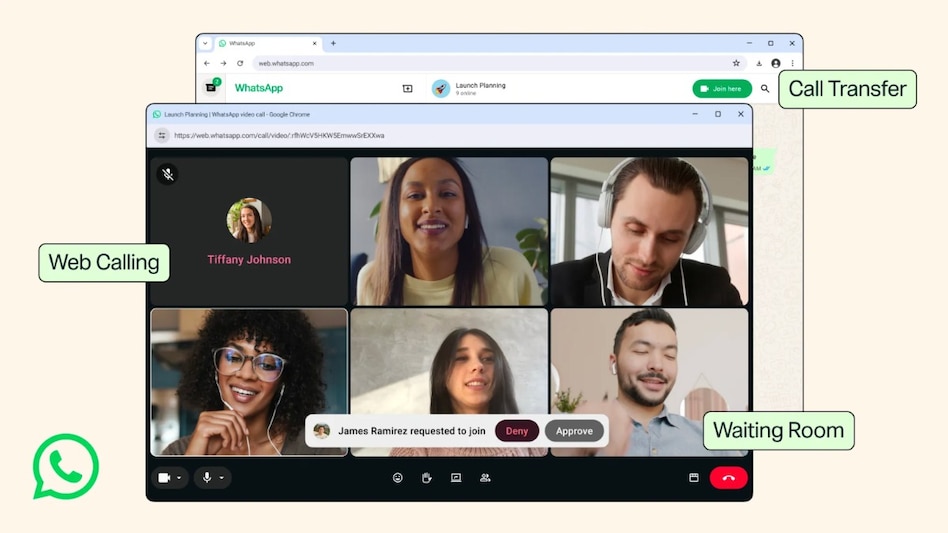
WhatsApp is expanding its calling experience beyond phones and desktop apps. The Meta-owned messaging platform has introduced web-based calling, which will allow users to make and receive audio and video calls directly through WhatsApp Web without installing a separate application. The update, announced on Tuesday, is part of a broader set of improvements to the platform's cross-device functionality.
According to WhatsApp's blog post, web calling includes screen sharing, reactions, and a dedicated Calls tab with full call history and favourites, all accessible from the browser. The calls are end-to-end encrypted, free, and have no time limits.

 Finance ministry weighs options on LTCG tax, decision likely in Union Budget 2027-28
 Jio Platforms IPO: Allotment out; should you hold or book profit on listing? What GMP hints at
 AI impact: Microsoft offers buyouts to 60,000 employees in India, US and other countries. Details here
 Varun Beverages shares set for second straight year of losses; price targets and more
  83% say savings won't last a year without income: How big should your emergency fund be?
 Piyush Goyal: ‘India Could Become A $30 Trillion Economy In The Next 22 Years’
 How Lula, Israel’s Vote And Trump’s Midterms Could Shape India’s Trade, Defence & Energy
 Arunachal Dam Protests Turn Violent; Centre Deploys 250 RAF Personnel Amid Shutdowns
 Diwali Stock Picks 2026: Top Banking, Consumer, Hotel, Defence And Metal Recycling Stocks To Watch
 Apple's iPhone Duo Craze: We Asked Buyers What Makes It Special
 Mazagon Dock shares tumble 14% from day's high as Q2 profit tanks 54%Varun Beverages shares set for second straight year of losses; price targets and more
  Bandhan Bank shares trim gains as lender denies First Abu Dhabi Bank proposal report
 L&T wins orders for Dhaka Metro worth over Rs 5,000 crore, check stock reaction
  Stock market outlook: Are Indian equities attractive after correction? What SBI Securities says
 Why did a Dubai Apple fan bring 53 iPhones to collect two new foldables? His reason is fascinating
 CBIC standardises GST registration documents; consent letter and affidavit formats detailed
 “Solutions in India can be templates for Global South,” says Irina Ghose, MD, Anthropic IndiaPiyush Goyal: ‘India Could Become A $30 Trillion Economy In The Next 22 Years’
 Karnataka's final voter roll out! Over 1 crore names deleted; here's how to check your name












