


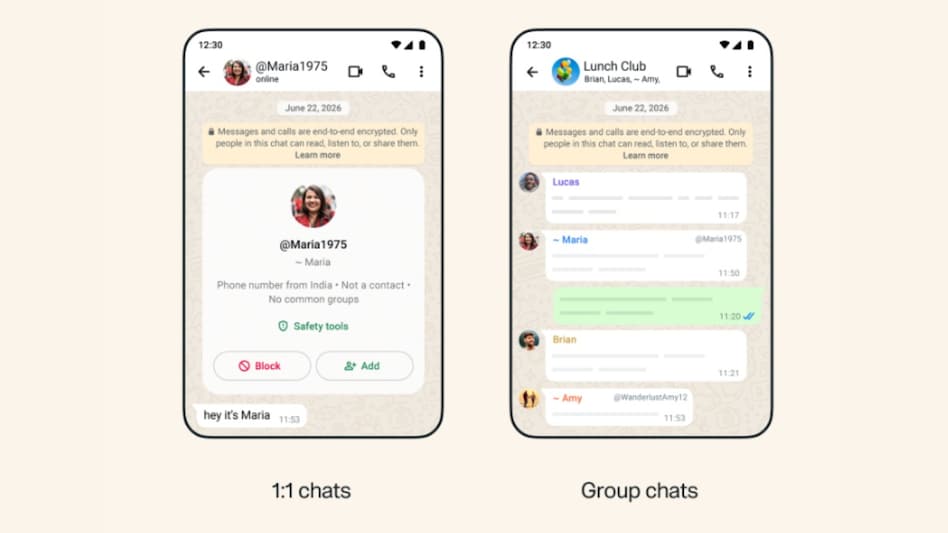
 Your username will appear with @ symbol so users can differentiate between your username, your display name, and your phone number.
 WhatsApp Username will be rolled out soon, and the platform is inviting users to reserve their desired username before anyone else does. WhatsApp is teasing the feature as a major privacy upgrade, as users will not have to exchange phone numbers to connect with anyone. Since you can reserve a username for WhatsApp, the company has shared some guidelines that you must follow.
Must read: WhatsApp Usernames are here: Here's how to reserve yours before someone else does

 UPI stays free: Finance Ministry bars charges on transactions up to Rs 2,000
 'Don't kill the Golden Goose': Trump says US must keep its AI lead over China
 Made-in-India cars are winning over Japan! Maruti powers nearly two-thirds of Suzuki's global production
 Amazon bets big on value commerce as Bazaar grows 5X, expands beyond Tier-2 and Tier-3 India
 Inflation heats up: Food prices rise, crude crosses $100; what it means for your wallet
 Why Crude Oil Prices Are Rising Again Now?
 Modi Xi Meet After 7 Years In India Signals Possible Reset In Bilateral Ties
 BRICS Summit 2026: India Secures New Delhi Declaration After Intense Negotiations
 BRICS Summit 2026: Modi’s Big Diplomatic Win As New Delhi Declaration Gets Backing
 Dario Amodei, Sam Altman, Elon Musk Back AI Slowdown Call Amid Growing Safety Concerns
 YES Bank, Cochin Shipyard, Indus Tower: Stocks to trade — Key levels, target price & stop loss
 Varun Beverages shares slip 25% from 52-week high; more downside ahead?
 Uno Minda gets 'IND A1+' credit rating for commercial papers from India Ratings
  Karnataka Bank, Pondy Oxides, ITDC, Blue Dart among stocks to turn ex-dividend on September 15
 Stock market outlook: Crude oil prices, US Fed's policy decision among key factors to watch out for this week
 'Today is your last working day': Larry Ellison-led Oracle begins new round of layoffs
 Quote of the Day by Deepinder Goyal: 'You should always bet on the team, not on the idea'
  MF investors are playing the long game: What 5-year SIP data means for your portfolioYES Bank, Cochin Shipyard, Indus Tower: Stocks to trade — Key levels, target price & stop loss
 Want to run a shop at a railway station? Here’s how you can actually get one












