We have been testing the device for a couple of weeks now, putting it through everyday tasks, productivity workloads, multitasking, and more demanding use cases to see how well it holds up in real-world usage. Know where the device shines, where it can do better, and if it is worth Rs 3,05,590.
Must read: ASUS ExpertBook Ultra (2026) review: Business-class performance, in a sleek package
Dell XPS 14 (2026): Design, keyboard, and trackpad
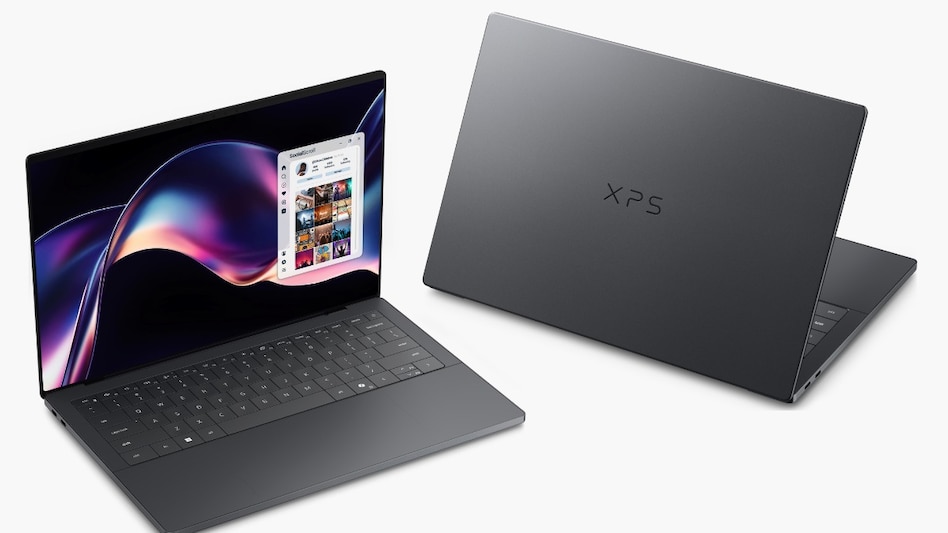
In terms of design, the Dell XPS 14 is perfect for someone who goes for minimalism and a not-very-flashy look. It looks perfect for professional use, with a matte black finish, aluminium build, glossy XPS logo on the lid, and a smooth finish, fulfilling all the premium checkboxes. The hinge felt sturdy, and you could effortlessly open the lid with just one finger. However, it retains some similarities with MacBook Pros in terms of design.
When you open the laptop, you get a 14-inch OLED touchscreen display, a keyboard deck, and a nearly invisible and enlarged trackpad. On the left side, you get two Thunderbolt 4 ports, and another Thunderbolt port placed on the right with a 3.5mm audio jack. However, the laptop feels heavier at 1.36 kilograms and thicker than I like.
After brief usage, I believe the Dell XPS 14 has the best keyboard, offering a comfortable layout, well-sized keys, and a satisfying typing experience. While working, it feels satisfying to go through every key without putting too much pressure; the CTRL key requires a slightly harder press to register.
On the palm rest area, you get ample space despite the trackpad taking the majority of the space. However, the missing biometric authentication option is a noticeable omission at this price.
Coming to the trackpad seamlessly blends into the space, but it has a clear visual indication with subtle bump-like edges on the left and right. In terms of numbers, the trackpad is 6 inches wide and 3 inches deep, which is quite unusual. While a larger touchpad makes it easier to scroll, but for me it led to several mistouches. I also tested the 2-finger tap gesture, and it worked flawlessly. However, it might be difficult to use for someone who relies heavily on the right-click function. The haptic touchpad suits the aesthetics of the laptop, and it also feels premium to use on a day-to-day basis.
Must read: Samsung Galaxy Book 6 Pro review: Impressive performance without the bulk
Dell XPS 14 (2026): Display
The Dell XPS 14 features a 14-inch 2.8K OLED InfinityEdge touch display that supports up to 500nits peak brightness and a 1- 120 Hz refresh rate. For content-viewing, the Dell XPS 14 is an ideal device as it impressively manages deep blacks, delivers accurate skin tones and vivid colours, while the high resolution and smooth refresh rate make everything from streaming movies to browsing look crisp and immersive.
The touchscreen function was also quite responsive and useful, but since the laptop does not rotate to 360 degrees, its full utilization remains limited. However, the majority of productivity laptops offer touchscreen functionality but do not offer the 2-in-1 form factor, which allows the display to be folded back and used as a tablet. Lastly, the screen also remained bright, even while working outdoors or under direct sunlight. However, it tends to reflect surrounding light, making it challenging to view content on the screen.
Dell XPS 14 (2026): Performance and battery
The Dell XPS 14 is powered by the new Intel Core Ultra X7 358H processor paired with 32GB LPDDR5x RAM and a 1TB PCIe SSD. In daily usage, the Dell XPS 14 is a premium productivity machine, offering reliable and responsive performance across demanding multitasking, multiple browser tabs, video streaming, and everyday workloads without noticeable slowdowns. In addition, the app launches also remained quick, making it perfect for people who work in a fast-paced environment.
The laptop is also equipped with an Intel Arc integrated GPU, reliable for everyday media and light creative work. This is suited for people who edit photos, create content, and conduct casual design work. However, demanding gaming or GPU-intensive rendering remains limited as it does not come with dedicated graphics.
Alongside day-to-day productivity, the laptop also offers Copilot+ AI features such as Live Captions, Recall, Windows Studio Effects for video calls, and much more. There’s also a dedicated Copilot+ key, where users can access the AI chatbot.
Must read: Alienware 16 Area-51 review: A desktop-crushing powerhouse with a spaceship aesthetic
In terms of battery life, the Dell XPS 14 is backed by a 70Wh battery, which delivers a promising battery backup, comfortably lasting through a full workday of usage. With mixed multitasking, browsing, video playback, and other day-to-day tasks, the laptop easily lasts over 8 hours on a single charge.
In terms of charging speed, the Dell XPS 14 offered a quick charging speed, taking nearly 1 hour and 30 minutes to fully charge the device.
Dell XPS 14 (2026): Verdict
Priced at Rs 3,05,590, the Dell XPS 14 (2026) is an expensive investment, but it will satisfy power users, creators, and working professionals who prefer top-tier performance, design, and an impressive display. Powered by the Intel Core Ultra X7 358H processor, the laptop effortlessly handles heavy multitasking, fast app launches, and integrated Copilot+ AI tools.
Its 14-inch 2.8K OLED InfinityEdge touchscreen display is its strongest suit, making it ideal for content consumption and immersive work. Lastly, its sleek and minimalist design makes it look and feel premium. The Dell XPS 14 (2026) is a compelling device if you do not require a dedicated GPU for heavy gaming or intensive 3D workloads.



 Dell XPS 14 2026 review
 Why are airlines opposing operations from Adani’s Navi Mumbai Airport?
 Jio Platforms IPO date, size, listing: Check tentative times; all key information you need to know
 India must move from assembly-led growth to end-to-end manufacturing capability: N Chandrasekaran
 SIR row: Supreme Court refuses interim suspension of CEC Gyanesh Kumar, seeks EC response
  Festive season travel shocker: IndiGo hikes fuel surcharge across all routes
 Mid & Small Caps Still The Secret Sauce? Kranthi Bathini On Market Outlook
 Shaktikanta Das Highlights 5 Pillars Behind India’s Economic Resilience
 Shaktikanta Das On India’s Growth, Resilience & Roadmap To Viksit Bharat 2047
 Pharma Rally Still Has Steam? Kranthi Bathini On Cipla, Sun Pharma & More
 IPO Season Delivers Mixed Debuts! Kranthi Bathini On Where To Invest Next
 Q2 preview: ITC Hotels, Lemon Tree, Juniper shares; brokerage sees up to 91% upside potential
 RBI MPC October 2026: Rate-hike dilemma deepens as crude, rupee pressures mount; experts weigh in
 TCS, Infosys, HCL Tech, Wipro, TechM: 3 takeaways from Accenture's Q4 results; top picks
 Holding pharma stocks? Minor correction offers buying opportunity, says analyst
 Mastek shares jump 5% as company launches AI-native Services as Software strategy
 Birthplace of 1989 album: Taylor Swift’s former Beverly Hills estate hits market for $8 million
 Florida woman used Claude as a ‘diary’. What happened next landed her in trouble
 Vivo X Fold 6 coming to India on October 6, but there’s a surprise device in the teaser
 Indian housing construction value jumps 83% to $430 billion amid demand boom: CREDAI-Anarock study












