


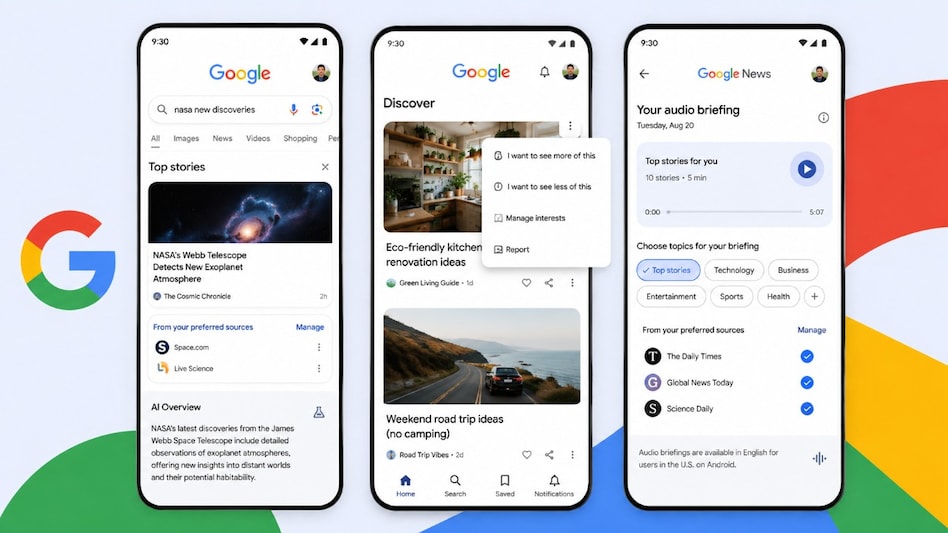
 Google adds new personalisation tools to give users greater control over Search and News feeds.
Google introduced new personalisation features on August 20, designed to give you greater control over Search, Discover and Google News, while also helping publishers build stronger, more direct relationships with readers.
The company is making it easier for you to shape the kind of information you see across its platforms.

 NSE IPO day 1 update : Issue subscribed 31% so far; NIIs, employees lead bidding | Key details
 MDR on UPI: Will examine concerns raised by stockbrokers, says SEBI chief
 Diwali demand lifts Indian food exports as global buyers seek sweets, snacks and ready-to-eat foods
 NSE IPO: SGX, LSEG, ICE and CME Group - how NSE compares with global peers
  US tariff clouds loom again: India awaiting more clarity on Russia sanctions bill
 Café Mondegar Shut: FDA Suspends Licence Over Alleged Food Safety, Hygiene Lapses
 NSE IPO Opens Today: ₹22,568 Crore Mega Issue, Valuation, Growth Outlook & Sona Select IPO
 Gold Finance & Jewellery Stocks: Expert Outlook Ahead of Festive Season | Sky Gold in Focus
 Best Stocks To Buy Now? Power, Hotels, Auto & Pharma Stocks For Long-Term Investors
 Fed Hikes Rates 25 Bps: What It Means For Indian Markets | Gaurang Shah
 Kanohar Electricals stock: Two-day rally takes gain from IPO price to 40%, here's why
  NSE IPO: CBDO Sriram Krishnan on retail growth, product diversification, new opportunitiesNSE IPO day 1 update : Issue subscribed 31% so far; NIIs, employees lead bidding | Key details
 Alembic Pharma shares rise 4% on receiving USFDA EIR for Vadodara facilityNSE IPO: SGX, LSEG, ICE and CME Group - how NSE compares with global peers Café Mondegar Shut: FDA Suspends Licence Over Alleged Food Safety, Hygiene Lapses
 Can an eye drop replace reading glasses for 8 hours? Can it create a new drug market?
 Govt Makes It Clear – No Compromise With India’s Energy Needs & Economic Interests
 UPI MDR row: Government rejects ‘external pressure’ claim, says move will support domestic players
 Can NSE Trade Its Own Shares? SEBI Chairman Tuhin Kanta Pandey Clarifies












