


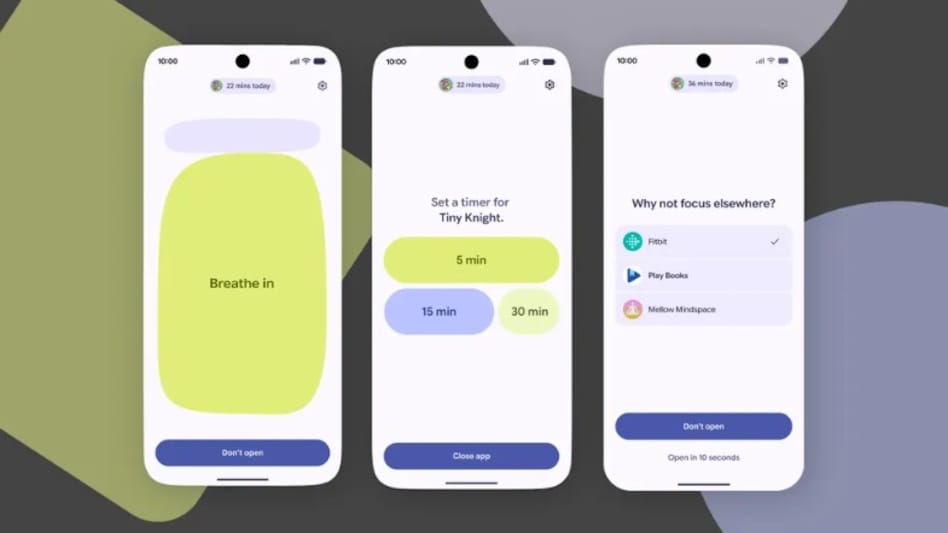
 Android 17 adds new digital wellbeing feature call Pause Point. Know what it is and how it works.
Google has introduced a new Digital Wellbeing feature with Android 17 called Pause Point, which claims to reduce smartphone use by adding a short delay before selected apps open. The feature marks a shift from screen time reports and app timers that users could easily ignore or snooze, and instead places a 10-second pause between a tap and access to an app.
Pause Point is designed to interrupt repeated phone checking. Rather than blocking access completely, it showcases a suggestion screen and asks users to pause before opening apps such as X, YouTube Shorts, Instagram and others.

 ICAI working out assurance standards for sustainability reporting by India Inc
 Saudi Arabia exits China-backed mBridge platform amid governance and compliance concerns
 US diesel price hits record $6.49: How much prices have surged since Hormuz crisis
 French fuel crisis deepens as one in nine stations run out of stock, diesel prices at record high
  Tata Motors or Ashok Leyland? Analyst reveals his preferred auto stock for near-term gains
 Gold Price Target 2026: Expert Sees MCX Gold At ₹1.8 Lakh By Year-End Amid Strong Demand
 Health Insurance: Why Pre-Existing Diseases And Waiting Periods Matter For Buyers
 Crude Oil Above $100: How High Energy Prices And Rupee Weakness Impact Gold Prices In India
 CEA On India’s Manufacturing Rise, Atmanirbhar Bharat And Modi’s Economic Policy
 Health Insurance Buying Guide: 7 Things First-Time Buyers Must Check Before Choosing A Policy
 SpaceX weight in Nasdaq 100 to jump to 2.82% following quarterly index rebalance: ReportTata Motors or Ashok Leyland? Analyst reveals his preferred auto stock for near-term gains
 Maharashtra Scooters, Dixon Tech, Bharat Dynamics, Jai Corp among stocks to turn ex-dividend on Monday
 Jindal Supreme, SS Retail, Hero Motors IPOs subscribed up to 181 times on final day; details here
 Sensex, Nifty post sixth weekly loss; TCS, Titan among top laggards, slip up to 4%
 47.3 kg heroin seized in Faridkot as police uncover network allegedly smuggling drugs, arms into PunjabSpaceX weight in Nasdaq 100 to jump to 2.82% following quarterly index rebalance: Report
 Maharashtra FDA seizes Rs 1.13 crore gutkha after six-hour chase, four people arrestedSaudi Arabia exits China-backed mBridge platform amid governance and compliance concerns
 Tragedy near Ganesh pandal in Mumbai: 8-year-old girl among 2 dead from electrocution












