












 You can now customise the duration of the disappearing messages on WhatsApp
 You can now customise the duration of the disappearing messages on WhatsApp
WhatsApp rolled out disappearing messages last year that allowed users to set a timer on texts. Once the time is up, these messages disappear without leaving a copy anywhere, unless you have screenshots or something sneaky like that.
The main concept behind disappearing messages, as WhatsApp puts it, is the freedom to be honest and vulnerable while chatting with someone “knowing that the conversation isn’t being recorded and stored somewhere forever”.
“Deciding how long a message lasts should be in your hands,” says the company and pointed out that this was the reason why it has introduced disappearing messages and the “View Once” option for photos and videos on the platform.
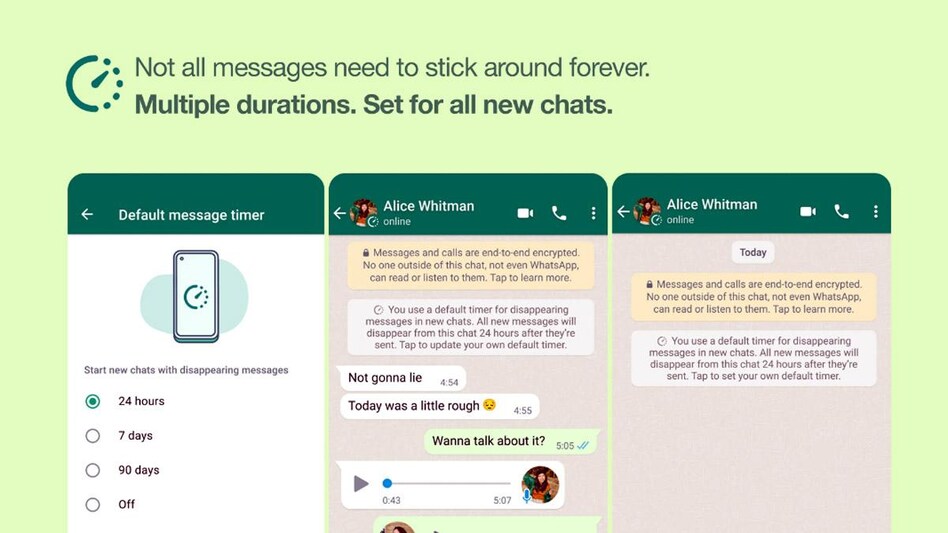
WhatsApp has now added another layer of customisation over messaged allowing users to pick how long they want their messages to “stick around” with default disappearing messages and multiple durations.
Available both on Android and iOS, WhatsApp users now have the option to turn on disappearing messages by default which will make one-on-one chats with another person disappear after the desired time. This option has also available for group chats. Once activated, disappearing messages apply to the messages sent there on and does not affect the older texts.
Earlier when WhatsApp rolled out disappearing messages, the only duration option available was seven days. Now, there are two other options of 24 hours and 90 days as well.
Once you turn this feature on, there is a message displayed in the chat that informs the participants about the choice made regarding how the communication is going to proceed. This can be easily toggled off and on from the settings.
Things you need to remember about WhatsApp’s Disappearing Messages
- Once the Disappearing Messages feature is turned on for any chat, it will only affect the conversations happening post that. Older chats will not be affected.
- The ability to turn on Disappearing Messages is available to all users in a group chat but the admin can change group settings to allow only admins.
- If a user does not check his texts in 24 hours, seven days, or over a 90-day period, the Disappearing Messages, as scheduled, will disappear from the chat. A preview of it might be visible in the notifications until the app is opened.
- If you reply to a Disappearing Message, the quoted text might remain in the chat even once the time is up.
- If any user creates a backup before a message disappears, the disappearing message will be included in the backup. But it will be deleted when the user restores from a backup.
- It is possible to forward a disappearing message to someone else before is disappears, one can also take a screenshot or copy the information.
How to turn on disappearing messages:
Go to Settings, click on Account. From there go to Privacy and then click on ‘Default’ message timer and pick a duration.
Also Read: WhatsApp new features: Five upcoming WhatsApp features you should be excited about
Also Read: WhatsApp voice messages to look better on iOS with next update
For Unparalleled coverage of India's Businesses and Economy – Subscribe to Business Today Magazine
 'Apologise to all women of India': PM Modi says 'dreams of 'nari shakti' crushed
 Yes Bank will aim for profitable, sustainable growth, but not growth at all costs, says new MD Tonse
  BT Explainer: India’s 12,980-crore maritime shield vs global insurance giants. 6 key facts
 Dividend announced in HDFC Bank Q4 results 2026 - Check amount, record date; net profit up 9% to Rs 19,221 cr | Highlights
 Cabinet approves 2% DA hike from Jan 2026, over existing rate of 58%
 Inside TCS HR Failure: Nida Khan’s Role Explained | What Investigators Found
 Renault India CEO On GCC, South America Exports & Growth Plan
 TCS Nashik Scandal Explained: Undercover Cops, HR Nexus & Shocking Allegations
 IT Sector In Trouble? Here's Why Abhay Agarwal Has A Bearish View
 How To Invest SIP Smartly? Nilesh Shah Shares Portfolio Strategy
 Why GIFT City is becoming a top investment route for NRIs: 5 facts to know
 Sensex, Nifty outlook for Monday, April 20: What to expect from stock market? Key levels & more
 ICICI Bank Q4 results 2026: Rs 12/share dividend; profit rises 8% to Rs 13,702 cr | Top financial highlightsDividend announced in HDFC Bank Q4 results 2026 - Check amount, record date; net profit up 9% to Rs 19,221 cr | Highlights
 YES Bank Q4 results 2026: Profit jumps 45% to Rs 1,068 crore; NII up 16% | Key highlights