
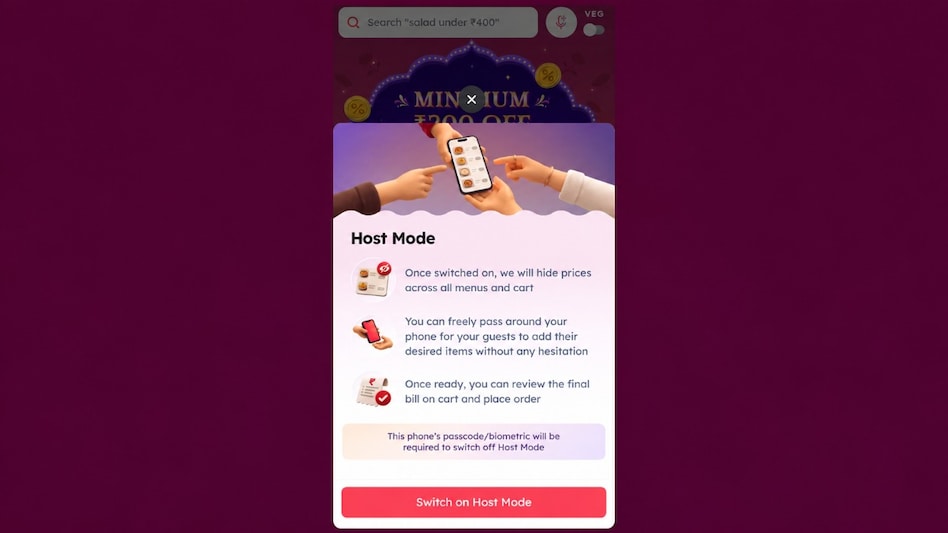
 Zomato Host Mode lets guests choose dishes without seeing their prices.
Ordering food for friends or family can sometimes put guests in an awkward position. Even when someone else is paying, people may hesitate to choose what they want because a dish is expensive, or choose something cheaper to avoid increasing the bill.
Zomato is now addressing that situation with a new feature called 'Host Mode', which hides food prices while guests browse a restaurant’s menu and select what they want to eat. The feature follows a suggestion made to founder Deepinder Goyal on LinkedIn, and the company says it brought the idea to its app within 72 hours. Business Today tested Host Mode to see how users can switch it on, let guests make their choices and regain control of the bill.

 Stockal shock: How a suspected cyber attack may have put crores in Indian investors’ US stock holdings at risk
 Big change in Agnipath scheme: Centre announces 2-year extension for remaining 75% Agniveers
 US midterm elections: What can’t Trump do anymore now that the Democrats have seized Congress?
 Diwali bling: Gold, silver prices surge up to 4% after US midterm elections - can gold hit Rs 1.58 lakh, silver Rs 2.55 lakh?
 US midterm elections 2026: Big upsets, historic firsts and major comebacks, the full list of winners to watch
 SIP Inflows, Equity Funds & Market Trends: Anand Rathi On Samvat 2083
 Fractal Analytics Q2 Results | Net Income More Than Doubles | Top Management On Outlook
 Top 5 Foldable Phones In India: Samsung, Google, Vivo & Apple Compared
 What’s Hot: Stocks, Gold & Big Money Moves | Daily Markets Show | November 04 | Business Today
 Defence & Aerospace: Why Smaller Companies Could Lead India's Next Manufacturing Growth Story

 NLC India shares gain 9% on Q2 earnings, interim dividend
 This small-cap ferrous metal firm declares Rs 5/share dividend; check record date, Q2 results
 Thangamayil Jewellery Q2 earnings: Stock falls 7% amid decline in gross profit, EBITDA margins
 Fidelity Fund adds India exposure after US midterm results: Report
 PNB, Coforge, Adani Energy, Zydus Life, KDDL shares: Top 5 Diwali picks by NuvamaNLC India shares gain 9% on Q2 earnings, interim dividend
 Shubman Gill spotted wearing Deepinder Goyal’s Temple during Ind vs NZ match; What are ICC rules on wearablesSIP Inflows, Equity Funds & Market Trends: Anand Rathi On Samvat 2083This small-cap ferrous metal firm declares Rs 5/share dividend; check record date, Q2 results
 Tata Stocks Down 20-25%: Should Investors Hold, Exit Or Average Their Positions?