


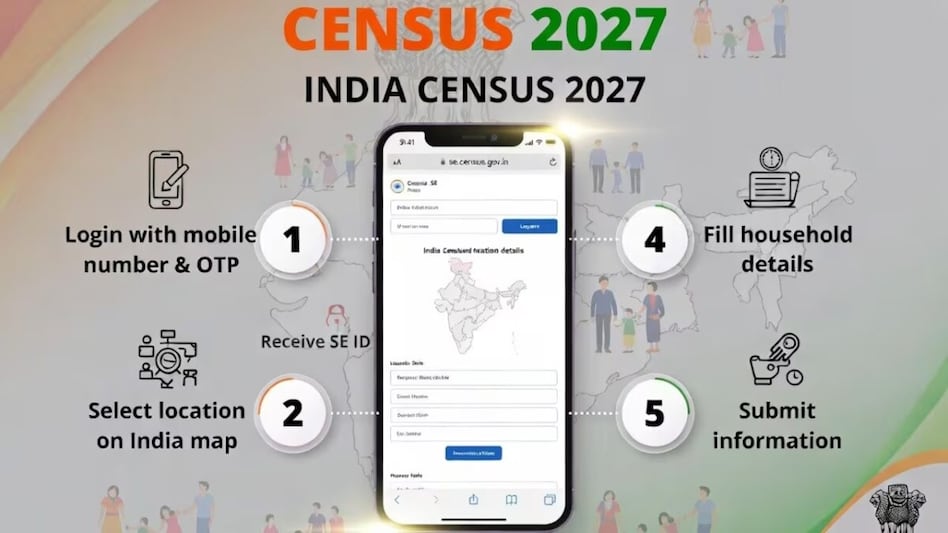
 The Census recommends using a laptop or desktop computer for better visibility while marking the location.
Residents can submit their household details online for Census 2027 before Census officials begin visiting homes, with the government opening a Self-Enumeration (SE) portal ahead of the house-to-house survey. The online process takes around 15 to 20 minutes, and households that complete it will receive a unique 11-digit Self-Enumeration ID (SE ID) to share with the Census Enumerator during the field visit.
The Self-Enumeration portal will remain open for 15 days before the start of Houselisting Operations (HLO) in each State or Union Territory. The exact dates for each region will be displayed on the portal.

 'FOMO, fixed return': SEBI proposes revamped ad code for bond portals from misleading investors
 Bangladesh-Pakistan ties: What Dhaka’s interest in Saudi-Türkiye defence pact means for India
 AI jobs rise 51% in India, but 75% of job skills could change by 2030: LinkedIn India head
 From small loans to big businesses : How rural women are changing India’s microfinance story
 RBI forex swap facility draws $72.85 billion inflows, FCNR(B) deposits account for bulk
  Rental Income Tax: 3 Key Deductions Every Senior Citizen and Property Owner Should Know
 Meta’s $200 Billion Trial: Did Instagram & Facebook Keep Kids Hooked?
 Motor Insurance Explained: Is Third-Party Car Insurance Enough? Know Before You Buy
 Retirement Tax Planning: 5 Ways Senior Citizens Can Reduce Their Tax Liability
 #IndiaAt100 : Adipen Bose Nandhiji On Conscious Capitalism- Can Profit & Purpose Coexist?
 'FOMO, fixed return': SEBI proposes revamped ad code for bond portals from misleading investors
 Crompton Greaves says no plan to sell stake, expects revenue to double by FY31
 Gaja Alternative Assets IPO: 3 ways to check application status; allotment odds, GMP, listing date
 FII sentiment shows early signs of turnaround after months of selling: Report
 ₹24,800 crore bill: How transaction costs are eating into retail derivatives trading
 'Trust key asset for modern corporate governance,' SEBI Chairman Tuhin Kanta Pandey
 Beyond major urban hubs: SEBI plans distributor model to boost retail reach in corporate bonds'FOMO, fixed return': SEBI proposes revamped ad code for bond portals from misleading investors
 Numero Uno Gujarat: How Gujarat, the growth giant, is attracting massive investments in manufacturing
 Govt scraps 12-minute ad cap on TV channels to level playing field with digital media












