
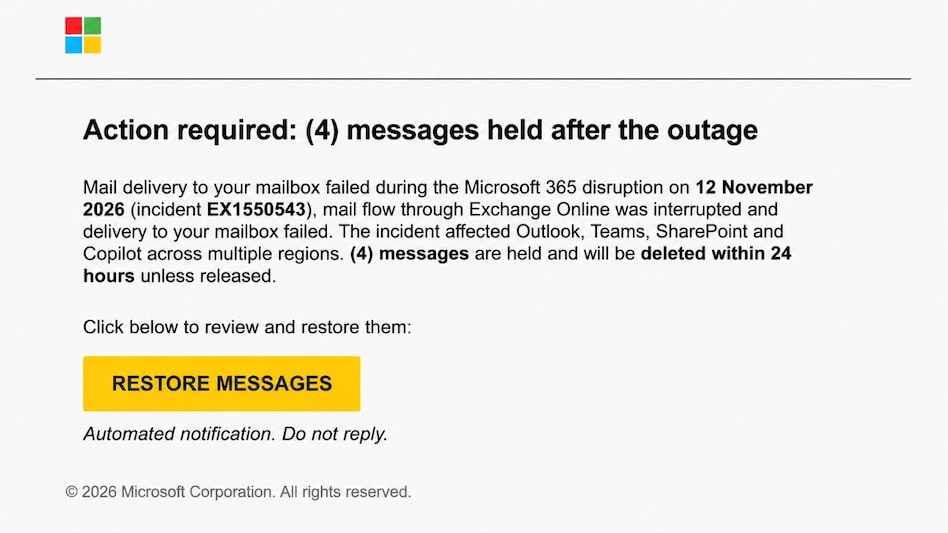
 Microsoft flags a global phishing campaign using fake Microsoft 365 outage notifications.(Photo:Microsoft)
A warning about missing work emails could be the latest way cybercriminals are trying to gain access to business accounts. Microsoft has flagged a coordinated, high-volume phishing campaign targeting organisations across multiple industries worldwide, with attackers impersonating Microsoft 365 service notifications to make their emails appear legitimate.
The messages claim that emails were held during a service disruption and will be deleted within 24 hours unless users take action to restore them. The tactic is designed to create urgency and push recipients into clicking suspicious links. Microsoft believes the campaign is likely aimed at stealing login credentials, although it has not found evidence confirming that credentials were captured or accounts were compromised.

 Petrol, diesel pump operators seek 30-40% hike in commissions, LPG dealers follow suit: Sources
 After Mahanadi Coalfields IPO, Coal India plans two more issues for investors; check key details
 How Nvidia contributed to nearly half of Israel's Q3 GDP growth
 India's crude basket sees sharp shift in November as Brent share falls to 53.49%, Oman-Dubai gains
 Instagram faces fresh India scrutiny as Meta steps up action against explicit content
 I.T. Stocks Rebound: These Midcap I.T. Companies Could Lead India's Next Technology Sector Recovery
 Trump, Xi & Putin Meet In China: Nuclear Arms, Iran War & New World Order In Focus
 PM Modi In Philippines: Quad Summit, Trump Meet And India's Big Indo-Pacific Push
 Prince William, Kate In Mumbai: Gully Cricket, Cutting Chai, Metro Ride & Earthshot Prize
 India Sees Record Horticulture Output In FY26 Despite Decline In Cultivated Area: Shivraj Chouhan

 Adani Power's expansion roadmap: Nuclear sector entry, Bhutan projects, power capacity and more
 Tata Chemicals, Tata Investment shares trim gains after NSE, BSE clarification
 SEBI directs market intermediaries to update KYC, tax reporting systems under new income tax rules
 Premier Energies shares stuck in bear grip, analysts share price targets
 SEBI mulls limits on margin trading as retail leverage hits Rs 1.53 lakh crore, says reportI.T. Stocks Rebound: These Midcap I.T. Companies Could Lead India's Next Technology Sector RecoveryAdani Power's expansion roadmap: Nuclear sector entry, Bhutan projects, power capacity and more
 Gold Near 1-Year Low! Silver Recovers: Buy The Dip Or Wait? Expert Reveals Key Levels
 U.S. President Donald Trump Weighs In On Jensen Huang Leading Nvidia; Dismisses China Spy AllegationPetrol, diesel pump operators seek 30-40% hike in commissions, LPG dealers follow suit: Sources