


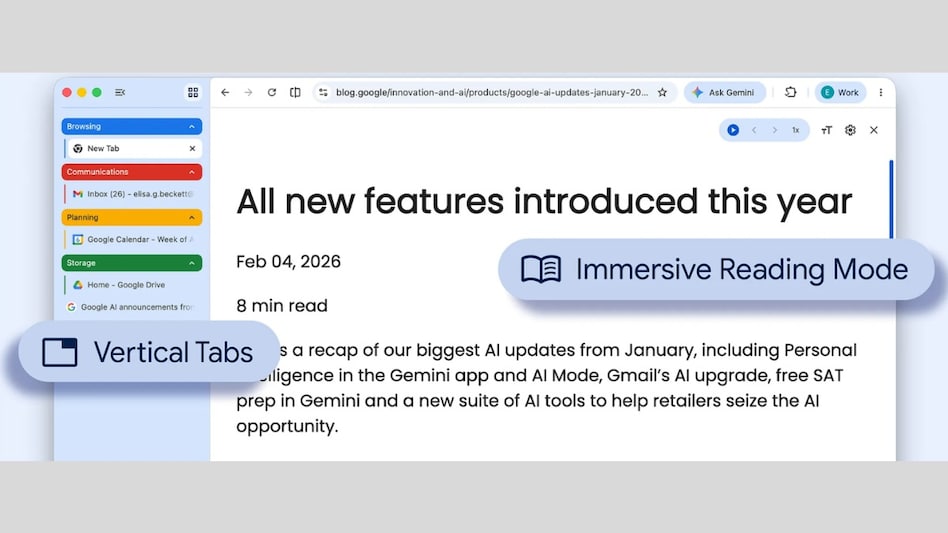
 Google Chrome update
Google is rolling out new upgrades to the desktop version of Chrome with vertical tabs and immersive reading mode. We have been using Chrome's traditional horizontal tab for years, where tabs shrink as more are opened, making it harder to read the page titles. Now, the vertical tabs feature resolves this by relocating tabs from the top to the side panel. Here’s everything you need to know about the Chrome updates.
How do vertical tabs on Google Chrome work?

 'Every great airline is built over decades': Tata Sons Chairman says Air India's turnaround is a 5-10 yr mission
  Tata Motors flags ‘severe disruption’ at Sanand plant in Gujarat due to floods
 HDFC Bank penalises top officials, including CEO and CFO, in MSRDC case. Here’s why
 Only 26 of every 100 young Indian graduates have salaried jobs; just 4 enjoy basic employment benefits: Report
 Where are the jobs: Youth unemployment remains high; fewer jobs for those with higher education in India
 DCB Bank Management | Q1 Earnings, Loan Growth, Margins & Asset Quality Explained
 Infosys Fined In France: 70-Hour Work-week Debate Returns After €175,000 Labour Penalty
 I.T. Sector Outlook: Is the Worst Over for Indian I.T. Stocks After Long Underperformance?
 France And Spain Wildfires Threaten Cap Ferret Mansions And Bordeaux Wine Country
 Maruti Suzuki Eyes 25-30% SUV Growth, Says CNG Demand Has Overtaken Diesel
 Tata Power Q1 profit rises 11% to Rs 1,176 crore; revenue up 6%, capex tops Rs 5,300 crore
 HDFC Bank concludes internal review into MSRDC deposit arrangements; CEO, CFO among 3 fined Rs 1 lakh
 How Narayana Murthy's era, Vishal Sikka's stint and Salil Parekh's tenure differed; big task awaits next Infosys CEO
 BEL Q1 results: Net profit rises 9%, revenue at Rs 5,533 crore
  Sensex, Nifty snap five-session losing run; investors add Rs 5.1 lakh crore in wealth
 India's Vande Bharat sleeper gets a luxury upgrade: First look inside the redesigned first AC coach
 Brazil aced the ethanol journey. Here's why it shows consumer trust matters most
 Beyond Strait of Hormuz & Red Sea: This Asian waterway is the world's most critical trade chokepoint
 AI could become the next financial shock: IMF tells central banks to prepare before crisis hits
 Women now own ₹18 lakh crore in mutual funds. What's driving India's investing boom?










